8
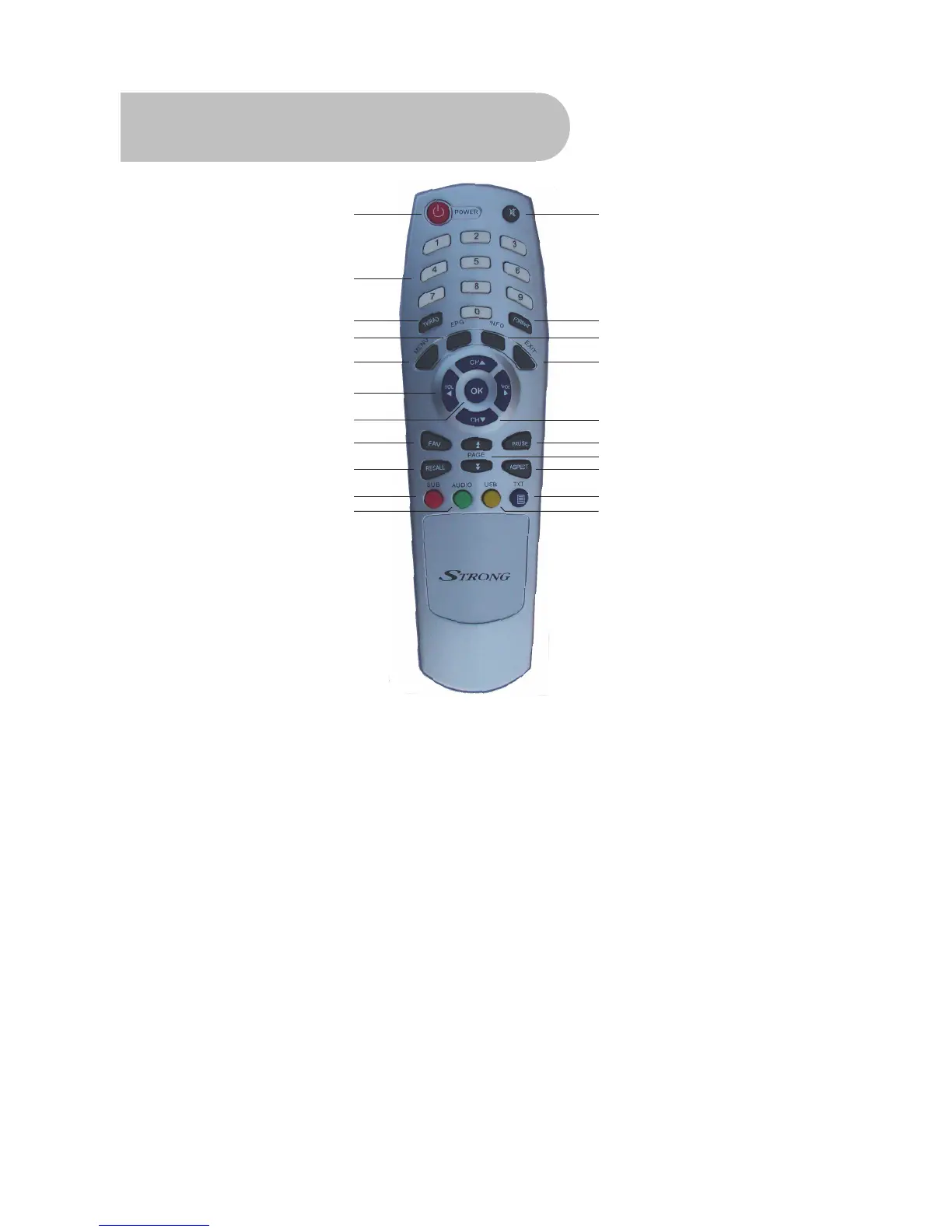
Remote Control
1
2
3
4
5
6
7
8
9
10
11
12
13
14
15
16
17
18
19
20
21
1. STANDBY: To switch to stand-by mode when
the receiver is on (or vice versa)
2. Numeric Keys (0–9): To choose a channel
directly, or to enter numeric information in a
menu
3. TV/RAD: To switch between TV and radio
(and vice versa)
4. EPG (Electronic Program Guide): To show
the TV and radio program guide
5. MENU: To display the main menu, or return
to a previous menu
6. VOL (
e/f): To change the volume in
viewing mode, or to change an option or
setting in a menu
7. OK: To show the channel list in viewing
mode, and to select an item (or confirm a
choice) in a menu
8. FAV: To display the favourites list in viewing
mode, and to select a favourite
9. RECALL: To return to the previous channel or
station
10. SUB: To turn subtitles on or off
11. AUDIO: To choose speakers (left, right or
stereo), audio format and audio language
12. MUTE: To turn the sound on or off
13. FORMAT: To cycle through the video
definitions: 576i, 576p, 720p and 1080i
14. INFO: To show information about the current
program
15. EXIT: To close the current menu and return
to normal viewing
16. CH (▲/▼): To change the channel, or to
move the cursor up or down in a menu



 To Next Page