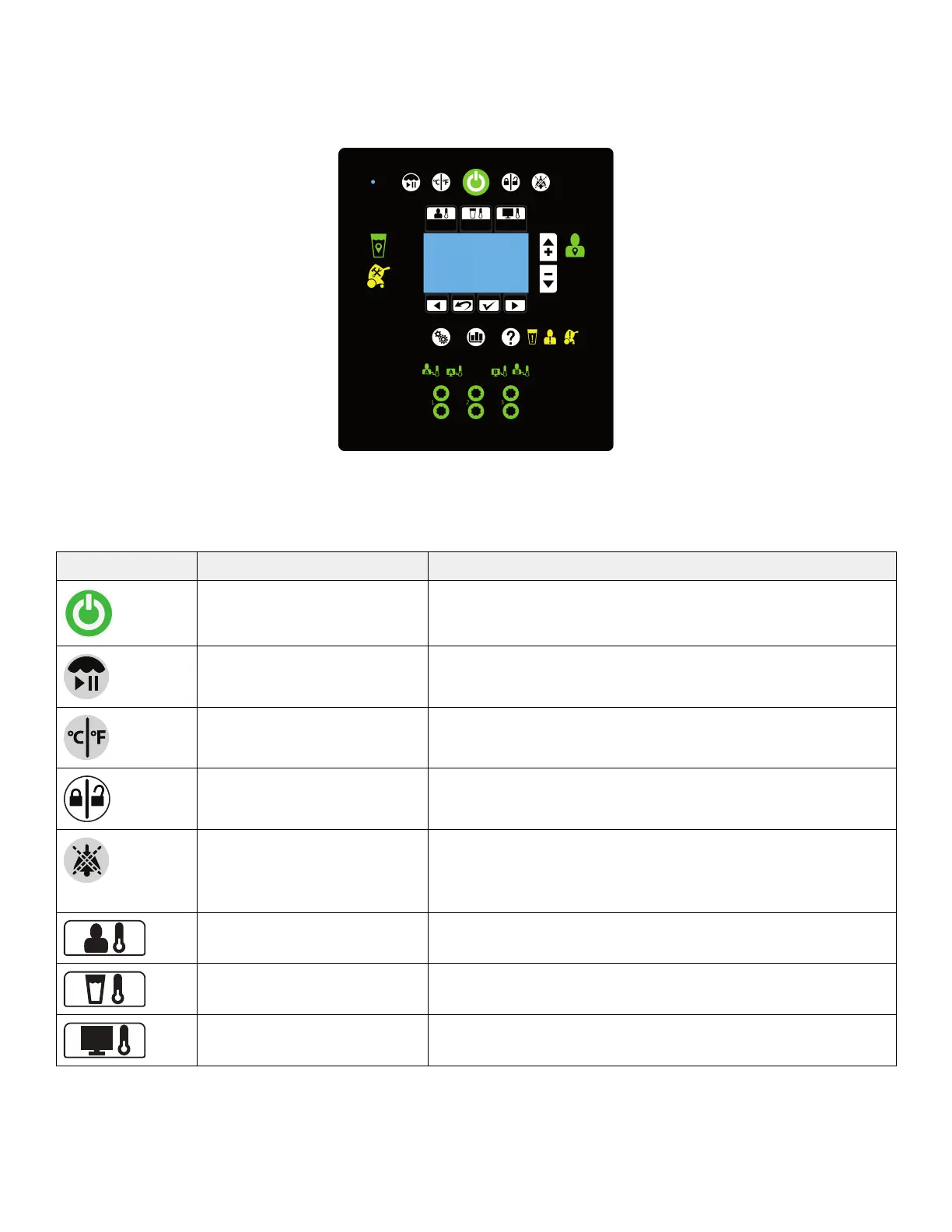
PPrroodduucctt ffuunnccttiioonnss
The graphical user interface shown is for reference only. The image shows where you will see the icons and buttons
illuminate when they are active. At no time will you see all of these icons at the same time.
BBuuttttoonnss
The buttons are located on the outside of the graphical user interface. They are visible when available.
IIccoonn NNaammee FFuunnccttiioonn
Stand-by Press and hold the button for two seconds to stop therapy or
power off
Therapy paused Press and hold the button for two seconds to pause or resume
therapy
View temperature Select temperature degree in Celsius or Fahrenheit
Lock / unlock screen Press and hold the button for two seconds to lock or unlock the
graphical user interface
Audio paused Pause or resume the audible indicator when an alarm is active.
Silences each alarm for 5, 10 or 30 minutes depending on the
alarm condition. This button breathes¹ to indicate that it is in a
paused state.
Automatic therapy mode Cools or warms the patient to a selected patient target
temperature
Manual therapy mode Cools or warms the water to a selected water target temperature
Monitor only mode Displays the current patient temperature (no therapy)
8001-109-001 Rev C.0 11 EN









 To Next Page