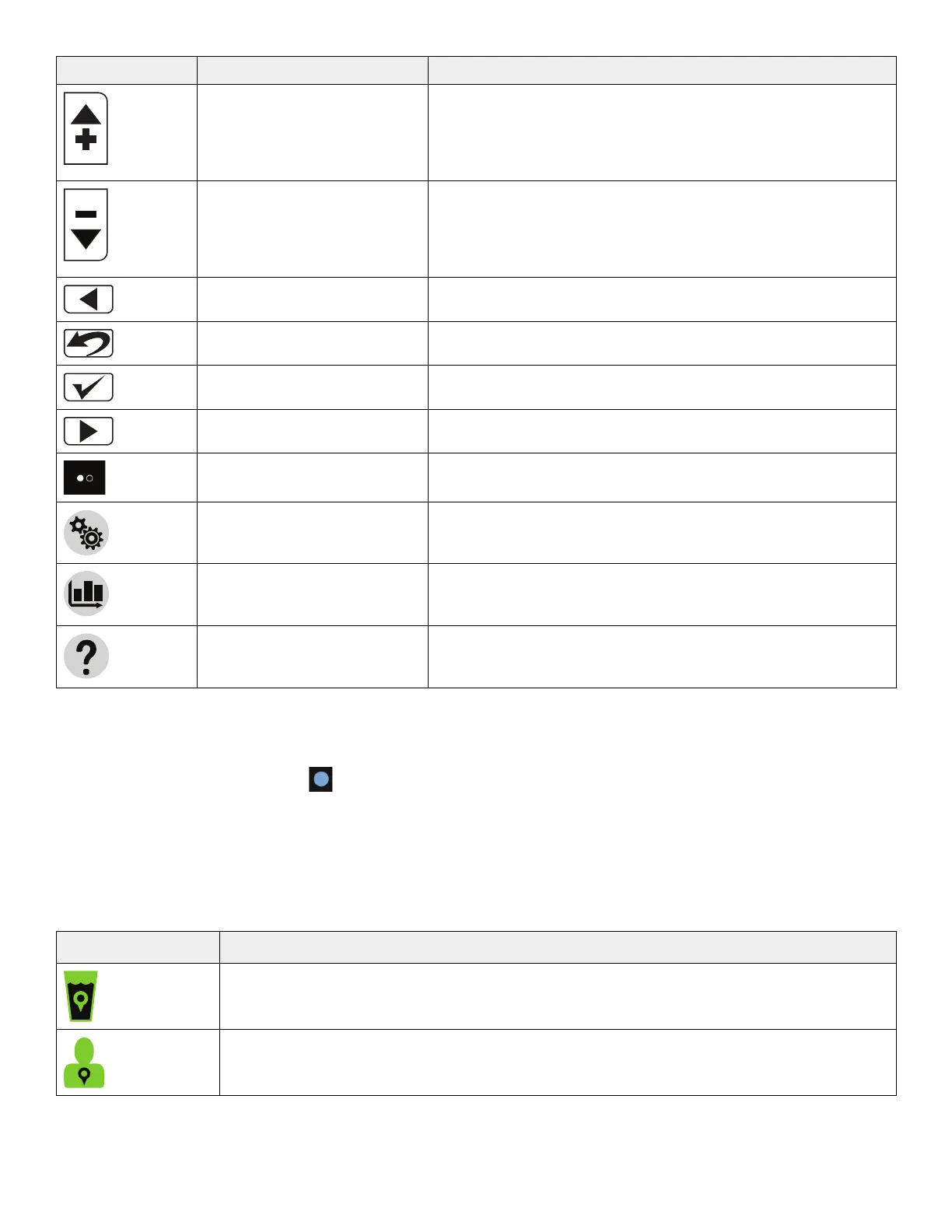
IIccoonn NNaammee FFuunnccttiioonn
Increase Increases the water or patient temperature by 0.1° for cooling or
warming temperature
NNoottee -- Press and hold the increase button to move the
temperature up faster.
Decrease Decreases the water or patient temperature by 0.1° for cooling or
warming temperature
NNoottee -- Press and hold the decrease button to move the
temperature down faster.
Back Returns to the previous screen or cancel an operation
Edit settings, Exit, or Cancel Edit current settings, exit, or cancel
Confirm selection Accepts the selected settings
Next or More Changes to the next screen, option, or setting
Page indicators (may also
appear vertical)
Indicates that there is more than one page associated with the
screen topic for the page that is currently displayed
Settings Displays the summary of the current, visual / audible, language, or
primary probe settings
Graph Graphical display of the selected items such as patient
temperature, target temperature, water temperature, and power
level
Help Displays contextual help screens for therapies, navigation,
buttons, and alarm screens. This button breathes to allow the user
to view the alarm screen.
NNoottee
• If not specified above, make sure that you tap and release the buttons or icons for you selection to register with the
system.
• The Light sensor (non selectable)
, dims or brightens the LCD based on the amount of light in the room.
• ¹Breathe: The brightness of the button or icon will go to a low light and then increase to a bright light. This cycle repeats.
VViissuuaall iinnddiiccaattoorrss
When the visual indicators are solid green, this indicates that the function is stabilized. The visual indicators breathe to
indicate that the controller is at the intermediate target.
IIccoonn,, ggrreeeenn NNaammee
Water temperature on target, solid green when active, does not breathe
Patient temperature on target
EN 12 8001-109-001 Rev C.0









 To Next Page