US-12
DE
3 Service Menu
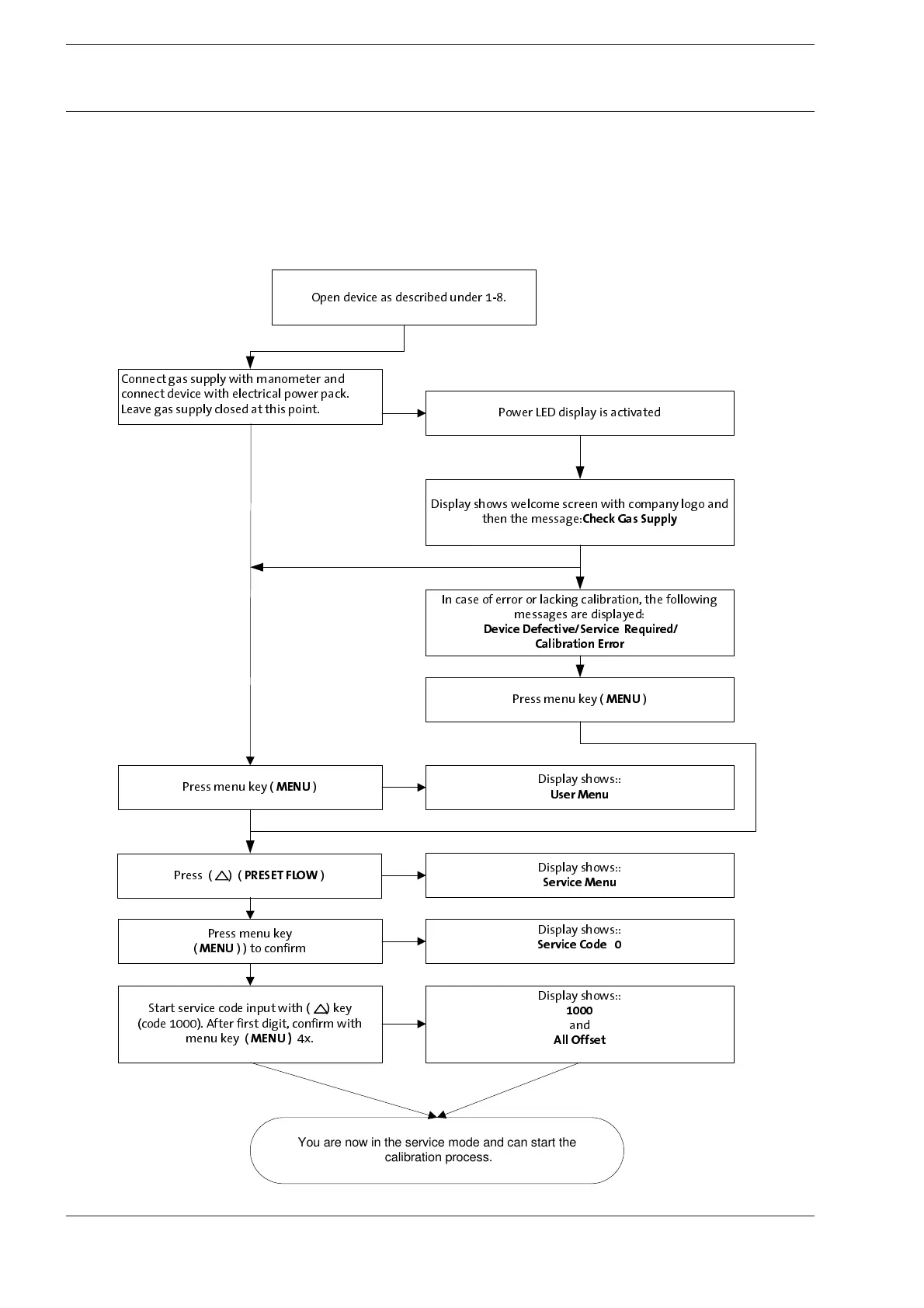
3-1 Opening the Service Menu
Device parameters are displayed and changed in the service menu.
Menu options are to be carried out in sequence to avoid malfunctions.
Use the keys below the display for input.
The function of each key is displayed above.
Confirm input (Enter) with the (MENU) key.
Use the (RESET) key to exit current menu level (Esc) and to return to the previous level.
2SHQGHYLFHDVGHVFULEHGXQGHU
&RQQHFWJDVVXSSO\ZLWKPDQRPHWHUDQG
FRQQHFWGHYLFHZLWKHOHFWULFDOSRZHUSDFN
/HDYHJDVVXSSO\FORVHGDWWKLVSRLQW
3RZHU/('GLVSOD\LVDFWLYDWHG
'LVSOD\VKRZVZHOFRPHVFUHHQZLWKFRPSDQ\ORJRDQG
WKHQWKHPHVVDJH
&KHFN*DV6XSSO\
3UHVVPHQXNH\
0(18
'LVSOD\VKRZV
8VHU0HQX
3UHVV
35(6(7)/2:
'LVSOD\VKRZV
6HUYLFH0HQX
3UHVVPHQXNH\
0(18
WRFRQILUP
'LVSOD\VKRZV
6HUYLFH&RGH
6WDUWVHUYLFHFRGHLQSXWZLWKNH\
FRGH$IWHUILUVWGLJLWFRQILUPZLWK
PHQXNH\
0(18
[
'LVSOD\VKRZV
DQG
$OO2IIVHW
You are now in the service mode and can start the
calibration process.
,QFDVHRIHUURURUODFNLQJFDOLEUDWLRQWKHIROORZLQJ
PHVVDJHVDUHGLVSOD\HG
'HYLFH'HIHFWLYH6HUYLFH5HTXLUHG
&DOLEUDWLRQ(UURU
3UHVVPHQXNH\
0(18










 To Next Page