US-8
DE
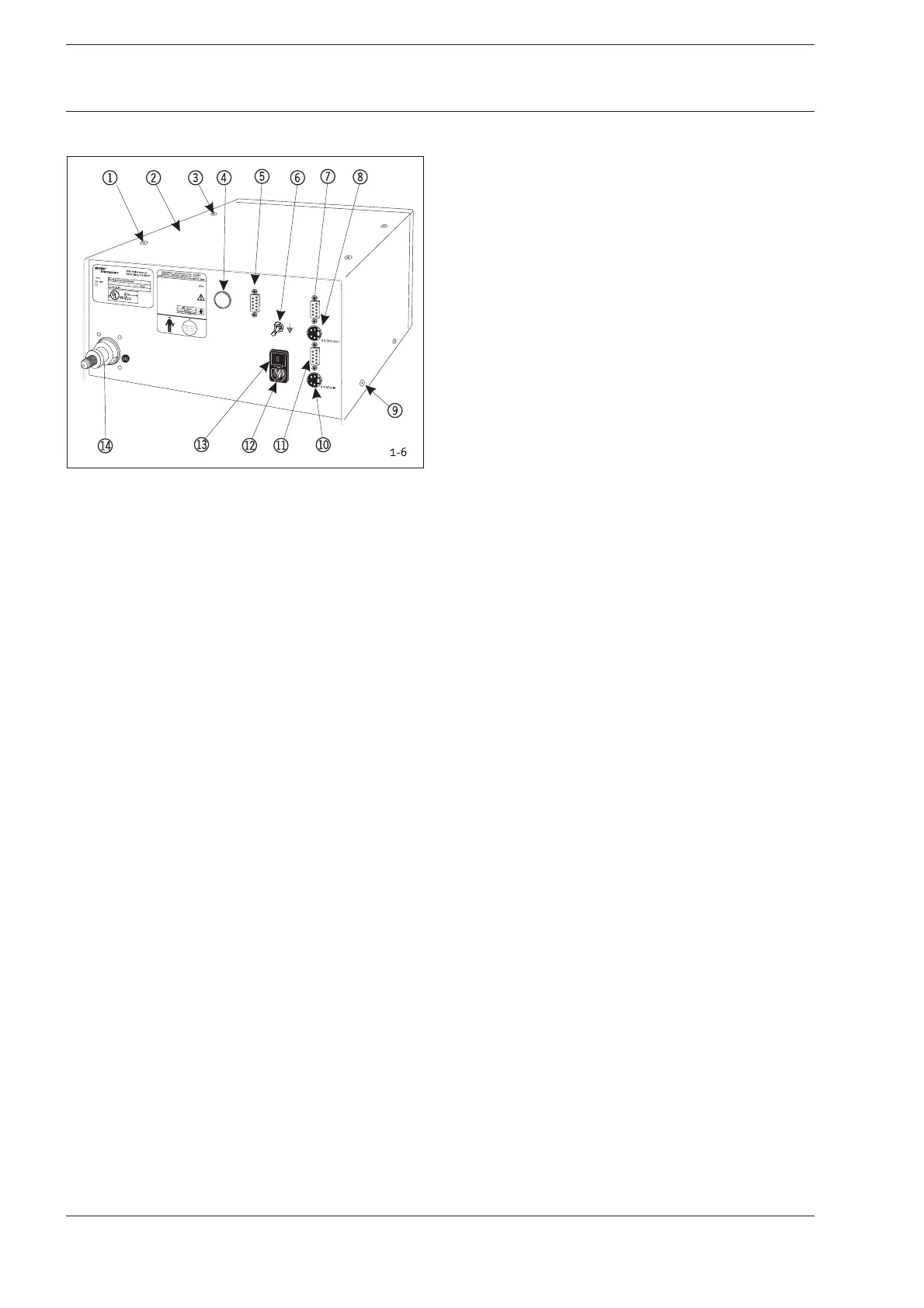
1-6 Rear of the Device
Fig. 1-6: Connection Elements, Rear of the Device
1 Recessed Head Screw to Fasten Case
2 Case Cover
3 Recessed Head Screw to Fasten Case
4 Blank Cover HERMES (Optional)
5 Service Interface
6 Potential Equalization Plug
7 Video Output RGB/FBAS
8 Video Output SVHS
9 Recessed Head Screw to Fasten Case
bl Video Input SVHS
bm Video Input RGB/FBAS
bn Power Pack Plug
bo Fuse Holder
bp Gas Connection
1-7 Opening the Device
1. You will need a recessed head screwdriver (Phillips) size 2
to open the device.
2. (See Fig. 1-6)
Remove four screws from top 1and two screws from
each side 9.
3. Lift the case cover panel 2towards the top and remove.
1 Introduction/Basics
1 Introduction/Basics










 To Next Page