US-13
3 Service Menu
3-2 Calibration
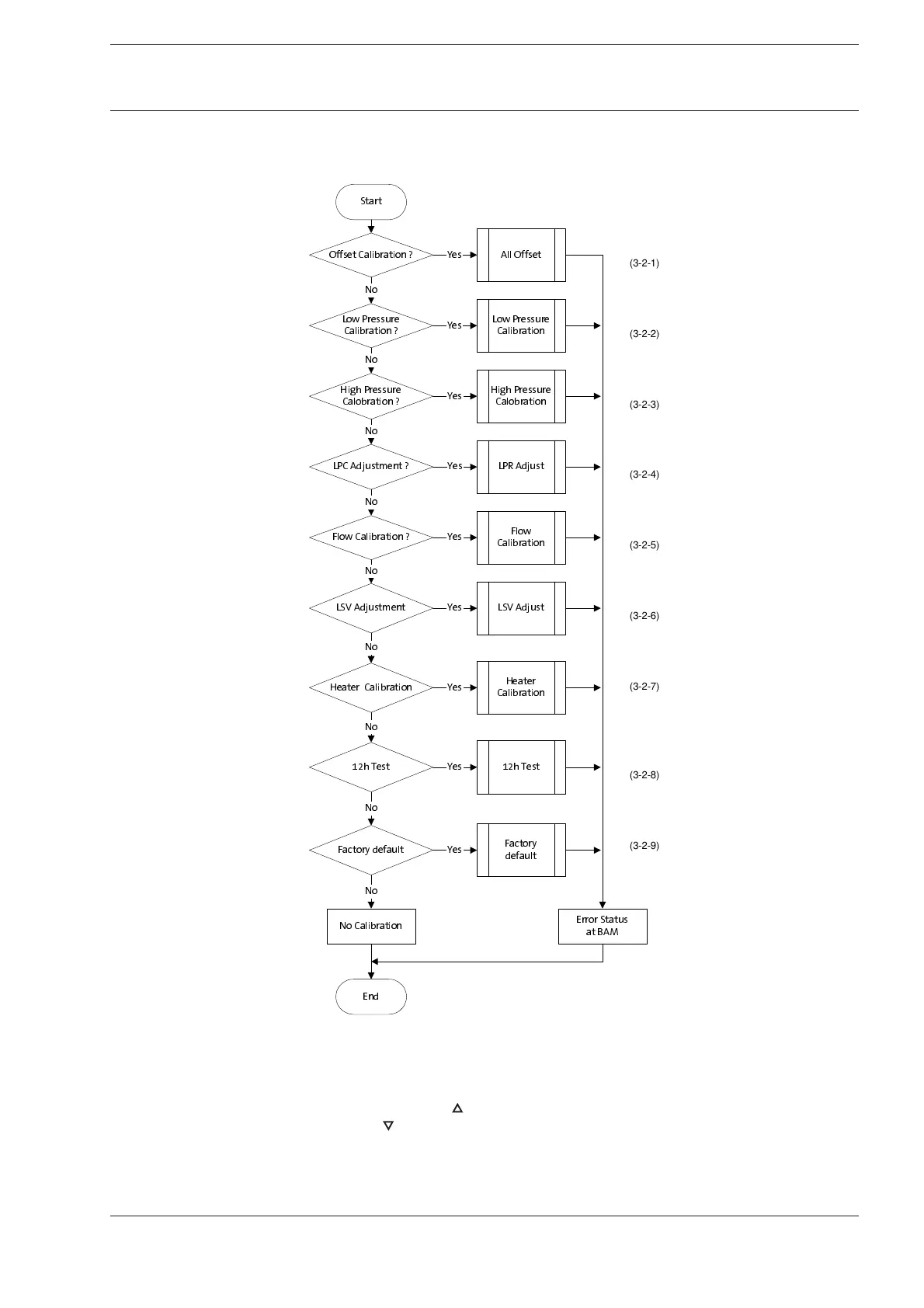
The following chart provides an overview over the necessary calibrations.
Use the keys below the display for input.
The function of each key is displayed above.
Confirm input (Enter) with the (MENU) key.
Use the (MENU) and ( ) key to open the next menu level.
Use the ( ) key to open the previous menu level.
Use the (RESET) key to exit current menu level (Esc).
2IIVHW& DOLEUDWLRQ" <HV
1R
/3&$GMXVWPHQW" <HV
1R
6WDUW
/RZ3UHVVXUH
&DOL EUDWLRQ"
<HV
+LJK3UHVVXUH
&DOREUDWLRQ"
<HV
1R
)ORZ &DOLEUDWLRQ" <HV
/69$GMXVWPHQW <HV
1R
1R
1R&DOLEUDWLRQ
(QG
(UURU6WDWXV
DW%$0
$OO2IIVHW
/RZ3UHVVXUH
&DOL EUDWLRQ
+LJK3UHVVXUH
&DOREUDWLRQ
/69$GMXVW
)ORZ
&DOL EUDWLRQ
/35$GMXVW
K7HVW <HV
1R
K7HVW
)DFWRU\GHIDXOW <HV
1R
)DFWRU\
GHIDXOW
1R
+HDWHU&DOLEUDWLRQ
+HDWHU
&DOL EUDWLRQ
<HV
1R
(3-2-2)
(3-2-1)
(3-2-3)
(3-2-4)
(3-2-5)
(3-2-6)
(3-2-7)
(3-2-8)
(3-2-9)











 To Next Page