16
Activating White Light Mode
White Light mode activates the LED diodes in the light source so it can
generate visible light.
Note: Activating White Light mode is also required as a preliminary step to
activate ENV mode or IRIS mode. While ENV mode is activated, it automatically
disables the white light output. While IRIS mode is activated, the user can
return to the White Light screen to toggle the white light output to Active or
Standby.
Follow the steps below to activate White Light mode.
1. Ensure a Stryker light cable is connected to the light source. See the
Connecting a Light Cable section for more information.
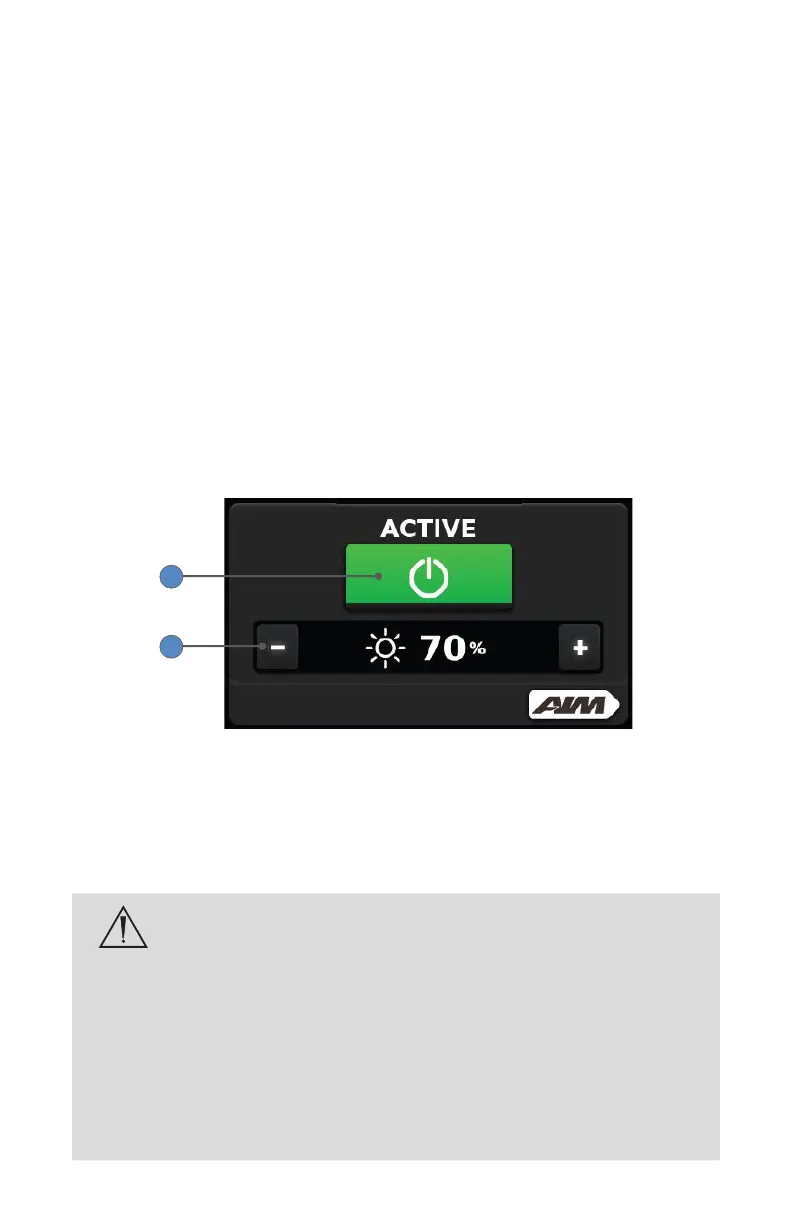
2. On the default White Light screen, press the touchscreen power button
so it appears green and the word “Active” appears above it.
3. Adjust the White Light brightness level by pressing the plus or minus
buttons.
2
3
Placing the Light Source in Standby Mode
Standby mode reduces white light output to a minimum, thereby reducing
the heat generated at the tip of the light cable or scope when the light source
is not being used.
To help prevent burns to the patient, user or inanimate objects
and possible re, always put the light source in Standby mode
whenever the endoscope is removed from the light cable.
The scope tip, scope light post, light cable adapter, and light
cable tip will take several minutes to cool o after being placed
in Standby mode and therefore may still result in re and/
or burns to the patient, user or inanimate objects if not used
properly. Do not place the scope or the light cable on the
patient, on the drapes, or other ammable material, even when
the device is in Standby mode.










 To Next Page