11
Setup
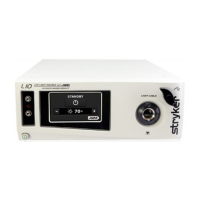
Stryker considers instructional training, or inservice, an integral part of the L10
AIM Light Source. Your local Stryker sales representative will perform at least
one inservice at your convenience to help set up your equipment and instruct
you and your sta on its operation and maintenance. To schedule an inservice,
contact your local Stryker representative after your equipment has arrived.
Setting up the L10 AIM Light Source involves four steps:
• Connecting the AC power cable
• Connecting a USB cable to the Camera Control Unit
• Connecting a Light Cable
• Connecting an IRIS Ureteral Kit
Always connect the light source to an appropriate power
source, using a hospital-grade power cord. Loss of AC power
will cause the camera to shut down and the surgical image to
be lost.
Only connect items to the light source that have been specied
for use with the light source. Connecting incompatible
equipment may cause unexpected results.
When the light source is used with other equipment, leakage
currents may be additive. To minimize leakage current that
may travel to the patient or user, any Type CF applied part
should be used only with other Type CF applied parts. Ensure
that all systems are installed according to the requirements of
IEC60601-1.
Equipment which employs RF communications may aect the
normal function of the light source. When choosing a location
for the console, consult the Electromagnetic Compatibility
section to ensure proper function.
Always set up the console in a location that allows adequate
ventilation (airow) to the console. Insucient ventilation may
cause the console to overheat and shut down. The console
must also be positioned on its feet; do not operate the unit
upside down or on its side.










 To Next Page