20
Activating IRIS Mode
Infrared Illumination System (IRIS) mode activates the Class1 laser in the light
source and enables use of the IRIS Ureteral Kit.
Before using IRIS mode, read and follow all warnings in this
user manual and the IRIS Ureteral Kit user manual (P26059).
Use of controls or performance of procedures other than those
specied can result in hazardous radiation exposure.
See the IRIS Mode Requirements section for equipment
requirements. Use IRIS mode only with the specied
equipment.
Note: If ENV mode is activated, it must be disabled before activating IRIS
mode.
Follow the steps below to activate IRIS mode.
1. Ensure an IRIS Ureteral Kit is connected to the light source. IRIS mode will
not function unless an IRIS Ureteral Kit is properly connected. See the
Connecting an IRIS Ureteral Kit section for more information.
Note: When an IRIS Ureteral Kit is properly connected to the light source,
an image of two red bers will appear at the top-left of the touchscreen
in IRIS mode. (If only one ber is connected, an image of one red ber and
one gray ber will appear on the touchscreen.)
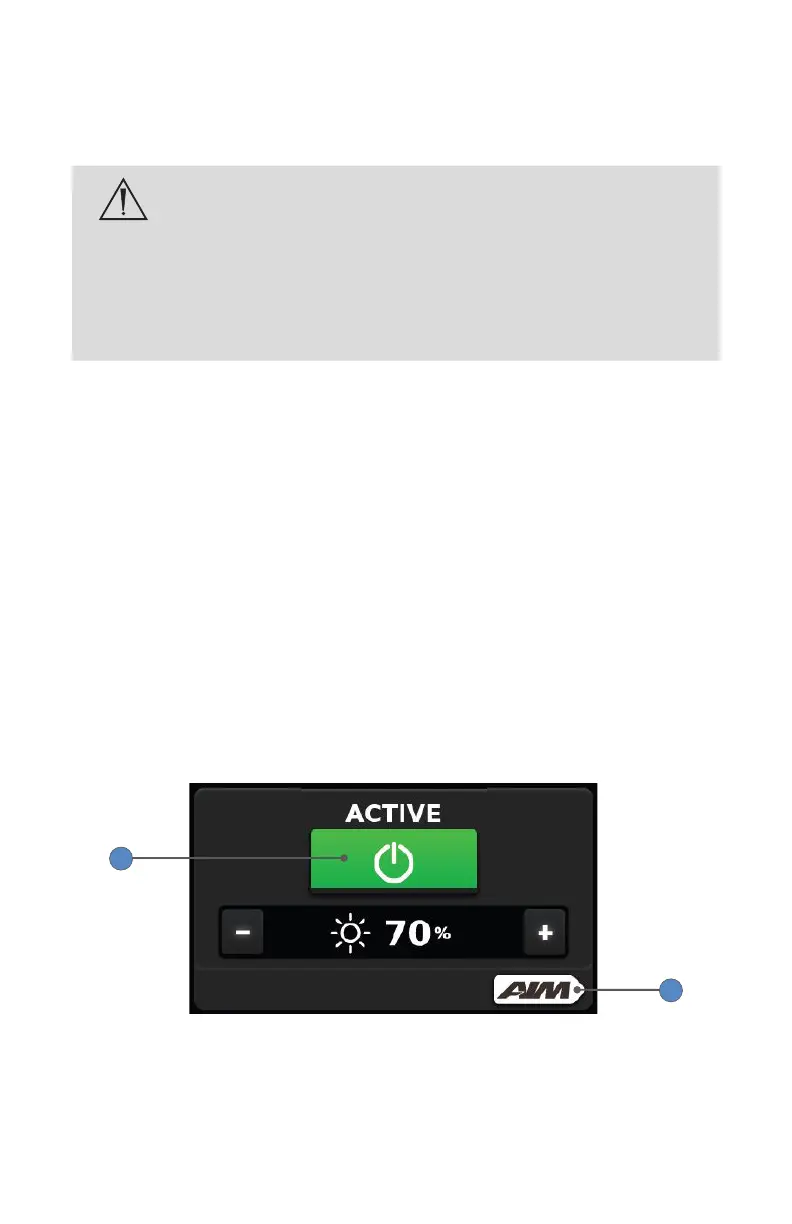
2. On the default White Light screen, press the touchscreen power button
so it appears green and the word “Active” appears above it.
3. Press the AIM button.
2
3










 To Next Page