EasyManua.ls Logo

Sungrow SG8K-D - Page 46

Sungrow SG8K-D
79 pages
Print Icon
To Next Page IconTo Next Page
To Previous Page IconTo Previous Page
Loading...
5 Electrical Connection User Manual
38
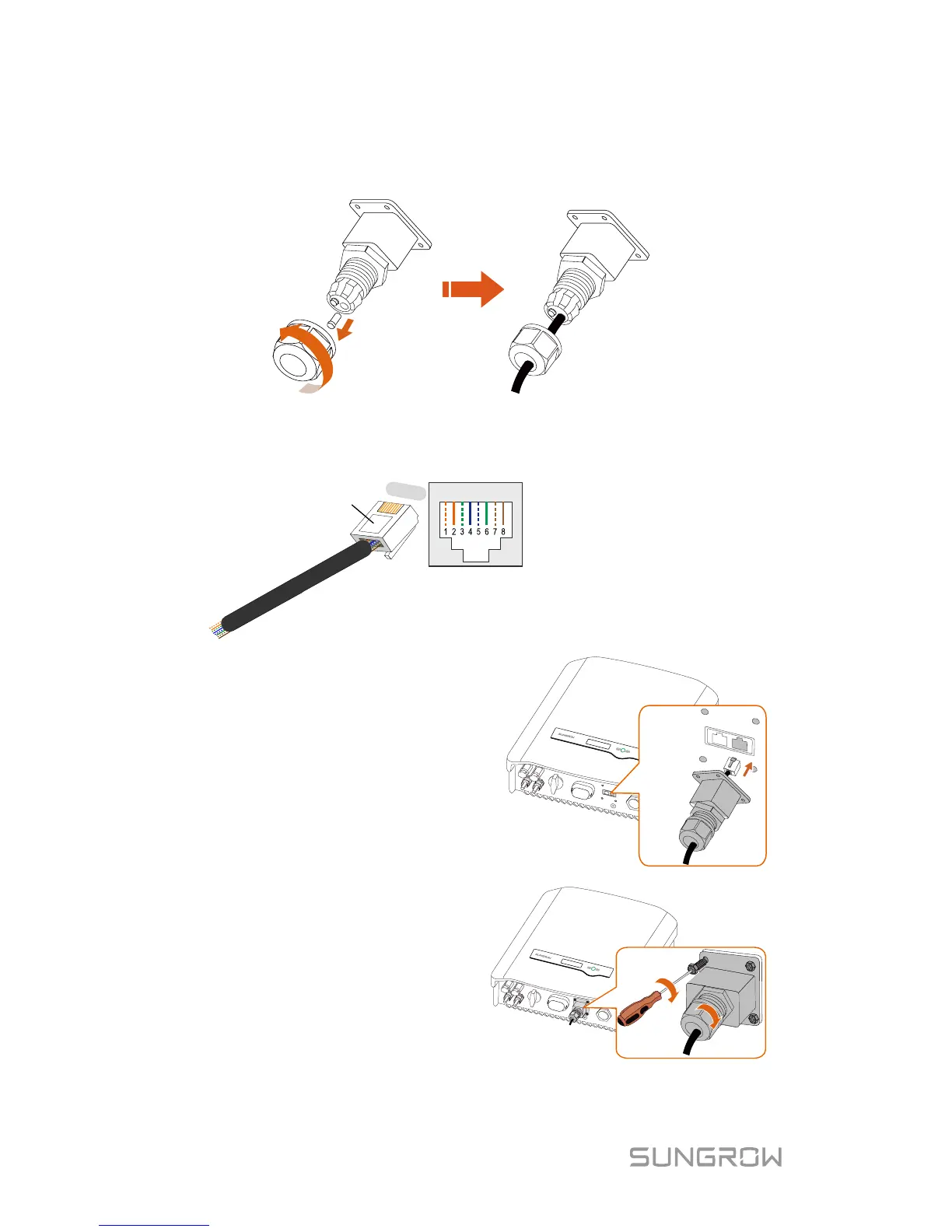
3. Unscrew the swivel nut from the cable gland and remove the waterproof
plug from the right inlet. Lead the cable through the cable gland then the
right inlet.
4. Use the Ethernet crimper to crimp the cable and carefully push all 8
unstripped colored wires into the RJ45 plug according to TIA/EIA 568B
standard, as shown below.

Corresponding Relationship Between
Cables and Pins
:
Pin 1: White-orange; Pin
2: Orange;
Pin 3:
White-green;
Pin 4: Blue;
Pin
5: White
-blue;
Pin 6:
Green;
Pin 7: White-brown; Pin 8: Brown.
RJ45 Port
RJ45 plug
4
0000;
5. Insert the RJ45 plug into the
right port (DRM)
until it
makes a clicking sound.
6. Secure the waterproof lid to
the inverter bottom with four
screws and then fasten the
cable gland.
7.
Connect the other end to
the external device.

Table of Contents

Related product manuals