PRE-OPERATION
Publication: 0028607 2-7
2
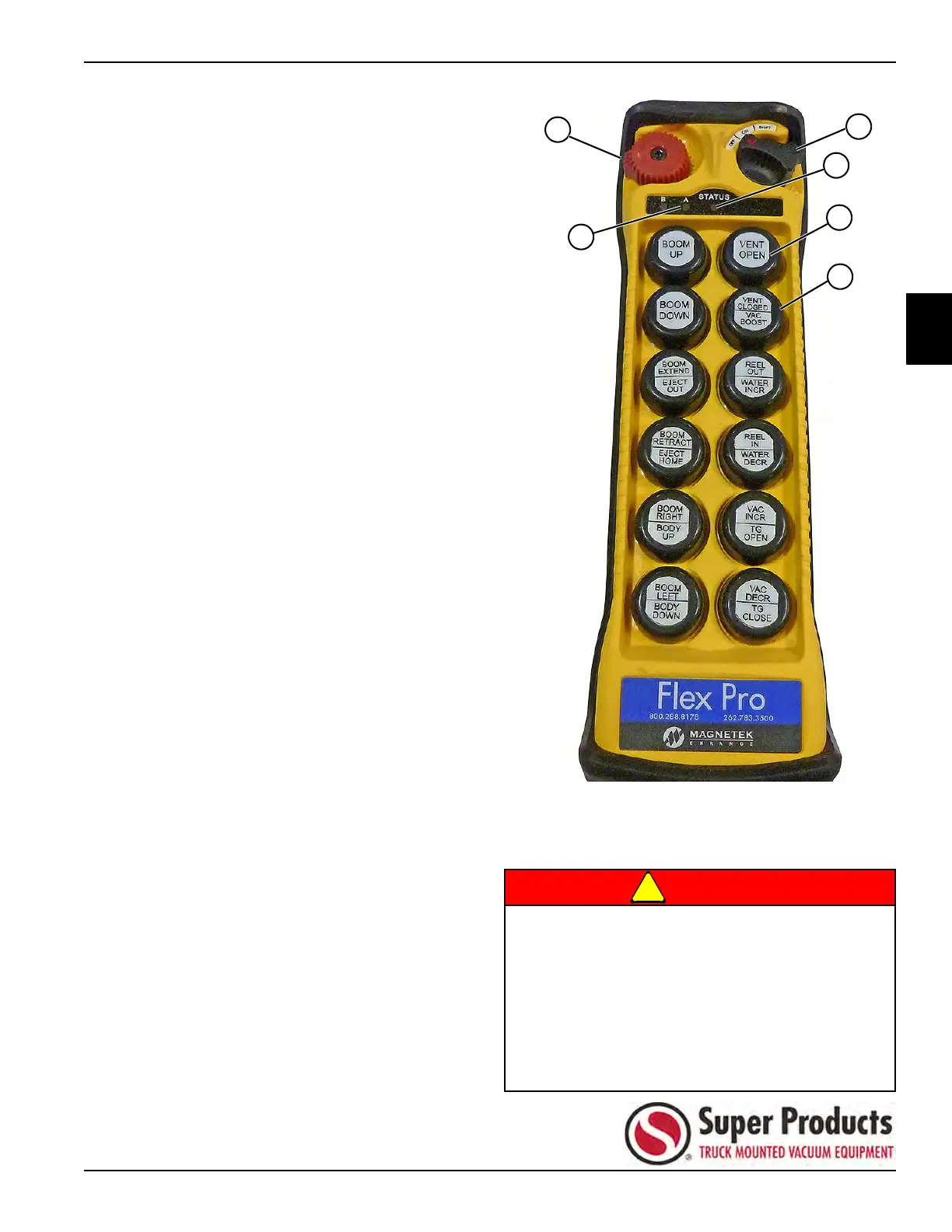
Testing with Wireless Pendant Remote Control
1. Visually inspect the wireless pendant for damage.
Repair or replace as necessary.
2. Make sure the emergency stop button (1) is not
activated.
3. Turn the OFF/ON/SHIFT switch (2) to the ON
position. The STATUS light (3) will flash green, and
the A light (4) will turn solid red.
4. Start up the vacuum pump per operating procedure
in this manual.
5. With the truck at full vacuum, press the VENT OPEN
button (5) on the remote and verify that the vacuum
vent door has opened. Press the VENT CLOSED
button (6) and verify that the vacuum vent door has
closed.
6. After test is complete, shut down the vacuum pump.
Make sure the wireless pendant remote control is
turned off when not in use to conserve battery power.
Figure 2-11
1 Emergency Stop 4 A Light
2 OFF/ON/SHIFT Switch 5 VENT OPEN Button
3 STATUS Light 6 VENT CLOSED Button
If the vacuum relief valve is not working properly,
personnel should not be allowed to work at end
of vacuum hose due to possible personal injury
or death.
Never work beyond the distance from the truck
that the wireless remote control was previously
tested. Failure to comply could result in loss of
control of the equipment and/or the equipment
not operating properly.


 To Next Page