CONTROL SYSTEM OPERATION
Publication: 0028607 3-13
3
Front Control Panel Joystick
Functions
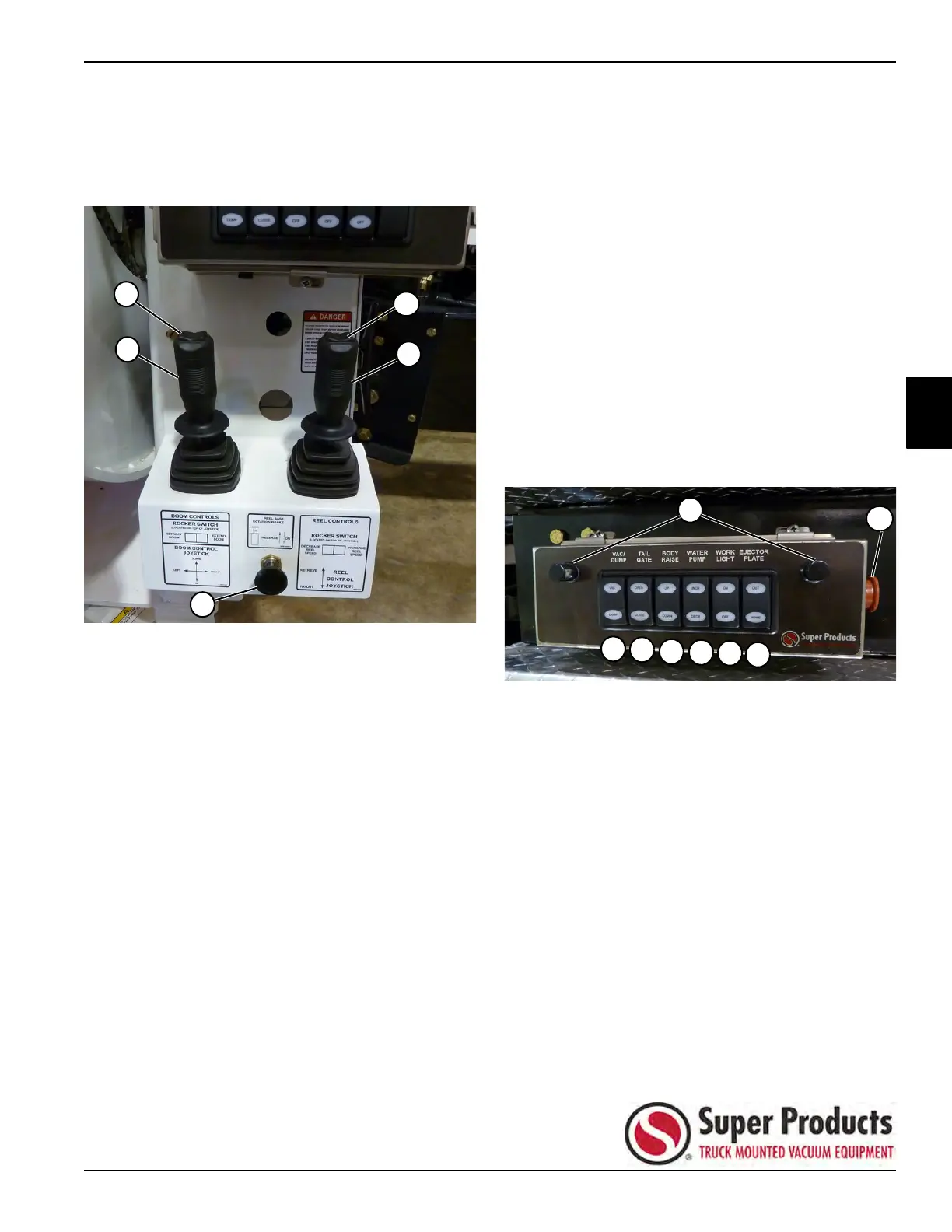
As you are facing the joysticks, the boom control joystick
is on the left, and the reel control joystick is on the right.
Figure 3-23
Hose Reel Function
• Pushing the reel control joystick (4) forward will rotate
the hose reel to retrieve (pay in) the sewer hose.
• Pulling the reel control joystick backward will rotate
the hose reel to pay out the sewer hose.
• The thumb switch (3) on the top of the reel control
joystick will increase or decrease the hose reel
speed.
• The hose reel speed, as a percentage of maximum,
is shown on the top left of the home screen.
Boom Functions
• Pushing forward or pulling backward on the boom
control joystick (2) will lower or raise the boom.
• Pushing left or right on the boom control joystick will
rotate the boom left or right.
• The thumb switch (1) on top of the boom control
joystick will extend or retract the boom.
• All three boom functions are available while the hose
reel is turning, although only one axis can be moved
at a time.
• The boom up, down, left, and right joystick functions
are proportional. Extend and retract are a fixed
two-speed operation. This allows for slow, precise
vacuum tube movement while working, but faster
boom movement for job setup.
• All motions are available when using the pendants.
Pendants and backup controls operate the boom in
two-speed mode.
Curbside Control Panel
The curbside control panel contains the same general
control functions as the front control panel, although not
all switch choices and positions are identical.
Figure 3-24
VAC/DUMP Rocker Switch – Same as
Front Panel (momentary switch)
• Pressing VAC on the VAC/DUMP rocker switch (3)
enables the vacuum, boom, hose reel, and
compaction functions and disables tailgate and body
functions.
• Pressing DUMP on the VAC/DUMP rocker switch
enables tailgate, body, and water pump functions and
disables the vacuum, boom, hose reel, and
compaction functions.
Front Control Panel Joysticks
1) Boom Thumb Switch 4) Reel Control Joystick
2) Boom Control Joystick 5) Reel Brake
3) Reel Thumb Switch
Curbside Control Panel
1) Emergency Stop Switch —
same as front panel
5) BODY RAISE rocker switch
2) Panel Light — illuminated when
in work mode
6) WATER PUMP rocker switch
3) VAC/DUMP rocker switch 7) WORK LIGHT rocker switch
4) TAILGATE rocker switch 8) EJECTOR PLATE rocker switch


 To Next Page