3-12 Publication: 0028607
CONTROL SYSTEM OPERATION
3
Figure 3-20
Panel Lighting
• When the control system is powered by the ignition
switch, the displays and LED switches are
illuminated.
• Two LED panel lights will be illuminated when in work
mode.
• There is a menu item from the front panel labeled
Color that alternates from a white background with
black text to a black background with white text for
viewing in different ambient lighting conditions.
Hose Reel Tilt
The hose reel tilt function is used to tilt the hose reel
forward enough to allow the truck’s hood to be opened for
servicing.
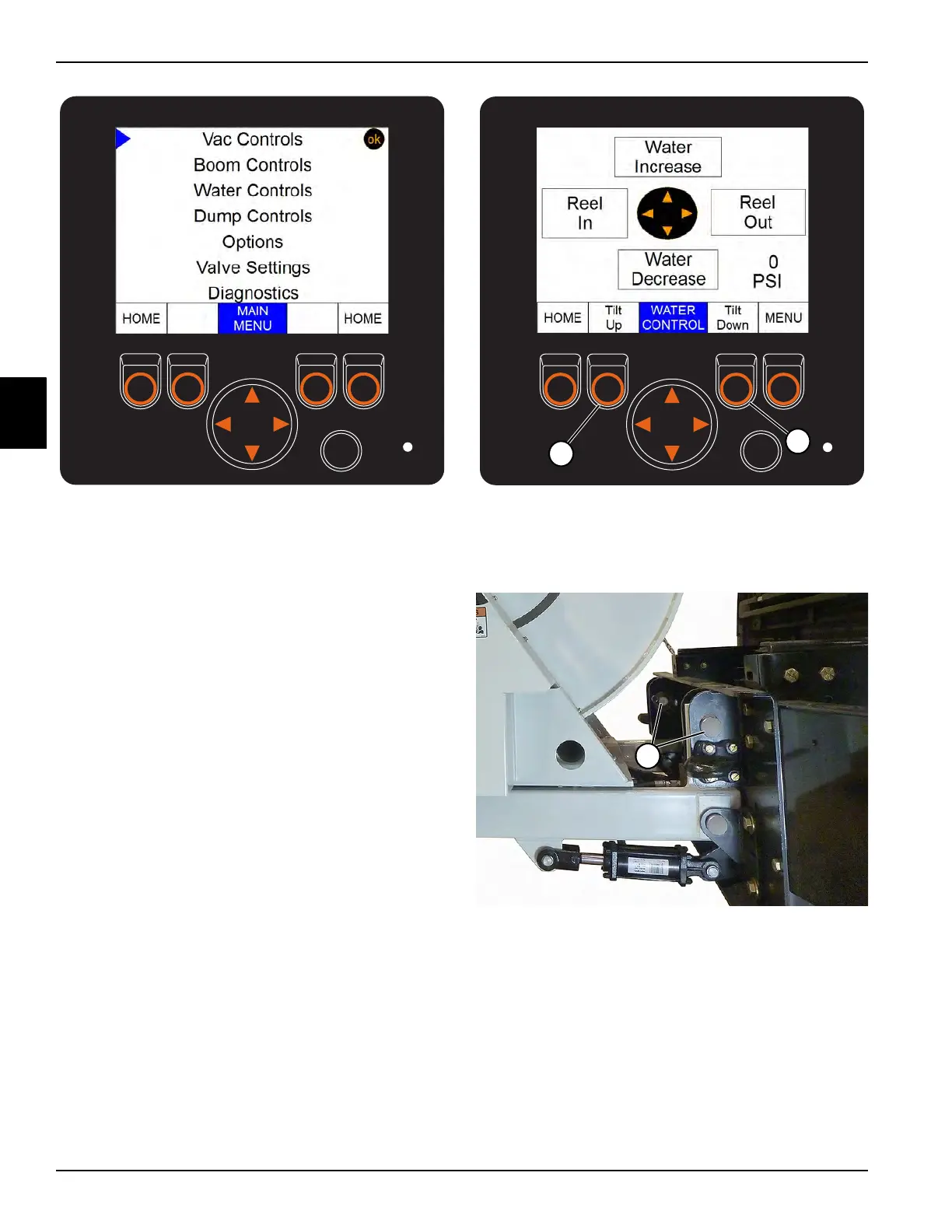
1. In order to tilt the hose reel forward, navigate to the
menu shown in Figure 3-20, then use the selection
arrows to select Water Controls and press OK.
2. Raise the hose reel slightly by pressing the Tilt Up
button (1) to take the weight off the hose reel pins.
Figure 3-21
3. Remove the two upper reel pins (2), located between
the reel and the front bumper on both sides of the
reel.
Figure 3-22
4. After pulling the reel pins, push the Tilt Down button
(3, see Figure 3-21) to tilt the hose reel out of the way
and allow the operator to open the hood for engine
inspection.
Upper Hose Reel Pins


 To Next Page