3-2 Publication: 0028607
CONTROL SYSTEM OPERATION
3
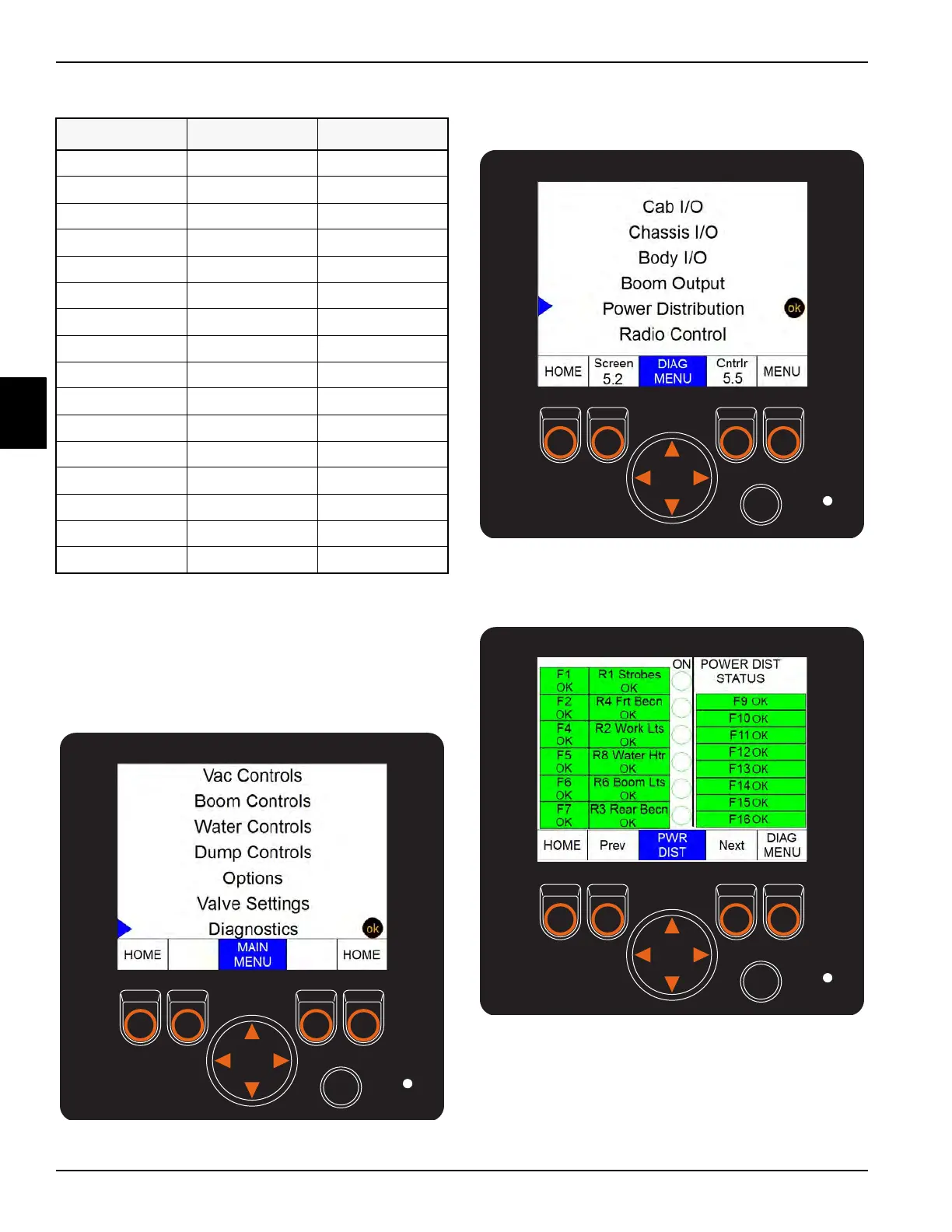
The status of the control panel fuses and relays can be
checked on the HMI screen on the front control panel.
1. From the home screen on the HMI, press the menu
button three times.
2. Using the navigation arrow, scroll down to
Diagnostics and press OK.
Figure 3-4
3. Using the navigation arrow scroll down to Power
Distribution and press OK.
Figure 3-5
4. The status of the fuses and relays will now be
displayed on the screen.
Figure 3-6
5. Press the HOME button to exit this menu screen.
Table 3-1: Fuse Information
FUSE AMPERAGE CIRCUIT
F1 7.5A Strobe
F2 7.5A Front Beacon
F3 5A Front Panel
F4 7.5A Work Lights
F5 25A Water Heater
F6 7.5A Boom Light
F7 7.5A Rear Beacon
F8 10A Open
F9 10A Front Panel
F10 5A AX / CAN2
F11 5A Curbside
F12 5A Cab
F13 10A Chassis I/O
F14 10A Boom I/O
F15 10A Cab I/O
F16 10A Body I/O
Fuse and Relay Status



 To Next Page