2-14
X9DRW-3LN4F+/3TF+ Motherboard User’s Manual
X9DRW-3LN4F+
Rev. 1.20
2-5 Control Panel Connectors and I/O Ports
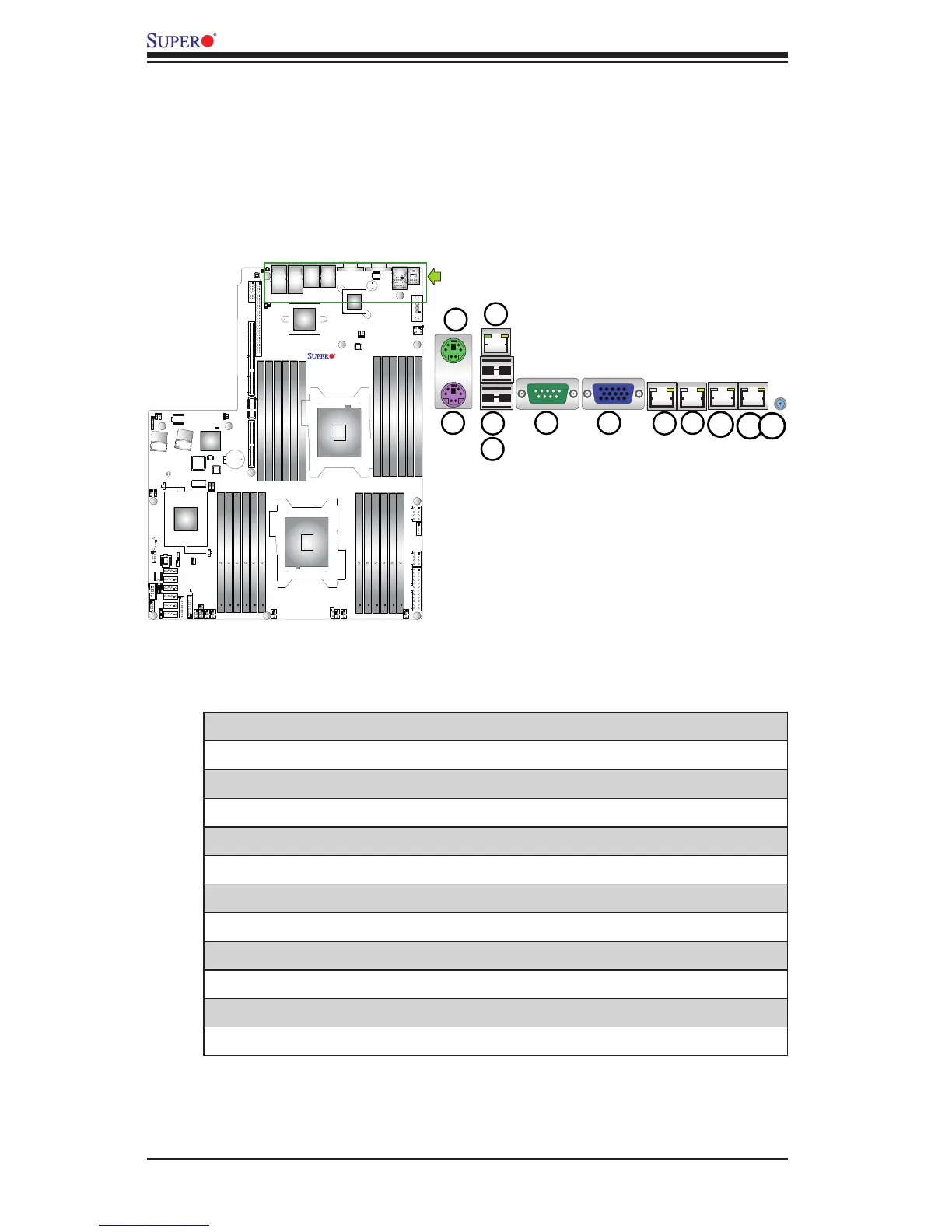
The I/O ports are color coded in conformance with the PC 99 specication. See
the picture below for the colors and locations of the various I/O ports.
Back Panel Connectors and I/O Ports
BackPanelI/OPortLocationsandDenitions
1. Keyboard
2. Mouse
3. Back Panel USB Port 0
4. Back Panel USB Port 1
5. IPMI LAN
6. COM Port 1 (Turquoise)
7. Back Panel VGA (Blue)
8. Gigabit LAN 1
9. Gigabit LAN 2
10. Gigabit LAN 3 1G: -3LN4F+(I350), 10G: -3TF+ (X540)
11. Gigabit LAN 4 1G: -3LN4F+(I350), 10G: -3TF+ (X540)
12. UID Switch



 To Next Page