20 A-96.250.571 / 050517
AMI Codes-II
Installation
3.5. Install the Option pH
3.5.1 pH as Option ex works
If the pH option was ordered with the AMI Codes-II, the pH sensor
cable as well as the temperature sensor are already connected to
the AMI transmitter.
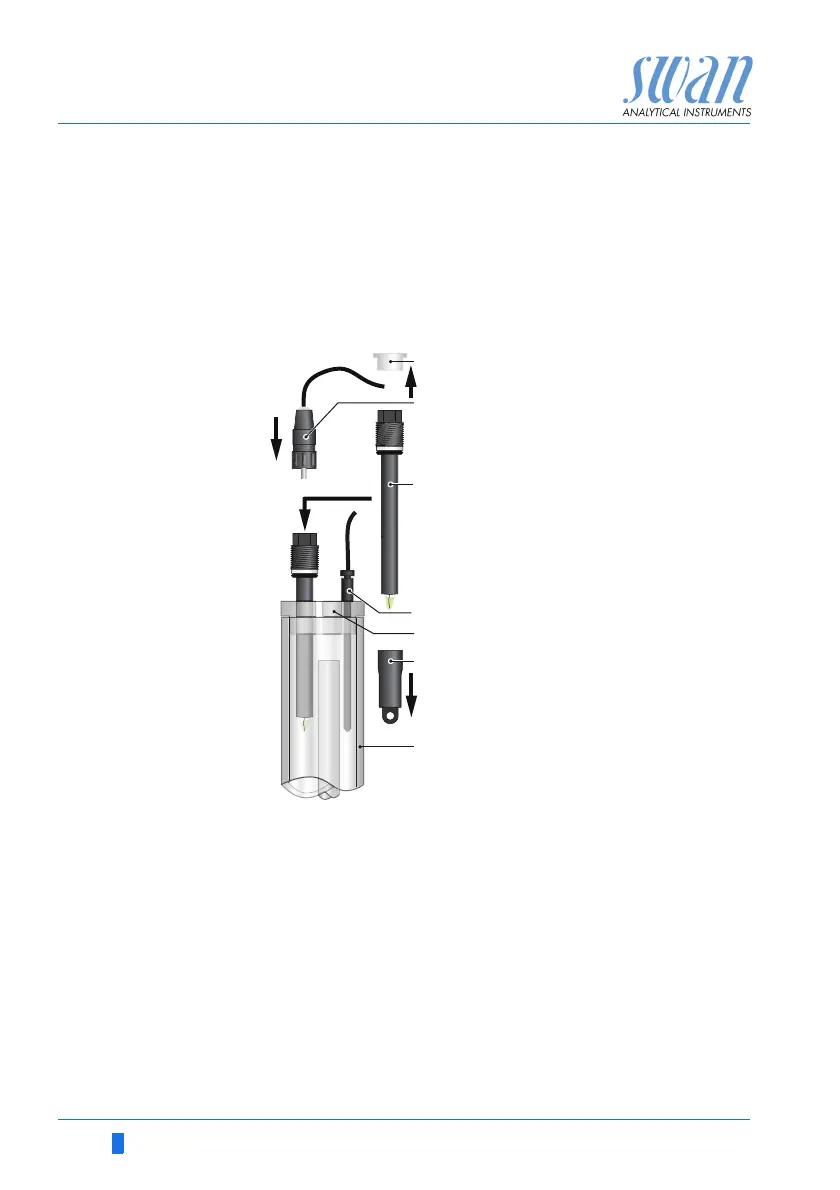
1 Carefully pull off the protective cap [F] from the pH sensor [C]
by turning it clockwise.
2 Store the protective cap in safe place.
3 Rinse the pH sensor tip with clean water.
4 Insert the pH sensor into one of the holes in the constant head
cover [E].
5 Insert temperature sensor [D] into the small hole.
6 Remove the connector cap from the connector of the pH sen-
sor. Store it in safe place.
7 Screw the connector [B] onto the pH sensor.
A
B
C
D
E
F
G
Connector cap
Connector
pH Sensor
Temperature sensor
Constant head cover
Protective cap
Constant head


 To Next Page