54 A-96.250.571 / 050517
AMI Codes-II
Maintenance
6.7. Cleaning the Photometer
Clean the photometer after indication by alarm (E020, FOME dirty).
Switch off the instrument according to instructions in Stop of Opera-
tion for Maintenance, p. 43.
Material Small brush.
Procedure
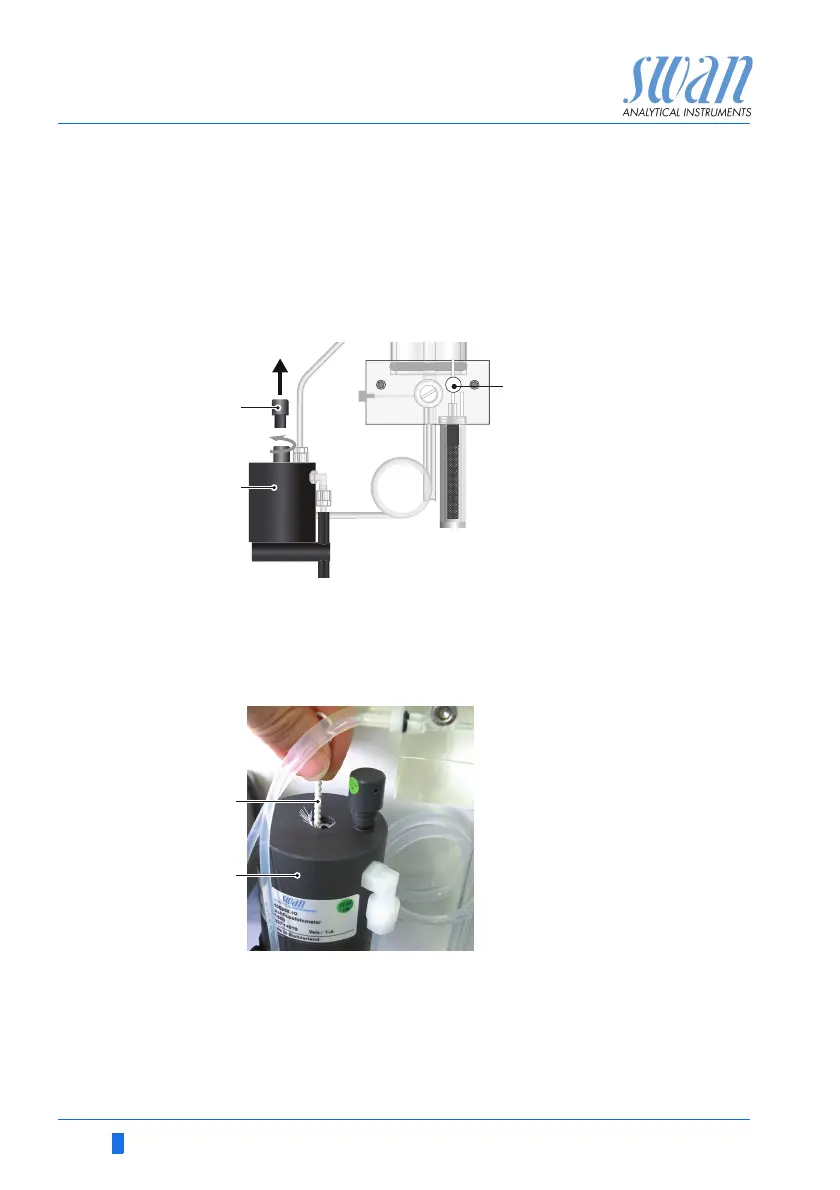
1 Close the flow regulating valve [A].
2 Wait until the sample flow through the photometer has stopped
3 Unscrew the cover [B] from the photometer [C].
4 Clean the Photometer with a small brush [D].
5 Screw the cover to the photometer.
6 Open the flow regulating valve.
Clean the photometer after indication by alarm (E020, FOME dirty).
A
B
C
D
Flow regulating valve
Photometer cover
Photometer
Brush


 To Next Page