EasyManua.ls Logo

Swann AMI Trides - Firmware Settings for Ph;Redox Electrode

Swann AMI Trides
96 pages
Print Icon
To Next Page IconTo Next Page
To Previous Page IconTo Previous Page
Loading...
24 A-96.250.111 / 211019
AMI Trides
Installation
3.6.3 Firmware Settings for pH/Redox Electrode
After the pH/Redox electrode has been installed according to the
previous instructions activate the pH/Redox electrode in the menu
installation as follows:
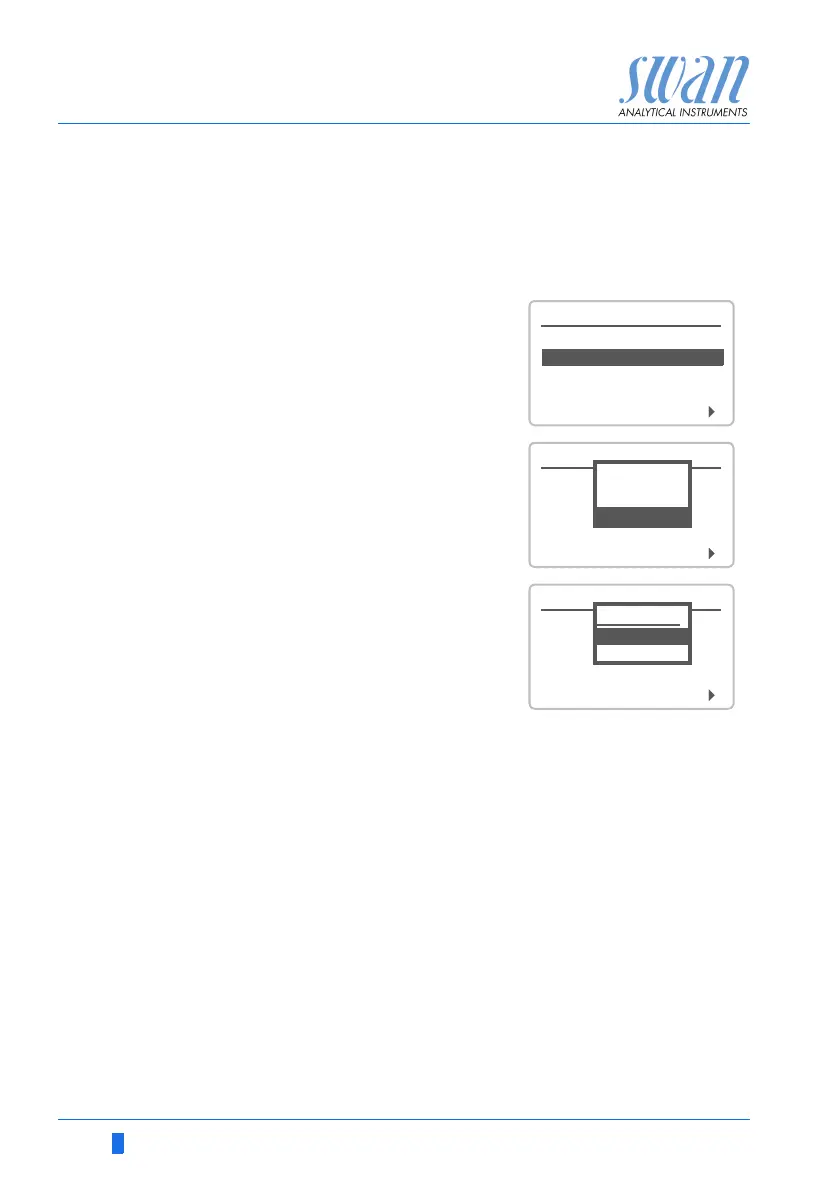
1 Navigate to Menu <Installation>,
<Sensors>
2 Select pH Electrode.
3 Press [Enter]
<without> is highlighted.
4 Select <with>.
5 Press [Enter].
6 Press [Exit].
7 Confirm with Yes.
5.1.1
Sensors
Type of Electrode pH
Disinf. Free chlorine
Dimension ppm
Standards
pH Electrode without
5.1.1
Sensors
Type of Electrode pH
pH Electrode without
Disinf. Free chlorine
Dimension ppm
Standards
pH Electrode
with
without
5.1.1
Sensors
Type of Electrode pH
pH Electrode without
Disinf. Free chlorine
Dimension ppm
Standards
pH Electrode
without
with

Table of Contents