AMI Trides
Maintenance
A-96.250.111 / 211019 53
Example of
Process pH
Calibration
Possible error
messages
See Troubleshooting List, p. 57
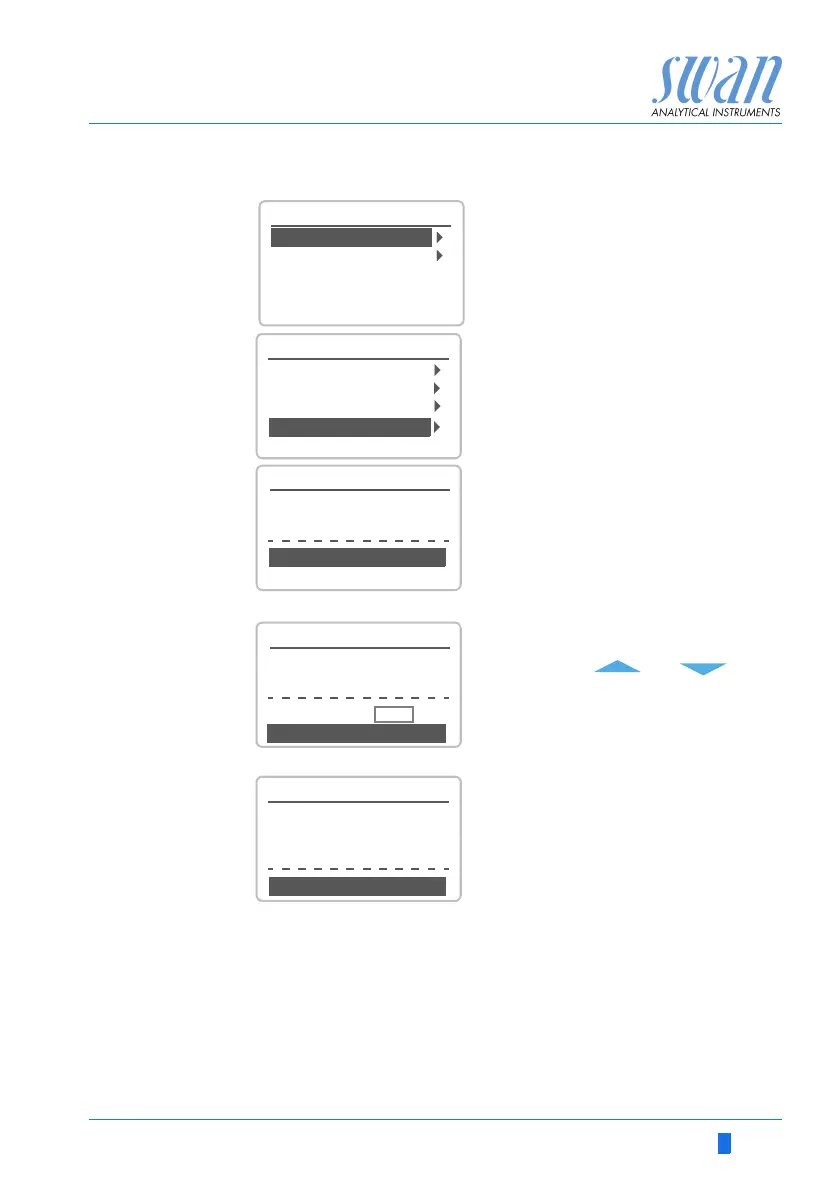
1 Navigate to menu
<Maintenance>/<Calibration>.
2 Press [Enter]
1 Select Process Trides
2 Press [Enter]
The following values are displayed:
Current value
Slope
Process value
Current value and Process value are
equal.
3 Press [Enter].
4 Enter the process value measured
with the photometer.
Use the [] or [] keys
to increase or decrease the
Process value.
5 Press [Enter] to confirm.
6 Press [Enter] to save.
The process value is saved and the
new slope in µA is displayed.
3.1
Calibration
Simulation
Maintenance
Set Time 01.01.05 16:30:00
Calibration
3.1.1
Standard pH
Calibration
Zero Trides
Process Trides
Process pH
Process Trides
Slope x µA
Save <Enter>
Process Value 0.30 ppm
3.1.4.1
Current Value 0.30 ppm
3.1.4.1
Process Trides
Current Value 0.30 ppm
Slope x µA
Process Value 0.45 ppm
Save <Enter>
3.1.4.1
Process Trides
Current Value 0.45 ppm
Slope x µA
Calibration successful


 To Next Page