3 - 2 Symbol LS9203/LS9203i Product Reference Guide
Troubleshooting
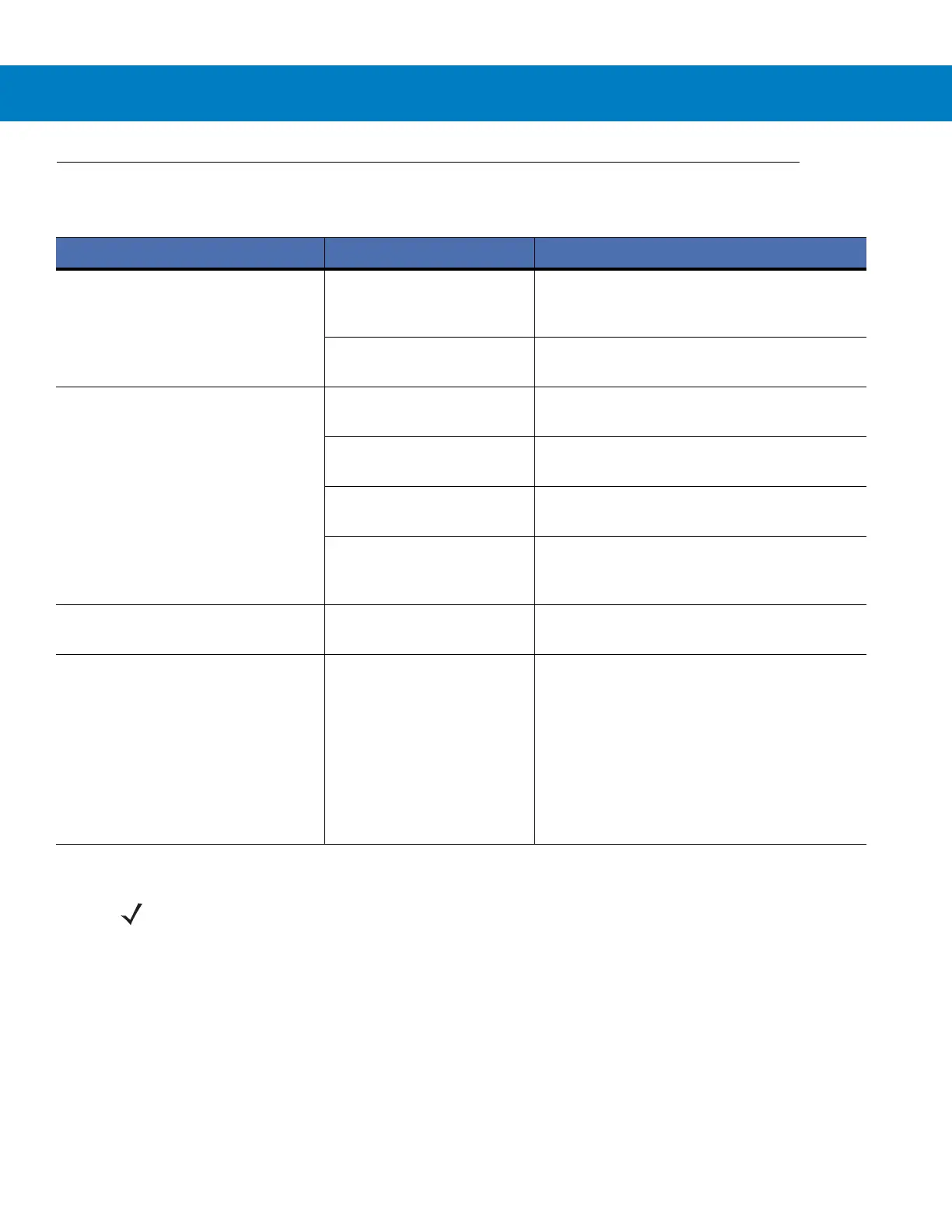
Table 3-1
Troubleshooting
Problem Possible Causes Possible Solutions
The omni-line scan pattern does not
display when the directions are
followed for installing the interface
cable on page
1-3
.
No power to the scanner. Ensure the host has power, and is on. If the
scanner uses a separate power supply, ensure
it’s connected to a working AC outlet.
Interface cable is not
properly connected.
Check for loose cable connections.
Scan line(s) display, but bar code
cannot be read.
Scanner is not programmed
to read the bar code type.
Ensure scanner is programmed to read the bar
code type being scanned.
Bar code is damaged. Try scanning other bar codes of the same bar
code type.
Bar code is too far from
scanner.
Move the bar code closer to the scanner.
The host has disabled
scanning or overridden
parameter settings.
See the technical person in charge of scanning.
Bar code is decoded, but not
transmitted to the host.
Scanner is not programmed
for the correct host type.
Scan the appropriate host type bar code.
Scanned data is incorrectly displayed
on the host.
Scanner is not programmed
to work with the host. Check
scanner host type
parameters or editing
options.
Ensure proper host is selected.
For RS-232, ensure the scanner’s
communication parameters match the host’s
settings.
For keyboard wedge, ensure scanner is
programmed with the correct country code and
that the CAPS LOCK key is off.
Ensure editing options (e.g., UPCE-to-UPCA
Conversion) are properly programmed.
NOTE If after performing these checks the symbol still does not scan, contact the distributor or call the local
Global Customer Interaction Center. See page xiv for contact information.



 To Next Page