11
2.2 Shutting Down
The internal structure of the DREAM 2 is very much like the structure of a desktop personal
computer that has an operating system which handles multiple applications simultaneously. This
kind of activity is naturally involved with opening of multiple files as required by the active
applications. As in PCs, cutting the power before closing the open files may be a harmful action
and therefore should be avoided. For this reason we are not supposed to turn off the power
switch of the controller before the software was commanded to shut down.
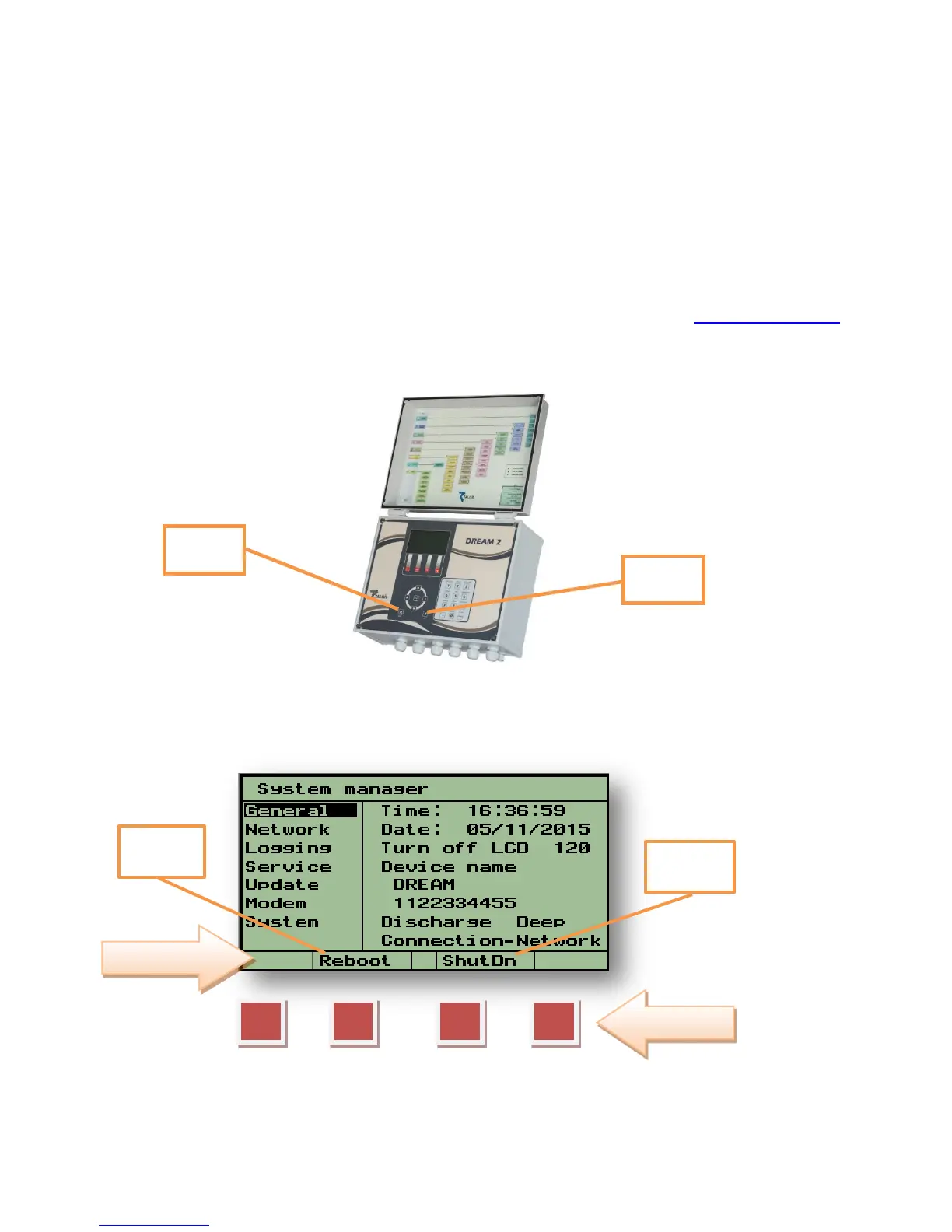
The software Shutdown button is located at the Function Bar of the System Manager
screens, which can be reached from any of the DREAM 2 application screens, by pushing
simultaneously the PgDn (˅) and PgUp (˄) buttons. Exiting the System Manager screens is
done in the same manner.
Pushing the F3=Shutdown button is the only safe way for shutting down the DREAM 2
controller. Shutting down takes time, it is necessary to wait until the lights on the CPU board
turn off. Only after the lights on the CPU went off, it is safe to switch off the Power Switch.
The Shutdown software key turns the DREAM 2 system OFF.
The Reboot software key turns the DREAM 2 system OFF and then ON again.



 To Next Page