12
The Reboot and Shutdown functions are activated by pushing the red function keys located
underneath the Function Bar of the screen. Both functions preserve all the data included in
the controller except the statuses and left quantities of programs.
3. THE INTERNET COMMUNICATION
The DREAM 2 has 3 options for accessing the internet:
Using a Cellular Modem supplied by Talgil and plugged into the CPU board.
Using an Ethernet card for connecting to a Local Area Network.
Using a USB Netstick plugged into the motherboard.
The controllers after power up will use their internet link to login to the service and stay online.
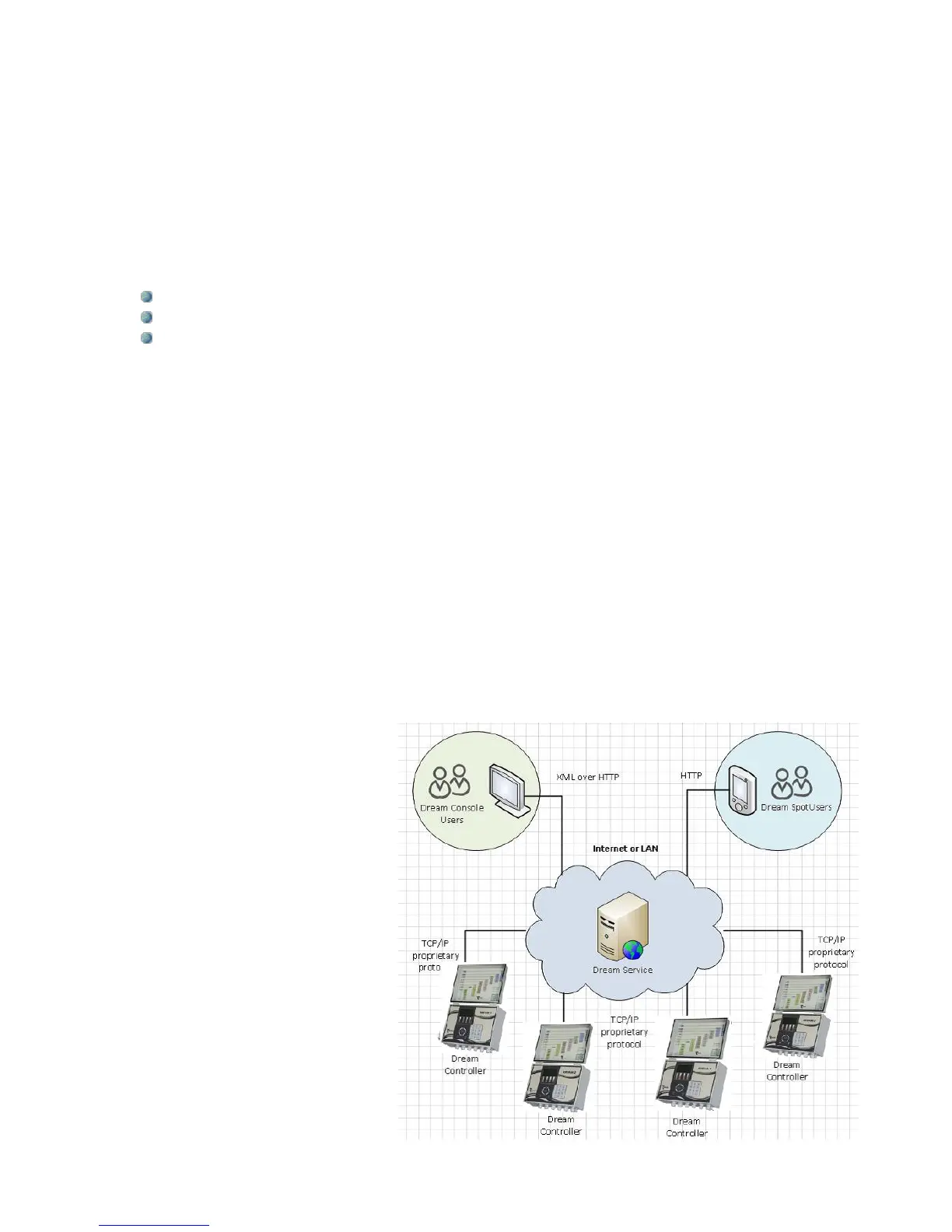
On the other end there are the users that want to access the controllers, they got two options:
one option is the software package called CONSOLE and the other is an internet site called
SPOT.
Both options enable the users to login to the SERVICE whose task is to coordinate between
users and their controllers. Additionally the SERVICE contains a large DATA BASE that stores
all the information about all the controllers and the ADMINISTRATION software that decides
about who is permitted to access which controller.
When a controller tries to login, the SERVER will ask its ID number and its full Image
contents. If the Image structure is correct, the controller will be permitted to login, otherwise it
will be rejected. If this is the first time for this controller to login, the SERVER will include its ID
in the list of recognized controllers and will allocate for it space in the DATA BASE. Once
logged in, the SERVER will keep asking the controller repeatedly “What is new?” in order to
keep the DATA BASE up to date, so that users interested in some information about the
controller, would be able to find it
in the DATA BASE.
The drawing to the right
demonstrates the physical layout of
the communication between users
and targets (controllers) in the
DREAM 2 system.
The procedure of setting up the
internet communication is explained
below.
Selecting the mode of
communication and setting the
needed parameters is done at the
System Manager screens.



 To Next Page