15
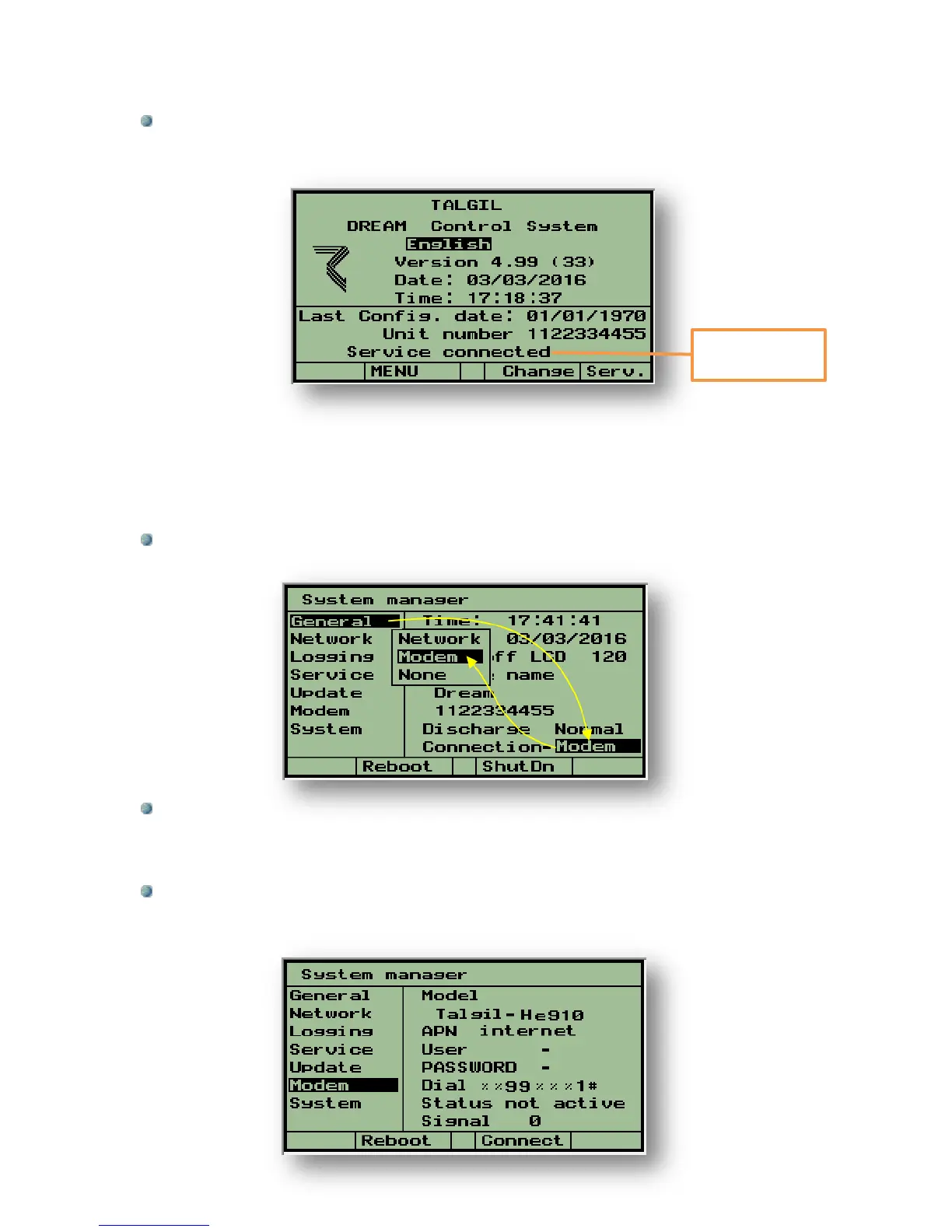
The success or failure of connection can be checked at the following screen which can
be reached from the Main menu by hitting F2=About. To get back to the Main
menu push the PgDn (˅) and PgUp (˄) keys simultaneously.
The connection process may take some time, however if it fails we can always try to use
F4=Serv to force another connection trial, otherwise the controller will try to reconnect every
few minutes.
3.2 Communication through Modem or Netstick
Step 1- Enter the System Manager screens by pressing the PgDn (˅) and PgUp (˄)
keys simultaneously.
Step 2- While the cursor is placed on the General subject use the right arrow to
move the cursor to the right side of the screen and then use the down arrow to move
the cursor to the Connection row. Hit the Enter key to open the options selection
window, select Modem and hit the Enter key for confirmation.
Step 3- Use the left arrow to bring back the cursor to the left side of the screen and
use the down arrow to place the cursor on the Modem subject. This subject deals
with defining the Model of the modem in use and the APN of the sim card provider to
be used.



 To Next Page