14
Step 5- Use the left arrow to bring back the cursor to the left side of the screen and
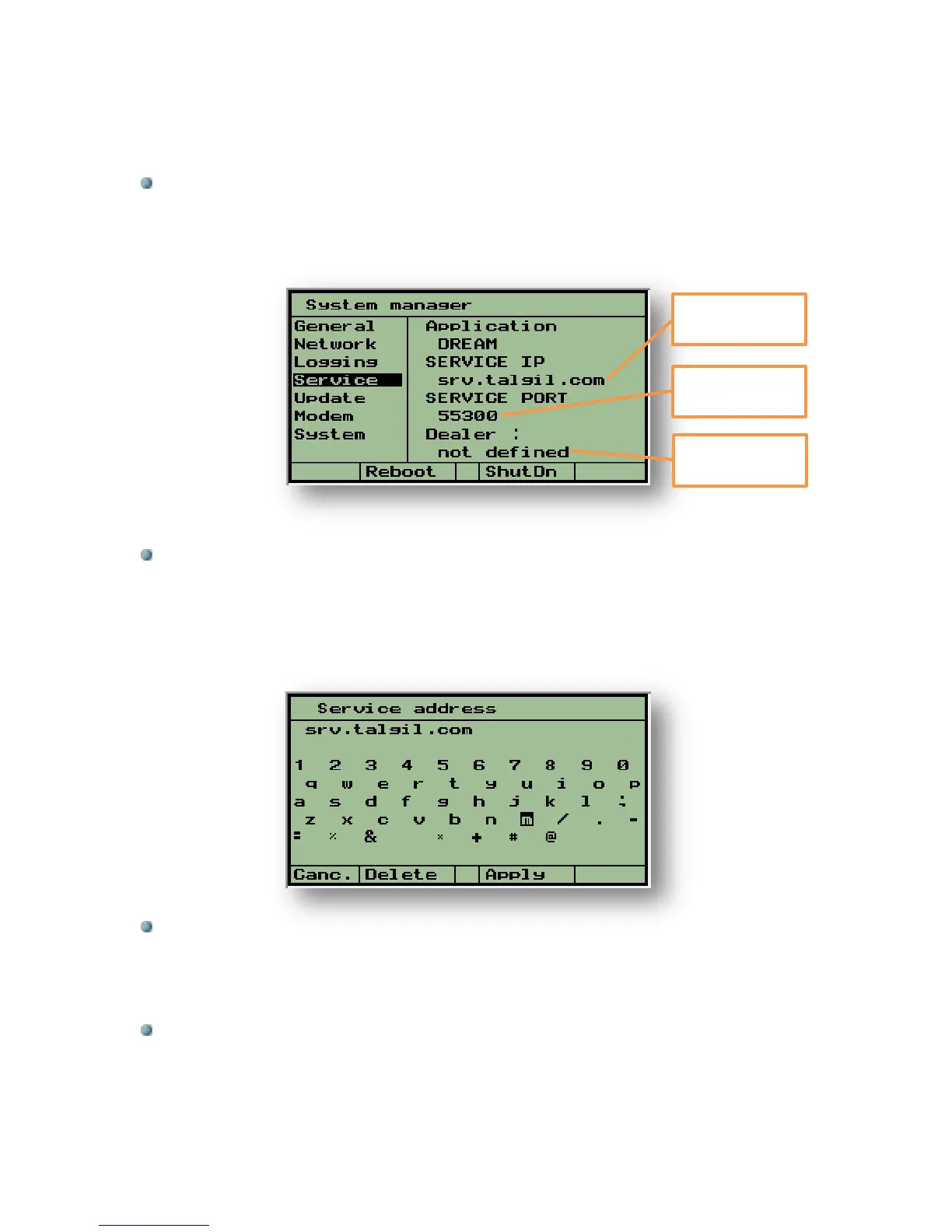
use the down arrow to place the cursor on the Service subject. This subject deals
with defining the IP address and the port of the Server through which the controller
can login to the system.
Step 6- The IP address (DNS) of the Server is srv.talgil.com and the port to be used
is 55300. If the IP address is incorrect and has to be changed, bring the cursor to the
existing address and press the Enter key, as a result the screen will change into an
editor screen like the one below, in which the characters need to be selected one by
one. When the correct string is complete use F3=Apply to exit the editor screen.
Step 7- When the Dealer’s users name is not defined, the controller will be registered
as belonging to Talgil, therefore in order to make it register as belonging to the
Dealer’s organization, the Dealer should insert his user name before letting the
controller login for the first time.
Step 8- At this stage the procedure is complete and the controller is ready for logging
into the Service, use F2=Reboot to let the controller restart.
IP address of the
Server (DNS)



 To Next Page