22
Restoring the configuration from USB – will restore the configuration
of the controller from the backup file stored on the USB memory stick.
Recovering configuration from internal backup – Loading the
configuration from the internal backup saved inside the controllers memory
each midnight.
VPN ON/OFF switch – this is the place where the Virtual Private Network can be
activated. The VPN acts like a bypass to the regular communication channel, which
is used by the technicians in case of need. Activating the VPN should only be done
by request from the technical team of Talgil.
4.6 Modem
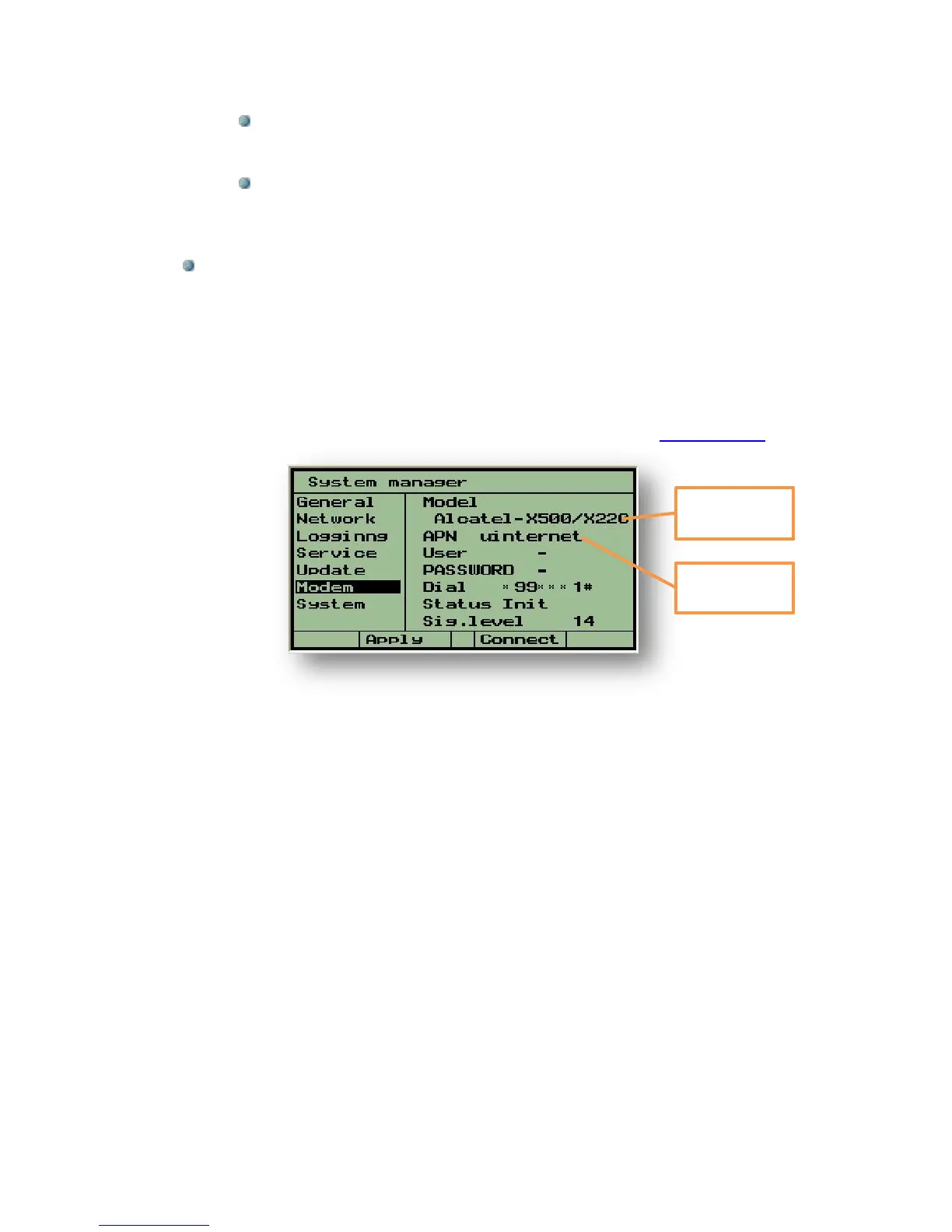
This subject deals with the definitions required for cellular modem communication. It can
be accessed only when the Modem communication was selected (see 4.1 above).
The system recognizes several models of modems for which the appropriate drivers are
available. So first thing is to select the type of modem we intend to use.
After selecting the type of modem in use, the APN should be defined.
The APN is the Access Point Name used by the specific cellular data communication
provider. Wrong APN may block the data communication.
The user name, the password and the dialing number are usually ignored. The local
service provider should be consulted about these parameters.
The last two rows supply information about the modem status and about the signal level.
When the modem fails to connect for a long time (more than 5 minutes) the user may
push F3=Connect, this will reset the modem and force it to try again.
Sometimes the reason for connection failure is the SIM card which is defected or
misplaced; it is worth trying another SIM card or check with the provider about the
features included in the specific SIM card.



 To Next Page