13
3.1 Communication through Ethernet
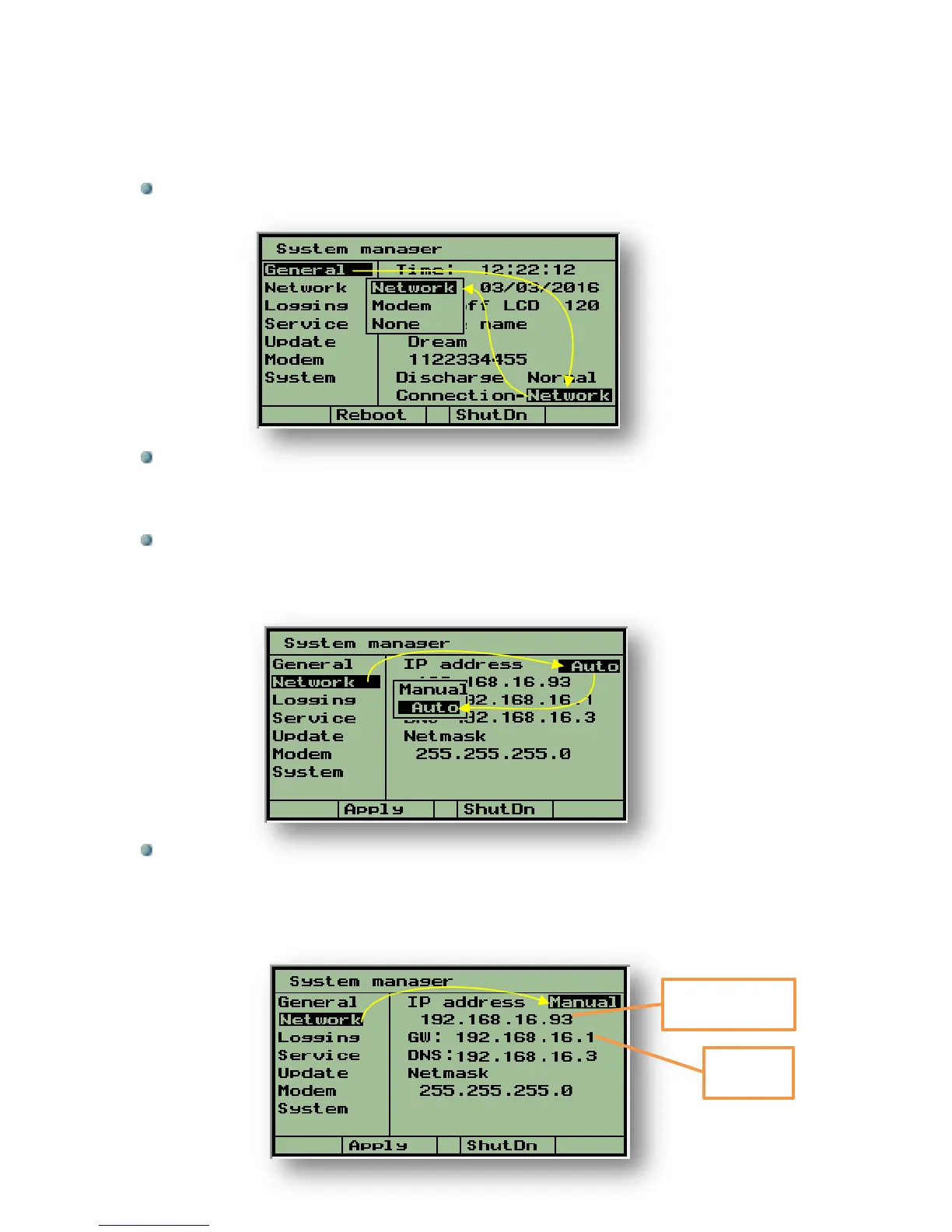
Step 1- Enter the System Manager screens by pressing the PgDn (˅) and PgUp (˄)
keys simultaneously.
Step 2- While the cursor is placed on the General subject use the right arrow to
move the cursor to the right side of the screen and then use the down arrow to move
the cursor to the Connection row. Hit the Enter key to open the options selection
window, select Network and hit the Enter key for confirmation.
Step 3- Use the left arrow to bring back the cursor to the left side of the screen and
use the down arrow to place the cursor on the Network subject. This subject deals
with defining the IP address and the Gate Way address at which the server can locate
the controller.
Step 4- Use the right arrow again to move the cursor to the right side of the screen,
the cursor will rest on IP address. Usually selecting the Auto mode will do the job.
However in special cases when the Auto mode does not work, the Manual mode can
be selected and then the IP address and the Gate Way address can be manually
inserted. Usually in such cases the person in charge of the local network should be
consulted.
IP address of the
controller



 To Next Page