J051X Continuous Feeding JAM
If J051X occurs, take an action as referring to below
procedure.
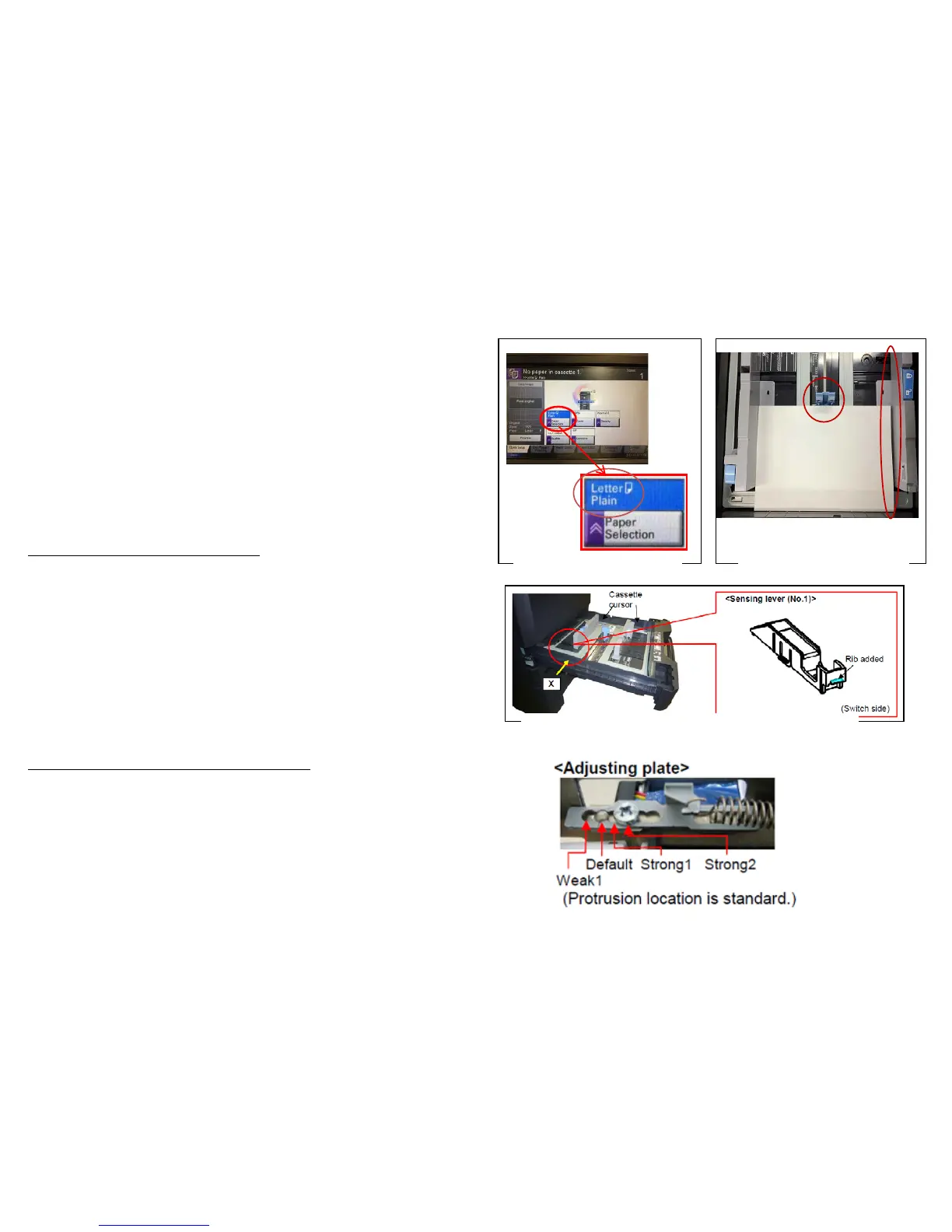
a. Check the paper size (Fig.1)
Check whether the size of paper is set at the cassette and stated on
the JAM log of the Even Log is same or not.
If the paper size is different at “a”
b. Check whether the position of cassette cursor is properly set
against the paper. (Fig.2)
c. Check whether the cassette is inserted into the end.
d. After performing above “b” and “c”, the problem is not solved,
replace with the modification parts mentioning on the service
bulletin No.2LC-0023(B287) (Fig.3)
If the paper size is matched at above “a”
e. Check the paper is using other than specified (such a coated paper,
inkjet paper)
f. Please adjust the pressure of the retard pulley.
Decrease the adjusting plate by one level.
Affected Model :4500i,5500i,6500i,8000i
PF-730,PF-740
Fig.1 Paper size check
Fig.2 Check the position
of the Cassette Cursor
Fig. 3 Item need to be replaced on SB:2LC-0023
J051X
31


 To Next Page