1. When CF182/CF186 occur after every printing.
1) Check connection of the harness (Engine - Main board) and connectors and check function.
*[Main⇔ENGINE Interface] Main board:YC3 Engine board:YC46 or YC50
2) Format the HDD and check function. (U024 FULL formatting)
3) Execute the U021 Memory initializing to initialize the controller backup memory and check function.
4) Replace the engine board and check function.
5) Replace the main board and check function.
6) Retrieve the USBLOG and contact the Service Administrative Division.
2.When CF182/CF186 occur from time to time
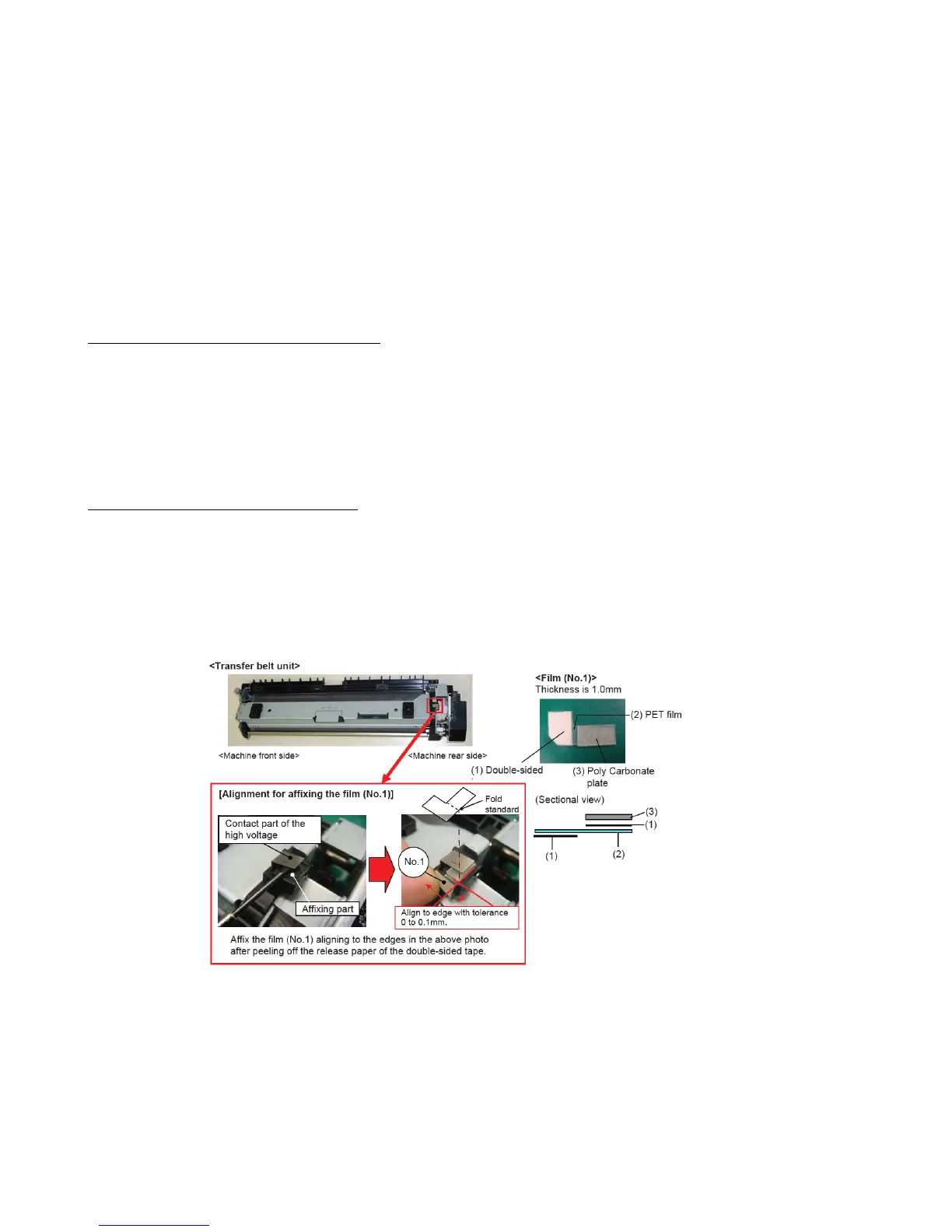
Add the film to the contact part of the high voltage terminal of the transfer belt unit.
*If the right cover isn’t closed sufficiently, the contact failure (leakage) may occur due to the wide gap between the high voltage
terminals at the right cover and the transfer belt. As the result, the F186 error may appear due to the misdetection of the inter-lock
switch caused by the noise that is generated by unstable transfer voltage.
Item :302LF22670 SHEET CONTACT TRANSFER 1set
CF182/CF186
【Service bulletin】2LH-0010(C128)
99


 To Next Page