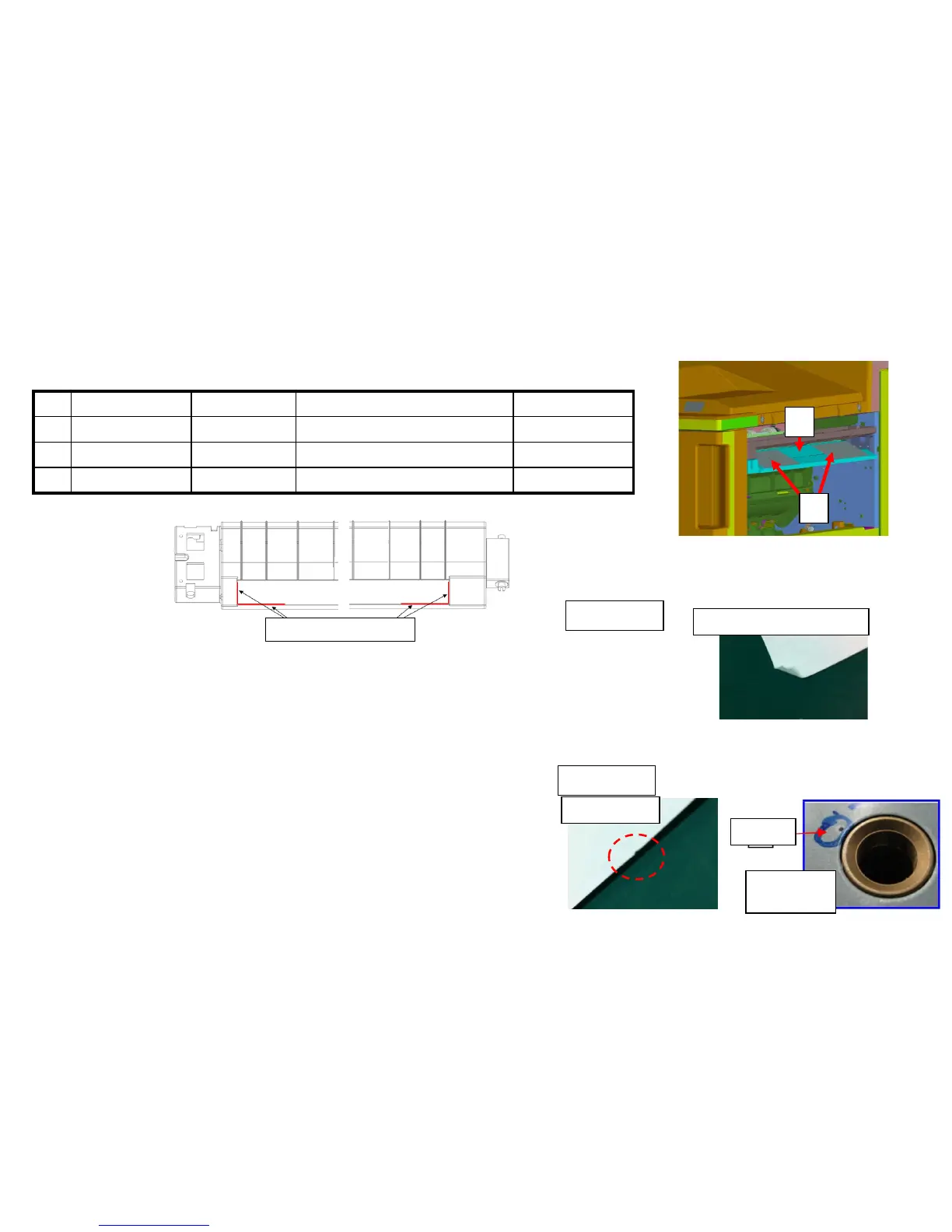
2. Replace the GUIDE FEED LOWER with the No.1 PARTS GUIDE FEED
ASSY which the No.3 PET Film is attached on.
No. Old Parts No. New Parts No Parts name Q’ty
1 303NB94250 PARTS GUIDE FEED ASSY SP 1
2 303NB07020 303NB07021 +GUIDE FEED LOWER 1
3 303NB07190 +SHEET FEED IN C 2
2
1
3. Check whether the paper corner folding or scratching occurs at the
Punch unit (Sample1, Sample2)
a. Upgrade the firmware (as set.)
3NB_9200.004.007 and after
3NK_9A00.003.004 and after
b, If the serial number of unit is before below
number, replace the Punch Unit.
PH-7A:N361703776 and after
PH-7B:N351700282 and after
PH-7C:N371701264 and after
PH-7D:NMY1700042 and after
Paper is caught by the convex of welding part at
the Punch unit upper guide conveying surface.
Scratch mark
Corner Folding (small fold)
Sample 2
Sample 1
The leading edge of paper (11 inch width rear side) is
caught at the hole of Punch unit upper guide plate.
J6100 / J6110 (DF) (4/6)
<Affix position of film>
Affix it 0 to1mm from R end
Convex
Conveying
surface
58


 To Next Page