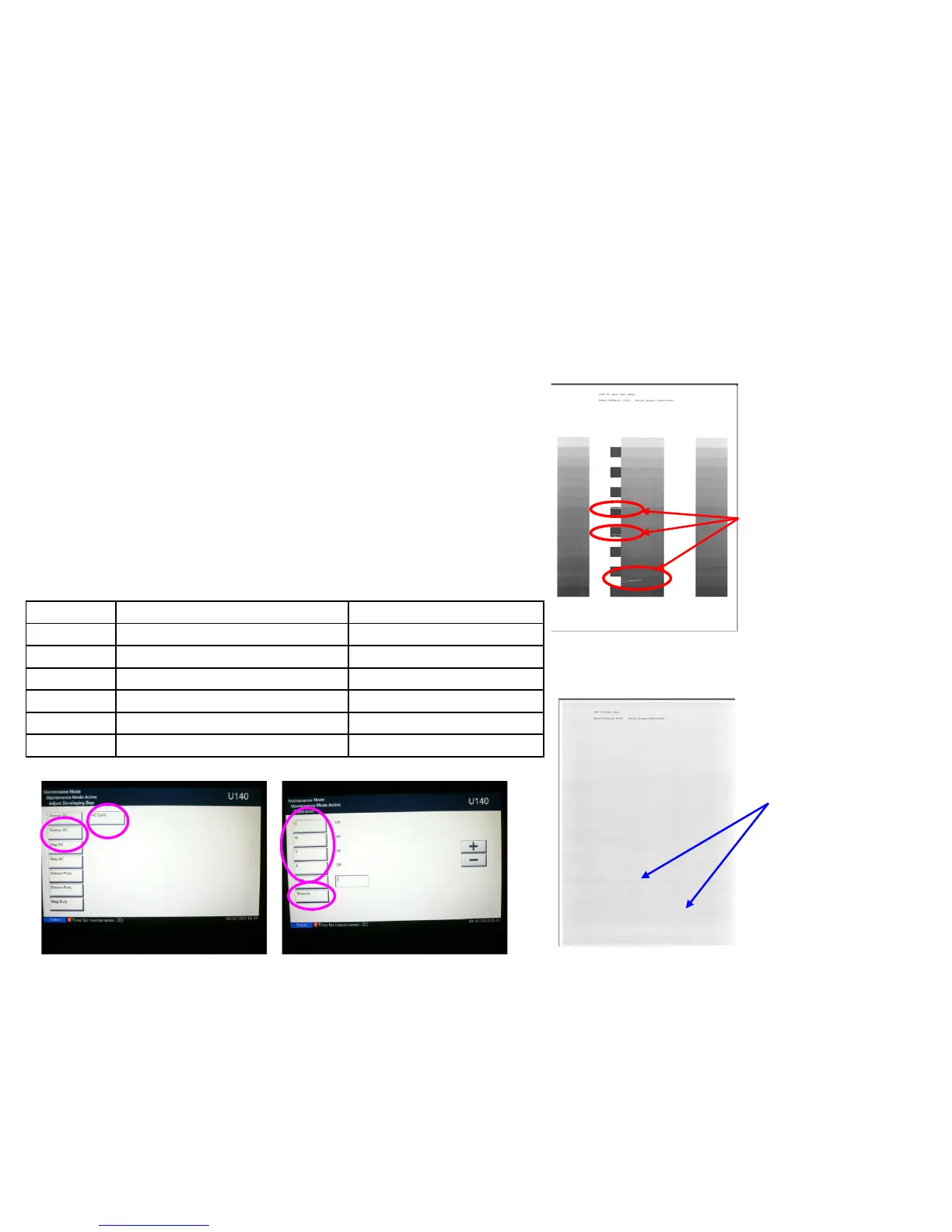
a. If the void image appear at solid part of prints out on U089 Color
Belt, refer to below “b” * If the vertical streak image appears at the
halftone, replace the developing unit.
b. Check the value of U140 Sleeve AC (1)
c. U140 Execute AC Calib(2) Set “K” Off to
On(3) Execute(4) Start
d. Check whether the value of U140 Sleeve AC (3) becomes lower
and the image is recovered.
e. If the image will not be recovered, replace the developing unit.
(3)
(4)
(1)
(2)
Image sample 1
◇ Leak at the solid part
Void image appear at the solid part.
U89 Sample set
Void image at
Solid part
Image sample 2
◇Leak at the halftone part
Horizontal streaks appear at Halftone image.
U89 Sample set
Horizontal streaks
at halftone image
Void Line / White Band (Horizontal White Streaks)
1. Leak Image 2 (5500i、6500i、8000i)
Execute AC Calib Operation Automatically
Select AC Calib High Altitude Setting
7550ci/6550ci
O
5550ci/4550ci
O
3550ci/3050ci
O
8000i/6500i
O
5500i
O
4500i/3500i
O
7


 To Next Page