oCare
TM
Pro 100
36
CAUTION:
1 The Low priority Alarm indicator is triggered when
approximately 25% remaining battery is left. The battery
symbol starts to flash as a reminder. The low priority
ALARM (and flashing of the battery symbol) is dismissed
when remaining battery is greater than 25%.
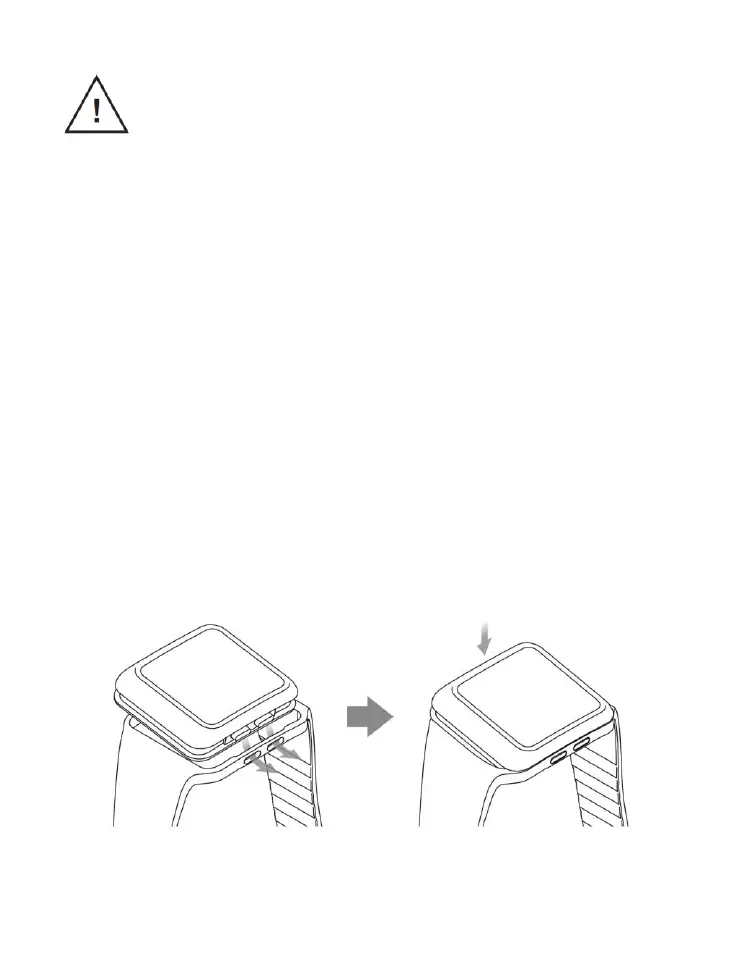
Attach the Watchband
1. Plug the anti-ESD (Electrostatic discharge) cover to the
micro USB AB port on the watch case
2. Align the watch case with the watchband as illustrated in
Figure 4.
3. Insert the buttons into the holes of the watchband all the
way to the end.
4. Assemble the watch case with the watchband.
5. Make sure the watchband sits in the trough of the watch
case to secure the device.
Figure 4. Attach the Watchband



 To Next Page