32
DRC value
This option sets the Dynamic Range Control (DRC)
value to be applied to received broadcasts. DRC is
used to reduce the range between high and low
volumes of audio and is sometimes applied at the
broadcast source. Pop music may have a high value of
DRC applied, appropriate for constantly high listening
levels, while classical music broadcasts may have
no DRC applied to allow the listener to hear the full
dynamic range of the source volume.
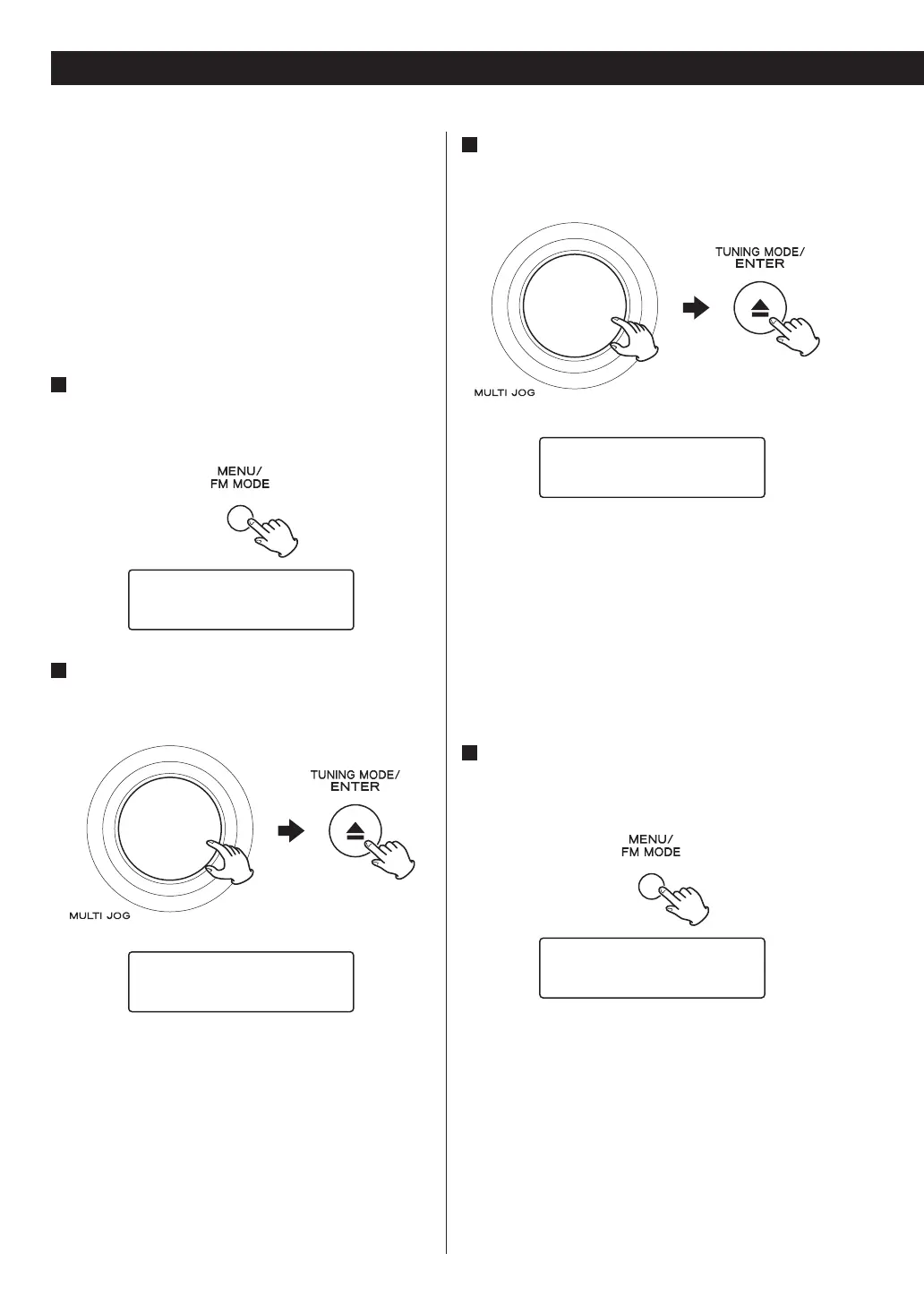
1
Open the DAB menu.
Press the MENU button while DAB is selected as the
source.
›Station List
Local Scan
2
Select “DRC”.
Turn the MULTI JOG knob to select the item, and then
press the ENTER button.
Preset Tune
›DRC
3
Select the desired level of DRC.
Turn the MULTI JOG knob to select the item, and then
press the ENTER button.
DRC high *
›DRC low
DRC off No DRC is applied.
DRC low Medium.
DRC high Maximum.
< Current setting is marked with “*”.
Station order
You can select the order in which stations are listed.
1
Open the DAB menu.
Press the MENU button while DAB is selected as the
source.
›Station List
Local Scan
Using DAB Menu (3)


 To Next Page