10
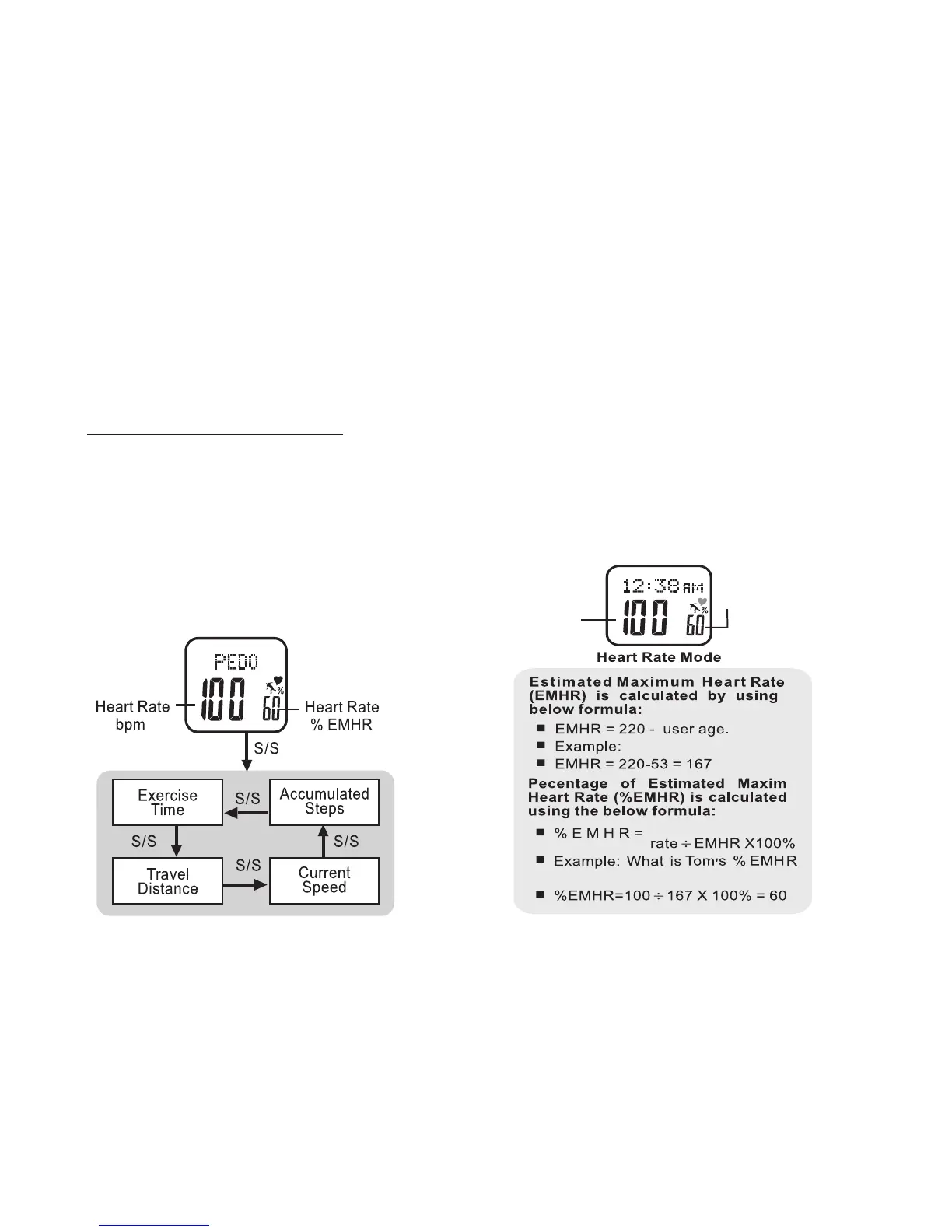
Estimated Maximum Heart Rate and
Percentage of Maximum Heart Rate:
Your Accelerator watch records and calculates
various heart rate data. Much of this data is
based on your estimated maximum heart
rate which is determined by the information
entered in your personal profile. See fig 11
for an explanation of your watch's calculation
of estimated maximum hear rate
Your accelerator watch automatically distinguishes
between walking and running and adjusts its calcula-
tions accordingly
• PRESS
LAP/RESET
at any time to exit Exercise
Mode. It will continue to record exercise data as
you navigate elsewhere in the watch
• HOLD ST/STP FOR 3 SECONDS to manually
start or stop recording
To View Pedometer Exercise Data: See fig.10
While in Exercise Mode:
• PRESS MODE to scroll PEDO display
• PRESS ST/STP to view pedometer data
• PRESS LAP/RESET to exit Exercise Mode
fig.11fig.10



 To Next Page