25
• PRESS MODE to enter Personal Profile:
8 of 1
• PRESS ST/STP to select preferred units
• PRESS MODE to confirm
• PRESS ST/STP or LAP/RESET to
adjust the weight to match your own
• PRESS MODE to confirm
• PRESS ST/STP or LAP/RESET to
adjust the average walking stride to
match your own
• PRESS MODE to confirm
• PRESS ST/STP or LAP/RESET to adjust
the average running stride to match
your own
• PRESS MODE to confirm
HOLD MODE FOR 3 SECONDS to return to
the Main Settings Menu
HOLD MODE FOR 3 SECONDS to return to
the Home Time display
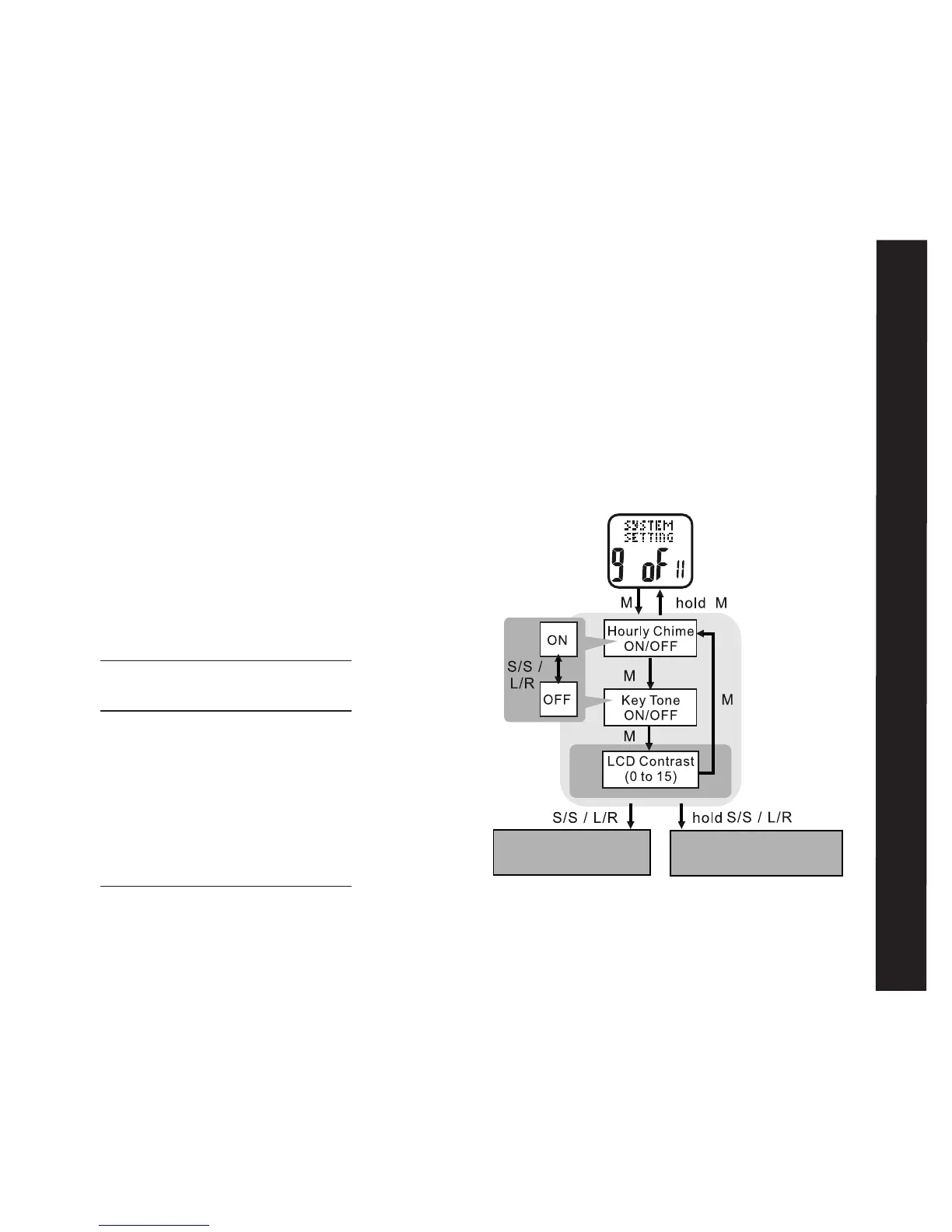
System Setting: 9 of 11 See fig.29
This section describes how to adjust various
audio and visual characteristics of the
Accelerator watch
HOLD MODE FOR 3 SECONDS in the
Home Time display to access Main Settings
Menu
• PRESS ST/STP or LAP/RESET to scroll
to System Setting: 9 of 11
• PRESS MODE to enter System Setting:
9 of 11
• PRESS ST/STP to adjust the hourly chime
on or off
• PRESS MODE to confirm
System Setting



 To Next Page