23
to Exercise History: 6 of 11
• PRESS MODE to enter Exercise History:
6 of 11
• PRESS LAP/RESET to select between:
* daily- previous seven days or
* weekly- previous ten weeks
Example: 12-20D = daily exercise record
for December 20th
Example: 51W = weekly exercise record for
the 51st week of the year
• PRESS ST/STP to select the proper day
or week
HOLD MODE FOR 3 SECONDS to return to
the Main Settings Menu
HOLD MODE FOR 3 SECONDS to return to
the Home Time display
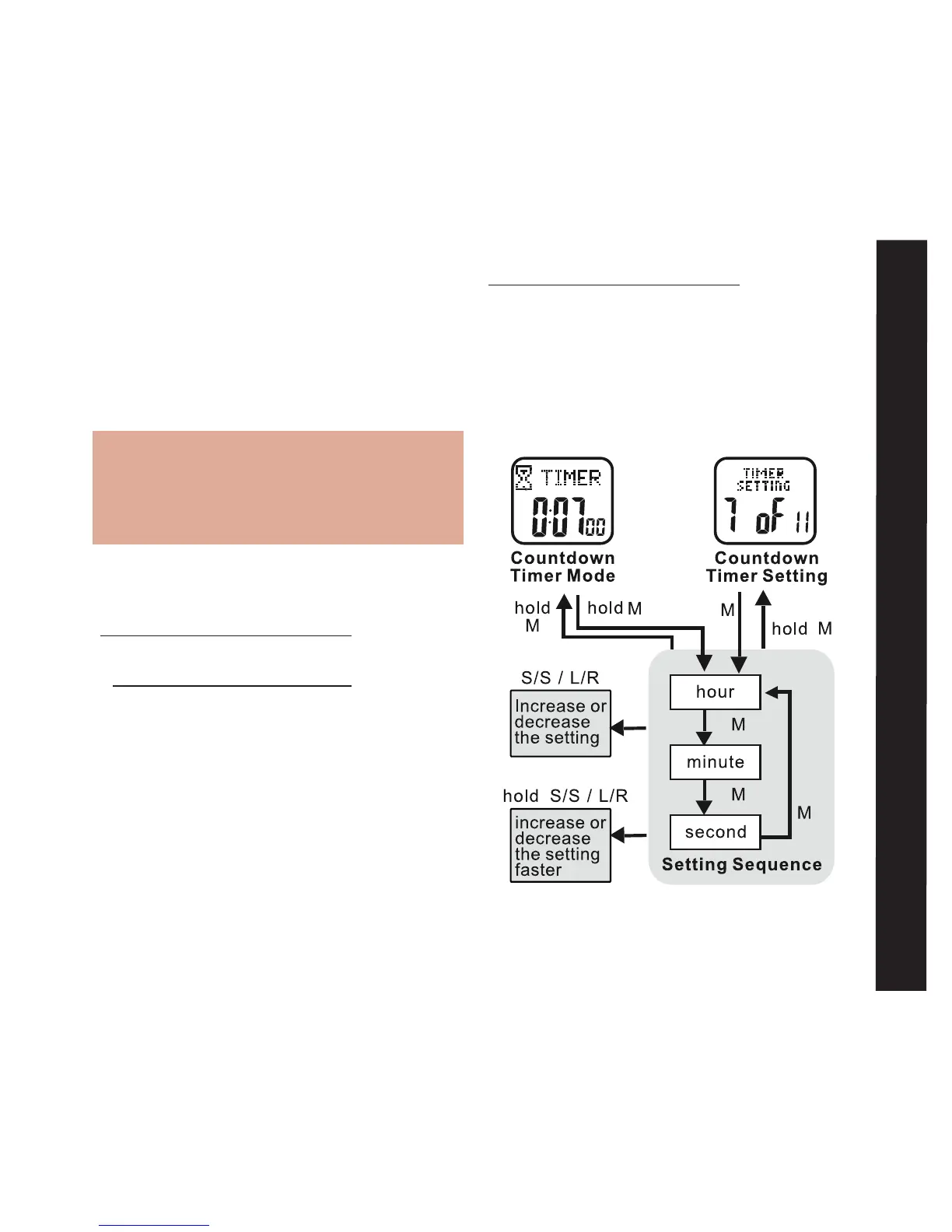
Timer Setting: 7 of 11 See fig.27
Your Accelerator watch has a convenient
Countdown Timer. The timer can be used
for advanced training or as a quick reminder.
The timer counts backwards from your pro-
grammed time and beeps at critical intervals.
See the following to set the Countdown Timer.
HOLD MODE FOR 3 SECONDS in the home
time display to access the Main Settings
Menu
• PRESS ST/STP or LAP/RESET to scroll
to Timer Setting: 7 of 11
• PRESS MODE to enter Timer Setting:
7 of 11
fig.27
Timer Setting



 To Next Page