24
length conversions. See the following to set
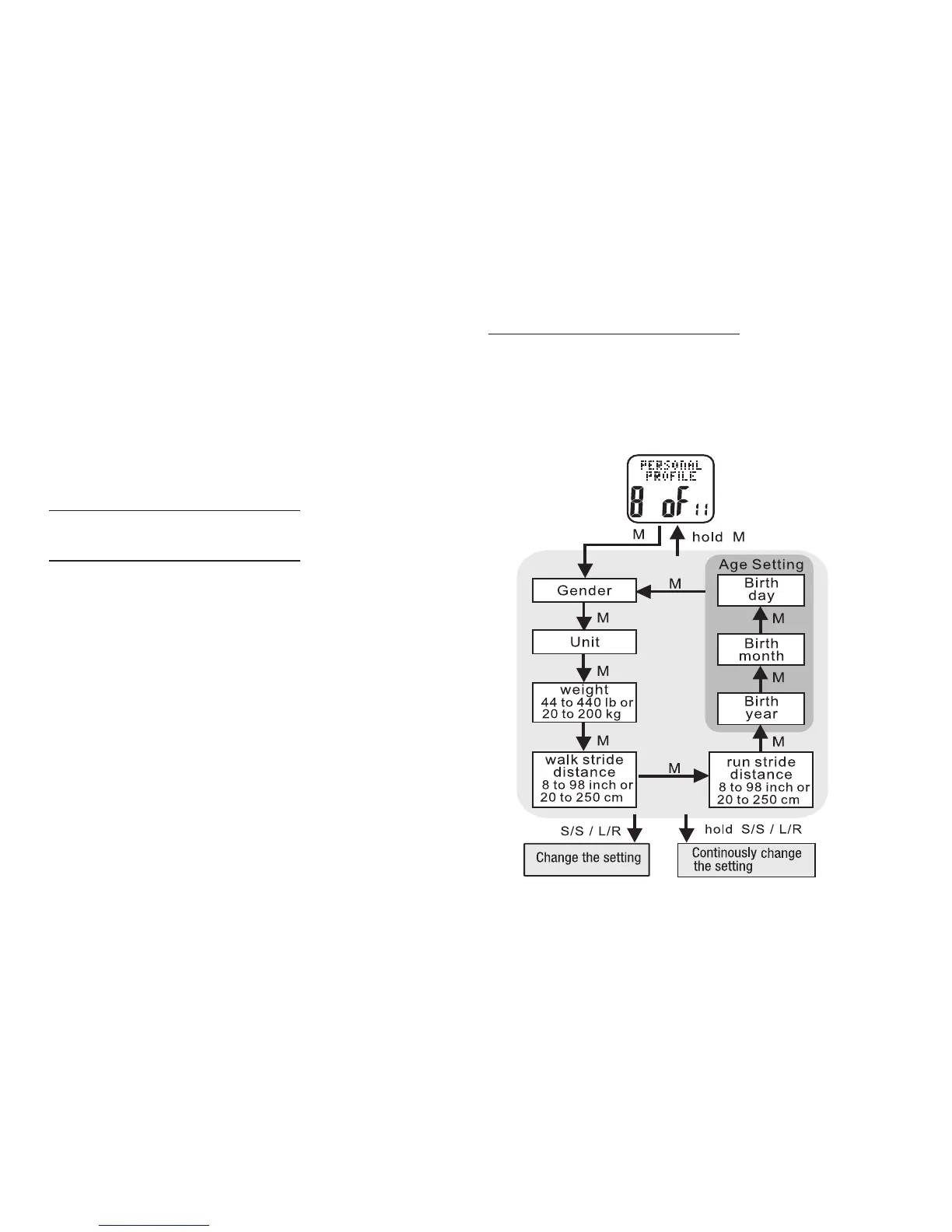
a personal profile
HOLD MODE FOR 3 SECONDS in the Home
Time display to access the Main Settings
Menu
• PRESS ST/STP or LAP/RESET to scroll
to Personal Profile: 8 of 11
• PRESS ST/STP or LAP/RESET to adjust the
hour. Check whether the hour is for AM or PM
• PRESS MODE to confirm
• PRESS ST/STP or LAP/RESET to adjust the
minutes
• PRESS MODE to confirm
• PRESS ST/STP or LAP/RESET to adjust the
seconds
• PRESS MODE to confirm
HOLD MODE FOR 3 SECONDS to return to the
Main Settings Menu
HOLD MODE FOR 3 SECONDS to return to the
Home Time display
Personal Profile: 8 of 11 See fig.28
Taking 5 minutes to determine your personal
profile measurements is key to enjoying your
Accelerator watch. Most important is determining
your average stride lengths. The greater the test
distance, the more accurate your data will be. A
distance of 100m or 300ft is sufficient for proper
calibration. This distance is easy to measure at
a local running track, as it is the length of one
straightaway. Use the online stride calculator at
www.tech4o.com for help with various stride
fig.28



 To Next Page