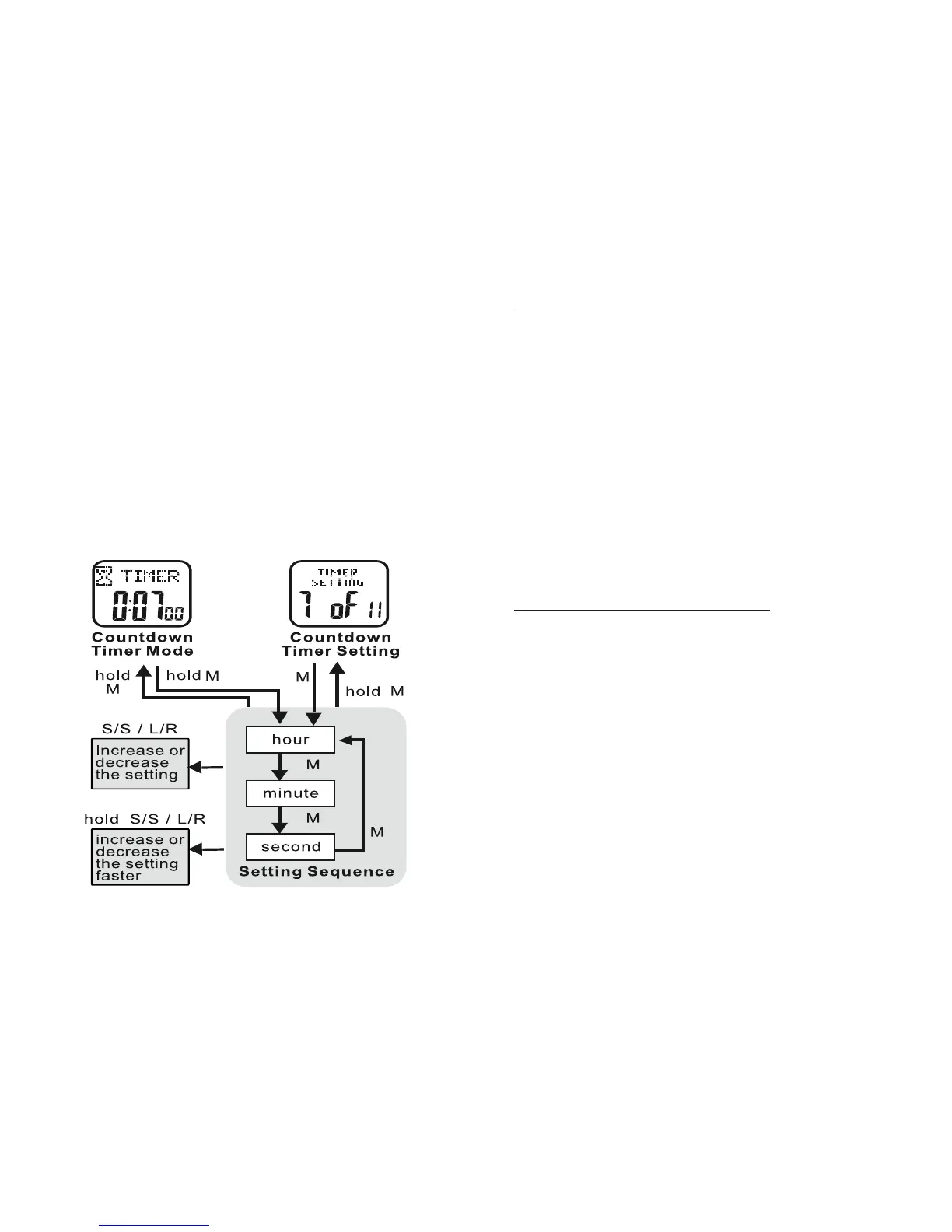
8
• PRESS MODE TWICE from the Home Time
display to access Countdown Timer
To Use the Countdown Timer: See fig.8
• PRESS ST/STP to start Countdown Timer
• PRESS ST/STP to stop Countdown Timer
The Countdown Timer will beep:
On the minute for the last 10 minutes.
Every 10 seconds during the last minute.
Every second for the last 5 seconds.
For 10 seconds at expiration
To Set the Countdown Timer: See fig.8
HOLD MODE FOR 3 SECONDS in the
Countdown Timer display to access the
settings menu
• PRESS ST/STP or LAP/RESET to adjust
the hours
• PRESS MODE to confirm
• PRESS ST/STP or LAP/RESET to adjust
the minutes
• PRESS MODE to confirm
• PRESS ST/STP or LAP/RESET to adjust
the seconds
• PRESS MODE to confirm
HOLD MODE FOR 3 SECONDS to return
to the Countdown Timer display
To Re-Set the Countdown Timer:
• PRESS LAP/RESET when the
countdown timer is stopped or at
expiration to reset
• PRESS MODE to exit Countdown Timer
Mode
Exercise Mode:
Your Accelerator’s Exercise Mode accurately
measures your speed, distance, calories,
steps and heart rate
fig.8



 To Next Page