5
Home Time Mode
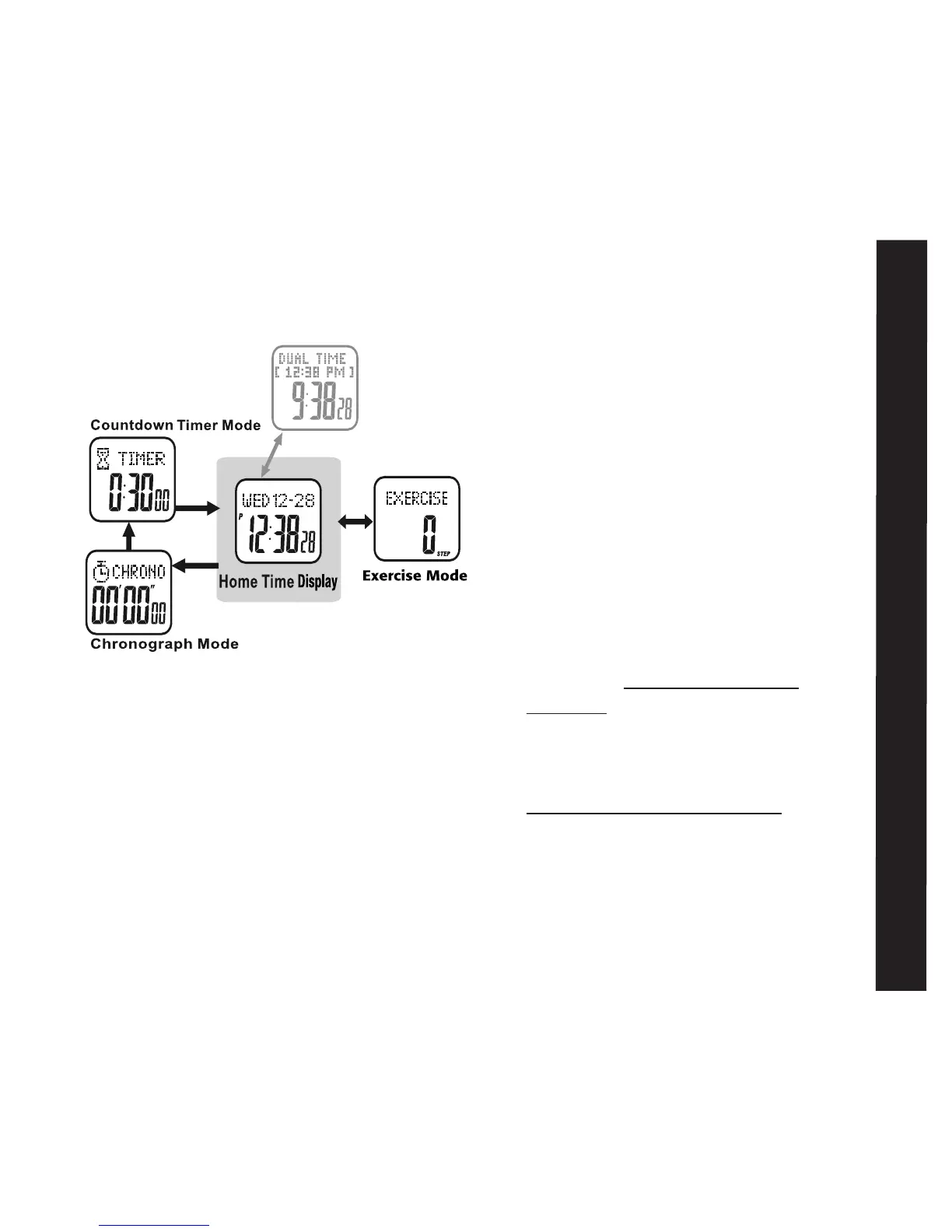
The Accelerator Pulse has 4 major functions:
• Home Time/Dual Time • Chronograph
• Countdown Timer • Exercise Mode
See fig. 4
Home Time Mode:
The Home Time display is the default display.
In any settings mode, if no button is pressed
for one minute, the watch will automatically
and continually revert to the previous
display, until it returns to Home Time
Home Time Display:
Top line: day of week, month, and date
Bottom line: current
hours, minutes and
seconds
or Top Line: Dual Time
Center line: Current Home Time
Bottom line: Current Dual
hours, minutes
and seconds
To set home time: see MAIN SETTINGS
MENU– Home Time Setting: 1 of 11
Dual Time View:
Your accelerator watch is capable of storing an
alternate time zone. There are 2 ways to
view Dual Time zones
• QUICK VIEW- PRESS ST/STP in the
Home Time display. The Dual Time zone
will appear for 3 seconds. After 3 seconds
the Home Time display will return
• DUAL VIEW- HOLD ST/STP FOR 3
SECONDS in the Home Time display.
Home Time will appear in the top line.
The Dual Time zone time will show in the
bottom line
HOLD ST/STP FOR 3 SECONDS to
return the view to home time display
To set dual time: see MAIN SETTINGS
MENU - Dual Time Setting: 11 of 11



 To Next Page