22
• Press MODE to scroll through the various
saving/clearing options:
Save this event = saves data currently being
recorded in exercise mode
Clear this event = deletes data currently being
recorded in exercise mode
Clear daily record = deletes previously saved
data for the current day, but maintains data
currently being recorded in exercise mode
• Press ST/STP to select between yes/no
• Press MODE to confirm selection
Hold MODE for 3 seconds to return to the Main
Settings Menu
Hold MODE for 3 seconds to return to the Home
Time display
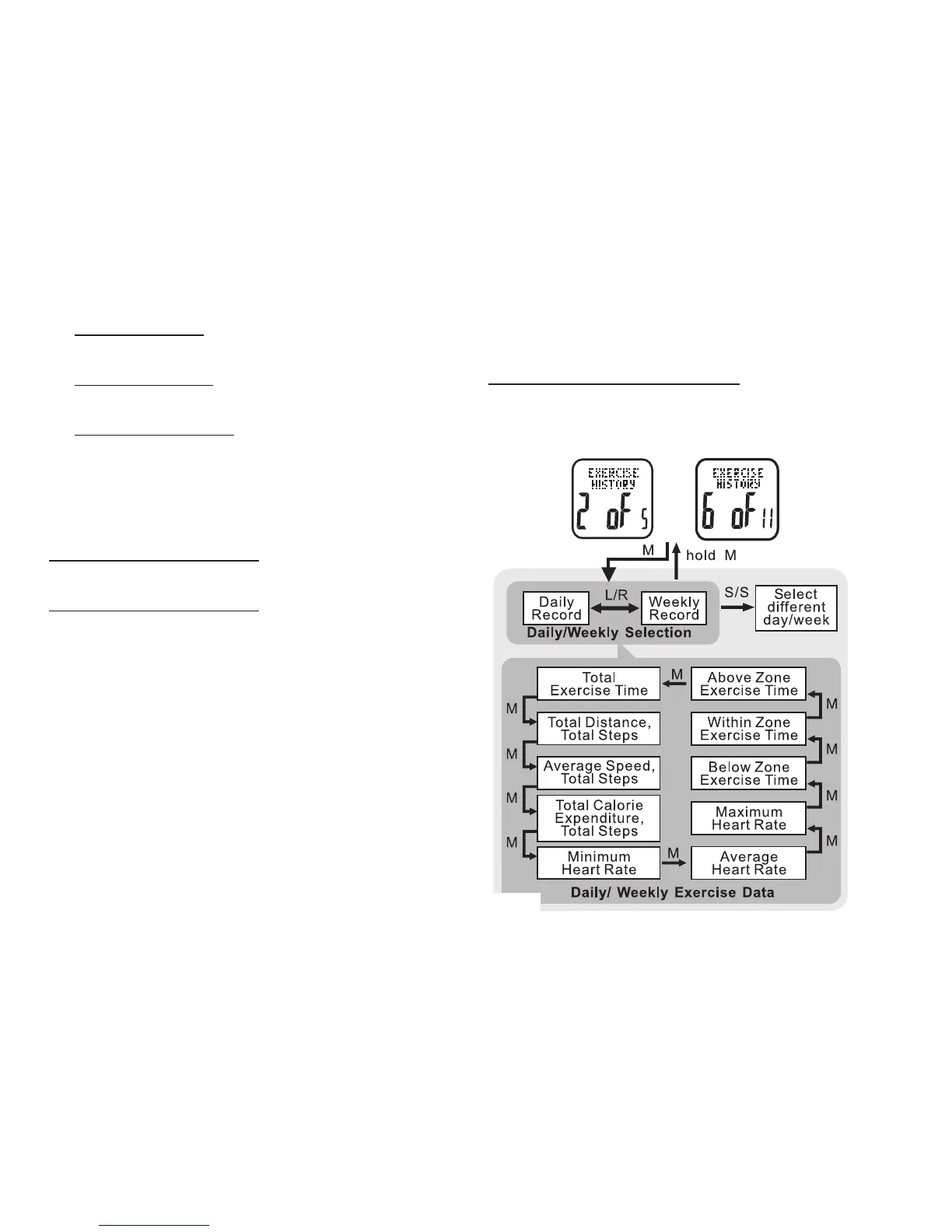
Exercise History: 6 of 11 See fig.26
The watch contains a vast amount of internal
memory. Daily exercise data is automatically stored
every night at midnight. The watch’s memory will
store up to 7 days of individual daily exercise data
and log the current day. After 7 days, the daily data
is automatically cataloged into a weekly exercise
record. The Accelerator’s memory stores 10 weeks
of records plus the last 7 days as daily exercise
data. All data is stored on a rolling counter i.e.:
after 10 weeks, the oldest record is replaced
by the most recent weekly data. See the
following steps to access the Accelerator’s
internal memory
HOLD MODE FOR 3 SECONDS i
n Home Time
display to access the Main Settings Menu
• PRESS ST/STP or LAP/RESET to scroll



 To Next Page