21
that has been recorded in exercise mode.
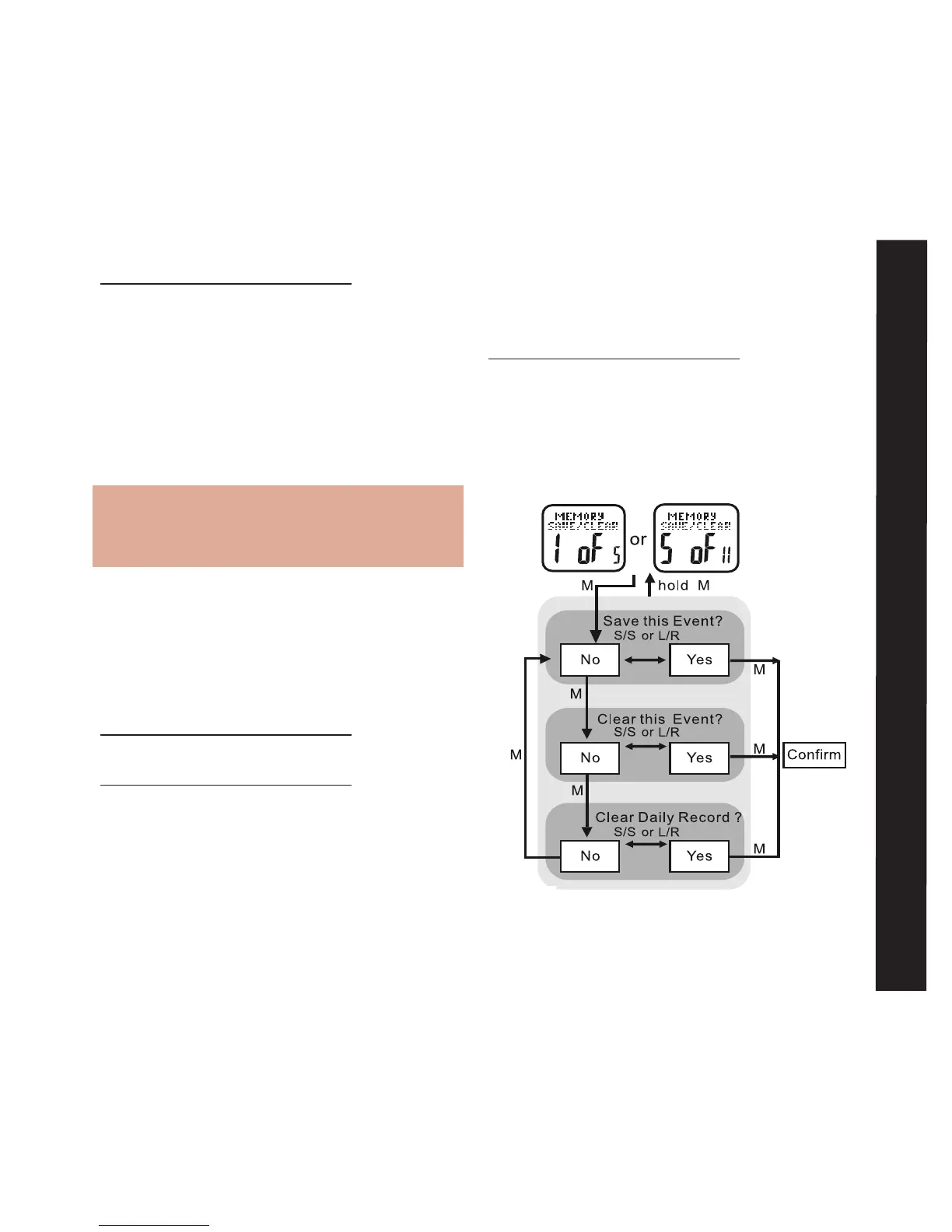
See the following to save or clear current
exercise data
HOLD MODE FOR 3 SECONDS in Exercise
Mode to access the Exercise Settings Menu
• PRESS ST/STP or LAP/RESET to scroll
to Memory Save/Clear: 5 of 11
• PRESS MODE to enter Memory Save/
Clear: 5 of 11
HOLD MODE FOR 3 SECONDS in the Home
Time display to access Main Settings Menu
• PRESS ST/STP or LAP/RESET to scroll to
Pedometer Setting: 4 of 11
• PRESS MODE to enter Pedometer
Setting: 4 of 11
• PRESS ST/STP to adjust the pedometer’s
sensitivity level from 1-5
Note: Sensitivity range is from:
1=least sensitive to 5=most sensitive.
For most people, level 1 works best
• PRESS MODE to confirm
• PRESS ST/STP or LAP/RESET to adjust
pedometer’s sleep timer from 1 to 240
minutes
• PRESS MODE to confirm
HOLD MODE FOR 3 SECONDS to return to
the Main Settings Menu
HOLD MODE FOR 3 SECONDS to return to
the Home Time display
Memory Save/Clear: 5 of 11 See fig.25
Your Accelerator watch makes it easy to quickly
save or delete any current exercise data
Memory Save/Clear
fig.25



 To Next Page