27
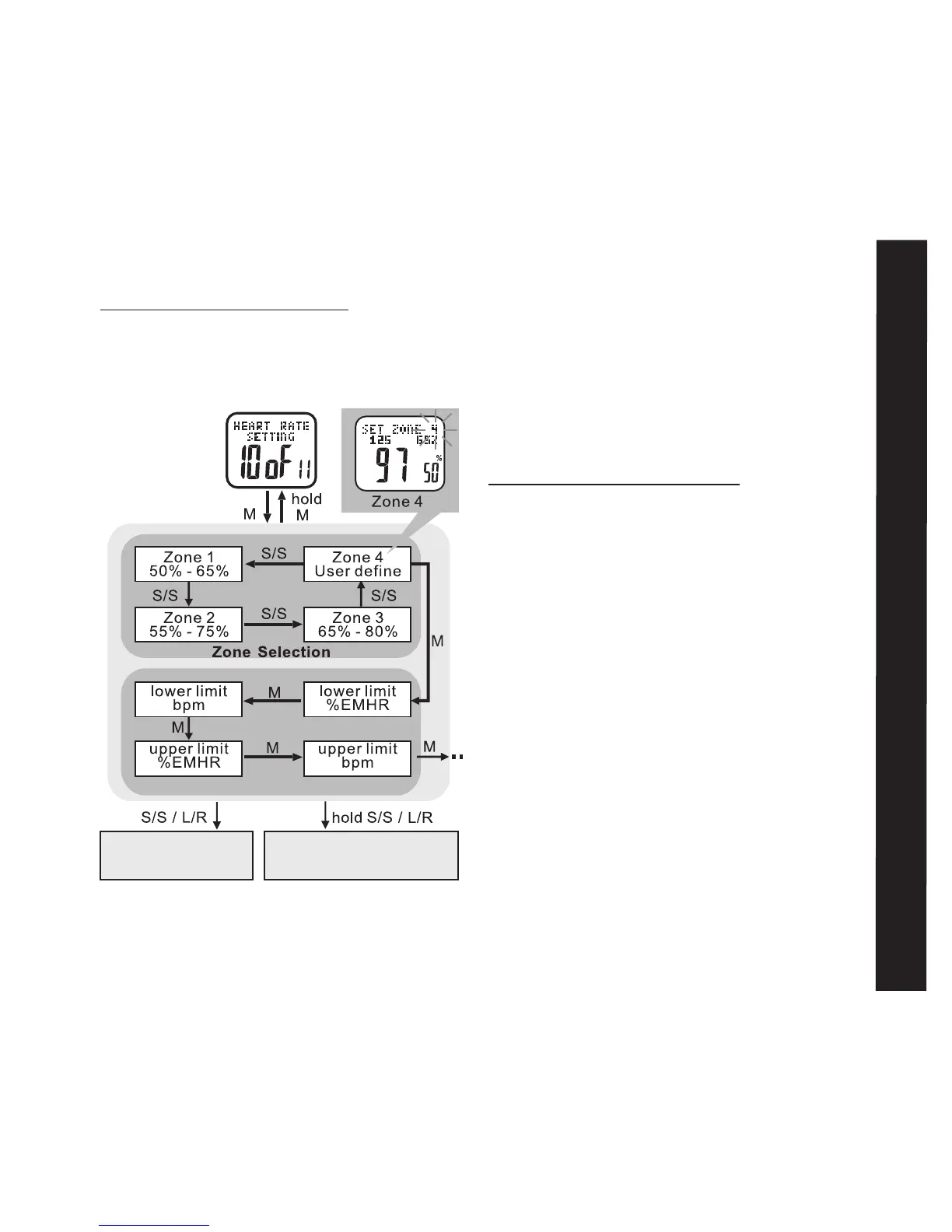
To Set Limits for Zone 4: See fig.31
HOLD MODE FOR 3 SECONDS in the Home
Time display to access Main Settings Menu
• PRESS ST/STP or LAP/RESET to scroll
to Heart Rate Setting: 10 of 11
• PRESS ST/STP or LAP/RESET to scroll
until SET ZONE 4 displays
• PRESS MODE to enter lower and upper
limit setting
• PRESS ST/STP or LAP/RESET to adjust
your upper and lower limits for bmp and
%EMHR
• PRESS MODE to confirm selection
HOLD MODE FOR 3 SECONDS to return to
Main Settings Menu
The Heart Rate Zone Alerts:
Your Accelerator watch features four different
heart rate zone alerts that sound whenever
a threshold is reached within the chosen
zone. See example: Zone 2 in the chart on
the next page fig.32
Heart Rate Alerts



 To Next Page