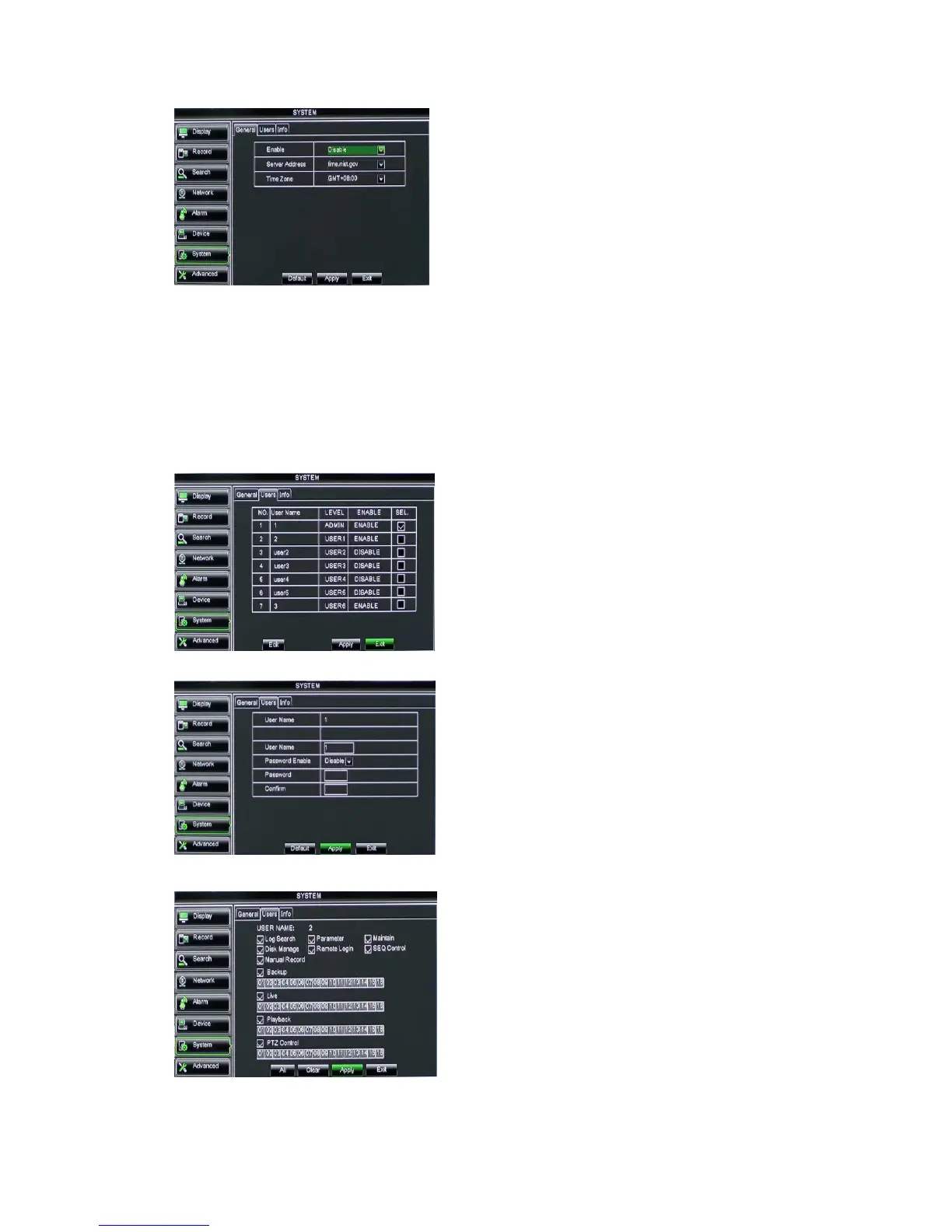
Picture 5-50
Note: The above change will be available only when system connected to internet. And
When NTP function is set to “Enable”, system will calibrate the time at every 00:07:50 and
every start-up.
5.3.7.4 Users
Click [Main MenuSystemusers] option and then enter into the interface shown
as Picture 5-51
Picture 5-51
Picture 5-52
Picture 5-53
The model supports up to seven users
with one Admin and seven users.
Click [Edit] button to enter into the
[User Edit] interface shown as Picture 5-52
[Admin] is authorized to set common user’s authority.
Log Search: allow you check the entire system log.
Parameter: allow you set all the parameters.
Maintain: allow you update version, recover
ex-factory value, device reboot and shut down.
Disk Manage: allow you manage and control the
HDDs.
Remote Login: allow you remote login DVR.
Rotate Control: allow you sequence live screens for
all the channels.
NTP Service:Allow you enable/disable the NTP
function.
Server Address: currently support three servers,
including time.windows.com, time.nist.gov and
pool.ntp.org.
Time Zone: System supports thirty Time Zones.
Update now: Click [Update Now] button to change
the above NTP set.
User name consist of eight characters,
password consist of 0~9 and its fixed-length is
6 bit.



 To Next Page