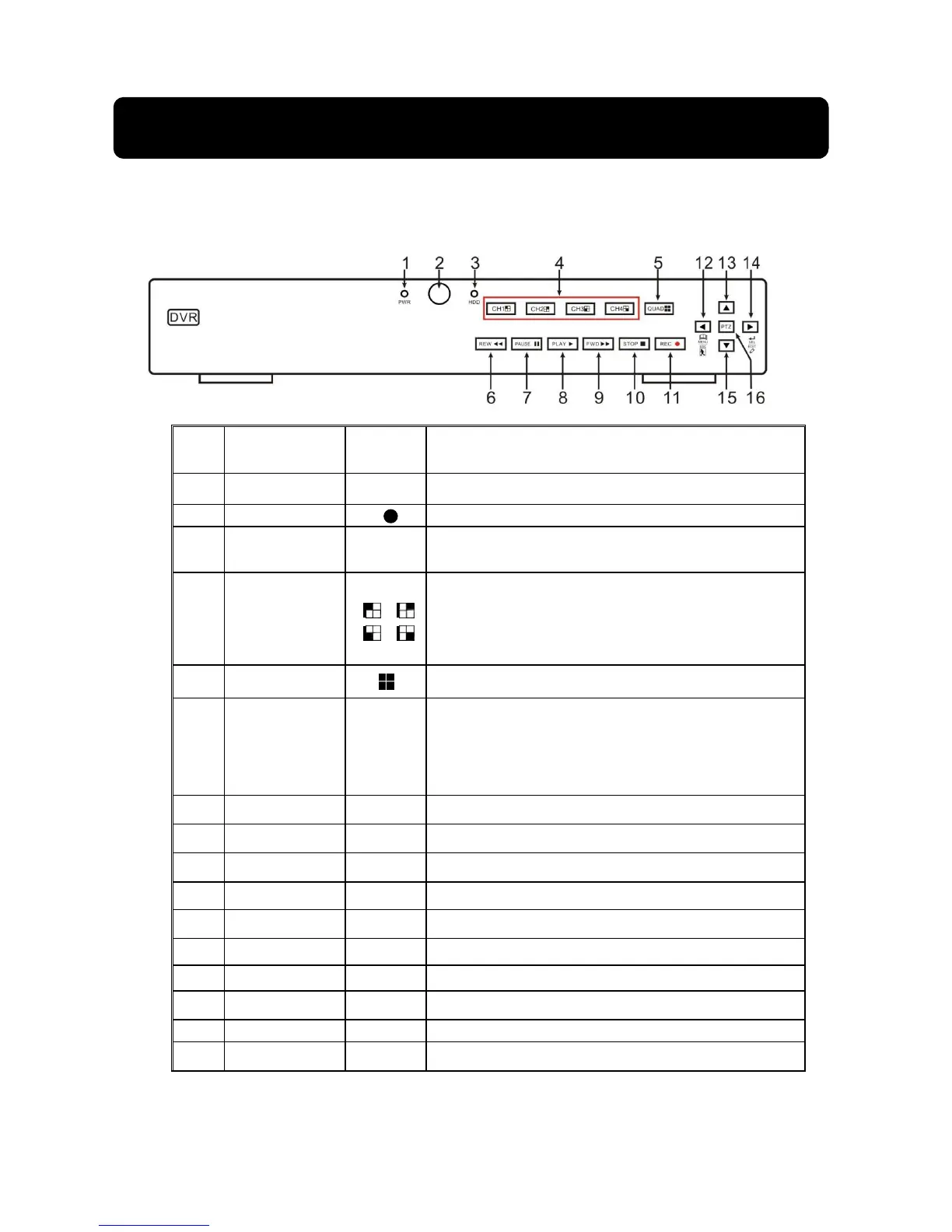
2
IR Receiver
Receives IR signal from Remote Controller
3
HDD Indicator
HDD
When the “Red” indicator flashes it means the hard
drive is being read or written to.
4
Channel
select:
CH1 CH2
CH3 CH4
CH select key
5
QUAD
On Live or Playback mode, switch to Quad display.
6
REW
Move to left; Rewind function;
decrease PTZ rotation speed and parameter value;
On preview mode, holding pressing the button to
switch GUI operation device
7
PAUSE
Pause / play frame by frame manually
8
PLAY
Enter into Pop-up Menu; Play record file.
9
FWD
Right key, F. Forward key; increase PTZ rotation
10
STOP
Stop playing or stop manual record
11
REC ● Press the button to start manual record.
12
MENU/ESC
Enter into Main menu, exit or stop playing
13
Up key
Move up
14
SEL/EDIT
select [Enter] / [Edit] operation
15
Down key
Move down
16 PTZ:
Enter into PTZ control interface
List 2-1



 To Next Page