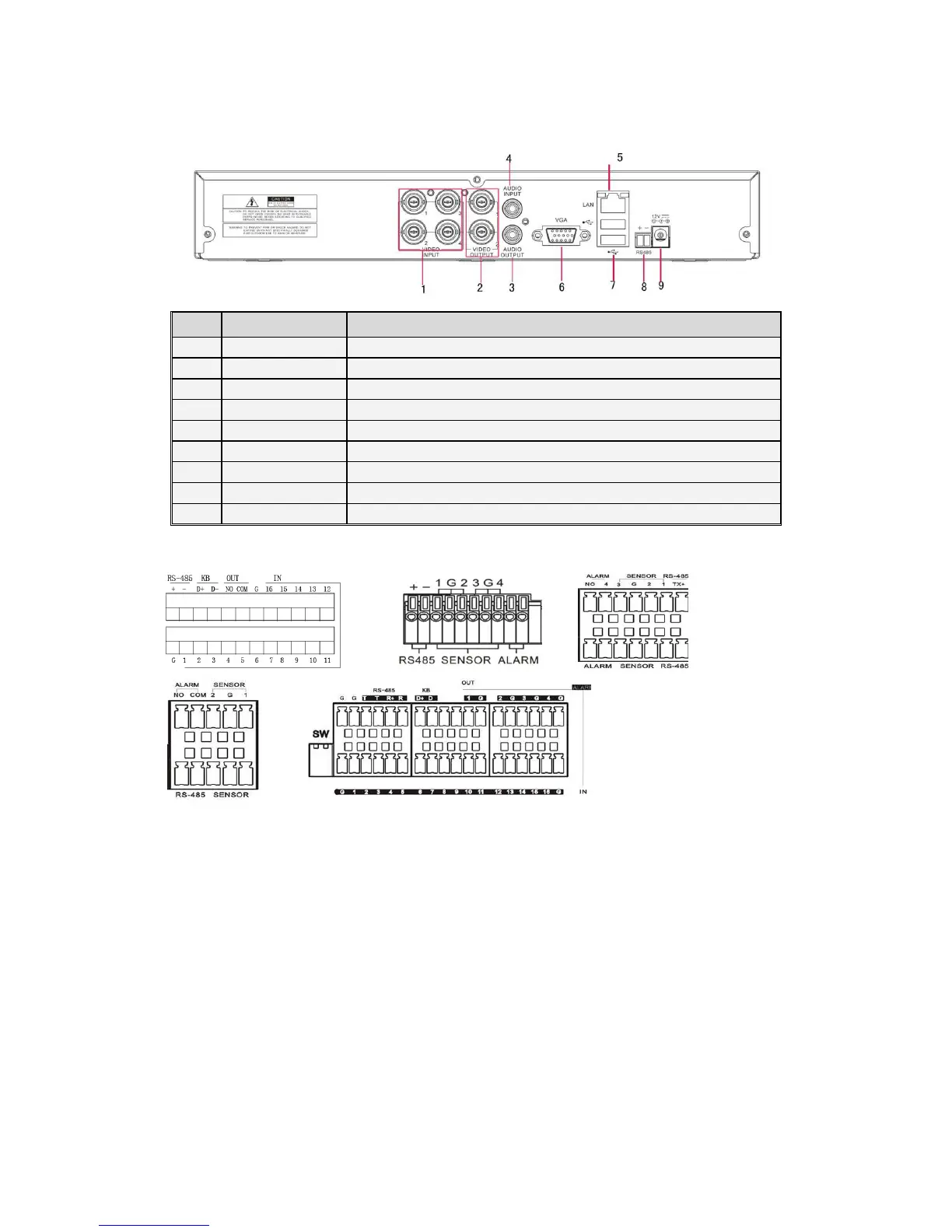
2.2 4CH-CIF DVR Back Panel
Item
Physical port Connection method
Video input
Connect CH1-4 (Virtual) video input device(BNC interface)
Video output Connect monitor output (BNC interface)
Audio output 2CH output; RCA(interface)
Audio input 2CH audio input (BNC interface)
Ethernet: Port Connect LAN, Ethernet (RJ45 interface)
VGA Port Connect to VGA monitor, such as PC monitor (Optional)
USB Port Connect USB device (Flash Drive, Hard Drive and Recorder etc) mouse
Power Port Connect power supply - DC12V 3A
RS485/Sensor/Alarm port functions:
Alarm input: Connect [-] port of your sensor to G (GND) pin, and [+] port to channel input
according to the alarm device you purchased.
Alarm output: Connect to the two ports marked with “out”
PTZ Port:
::
:Connect your camera to RS-485A and RS485B accordingly.



 To Next Page