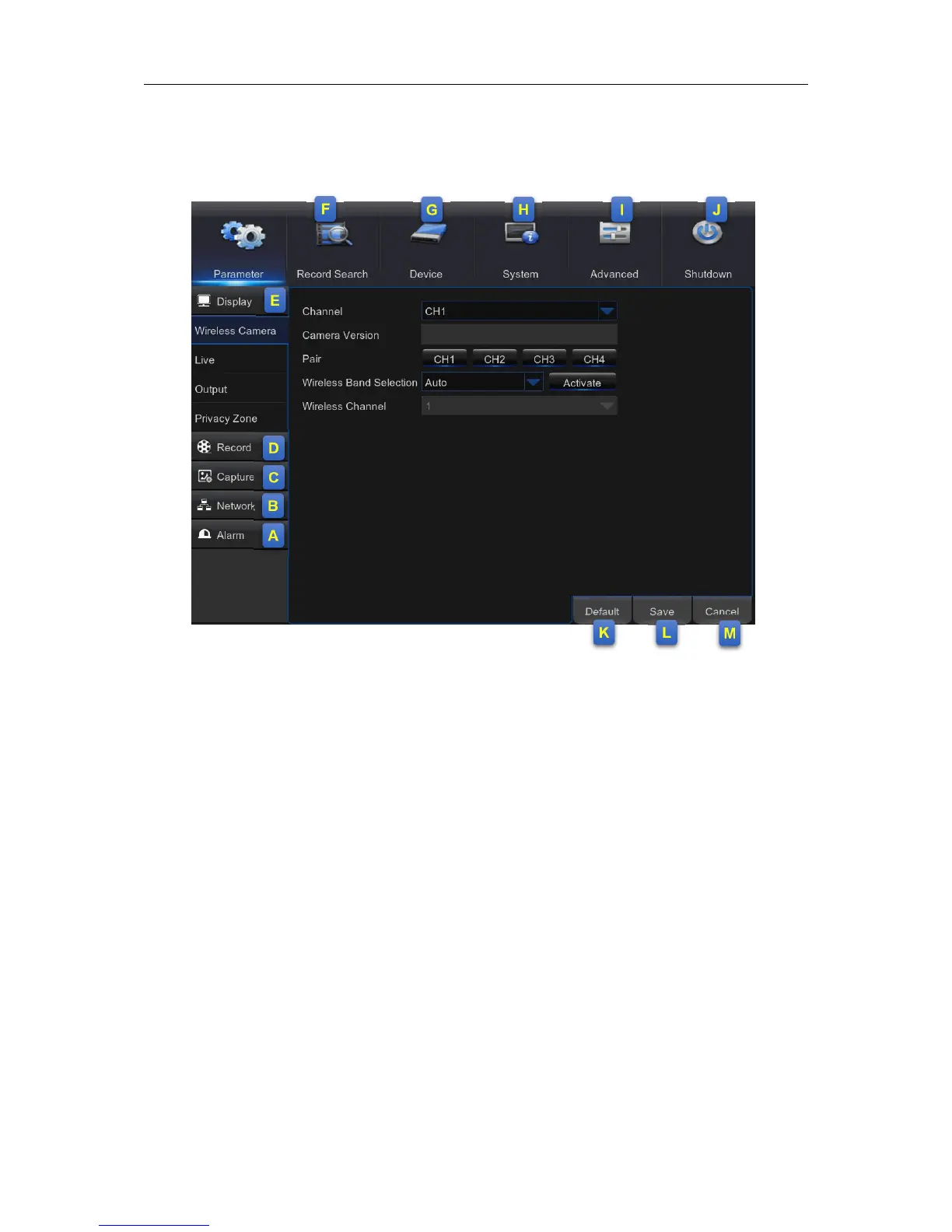
Chapter 5 WIRELESS NVR Menu
5.1 Overview
A: Alarm – To set the motion detection function.
B: Network - To configure the WIRELESS NVR’s access parameters to the network,
configure email settings, DDNS parameters, etc.
C: Capture – Image capture configuration
D: Record – To configure the recording options and set the recording schedule
E: Display – To configure how many channels are displayed on the Live Viewing screen, for
example color setup, video output resolution, privacy areas, etc.
F: Record Search – To search for recordings, events, and captured images
G: Device – HDD Management, connection parameters to link your WIRELESS NVR to your
Dropbox account.
H: System - To modify general WIRELESS NVR settings, such as date and time, User
management, view system info, etc.
I: Advanced – Advanced settings, for example load default, Firmware update, etc.
J: Shutdown - To shut down or reboot the WIRELESS NVR
K: Default - To restore the default settings
L: Save - Click to save the modifications
M: Cancel - Click to discard the modifications



 To Next Page