Note: Please make sure you have inserted your USB flash device to the WIRELESS NVR USB
port before you want to make backup.
8) If you want to Lock the recoding files, tick the checkbox after the files. The locked files will be
protected and unable to be overwritten if you had enable the HDD Overwrite function.
5.7.3 Picture
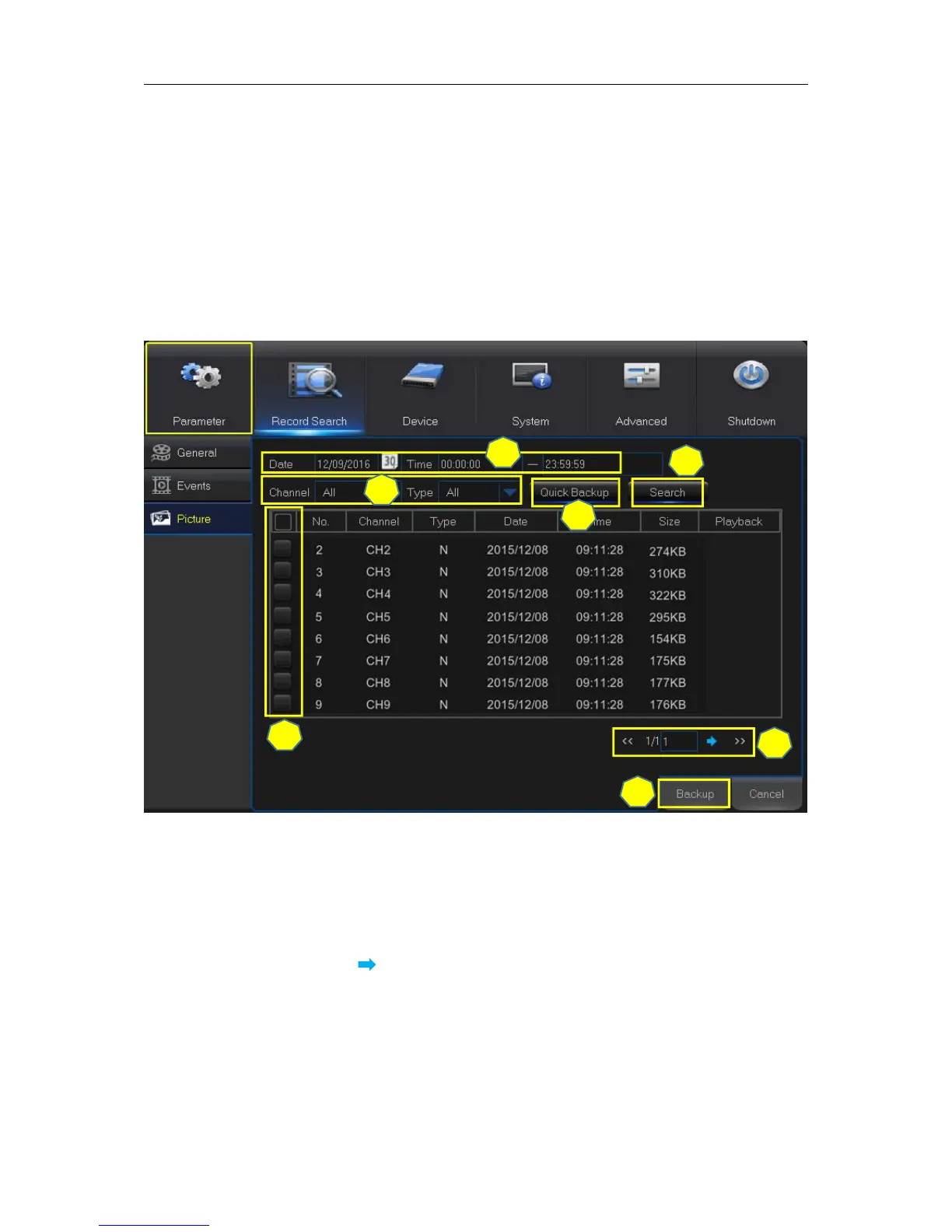
This section is used to view the captured pictures and make backup.
1) Select the recording Date & Time.
2) Select the Channel and Type (All / Normal / Motion / Manual).
4) If you want to make backup for all captured you had searched, click Quick Backup.
5) If you want to make backup for individual files, select the picture lists from the table.
6) If you want to move to other page, click << or >> to move to previous or next page. Or input the
number of page, then click to jump to the page.
7) After selecting all files, click Backup to start the backup.
Note: Due to the system limitation, only max. 5000 captured pictures will be searched & shown.



 To Next Page