Programming of zones and programs Installer Manual - TP8-96 VIDEO
2-14
2.1.4 CONSOLES
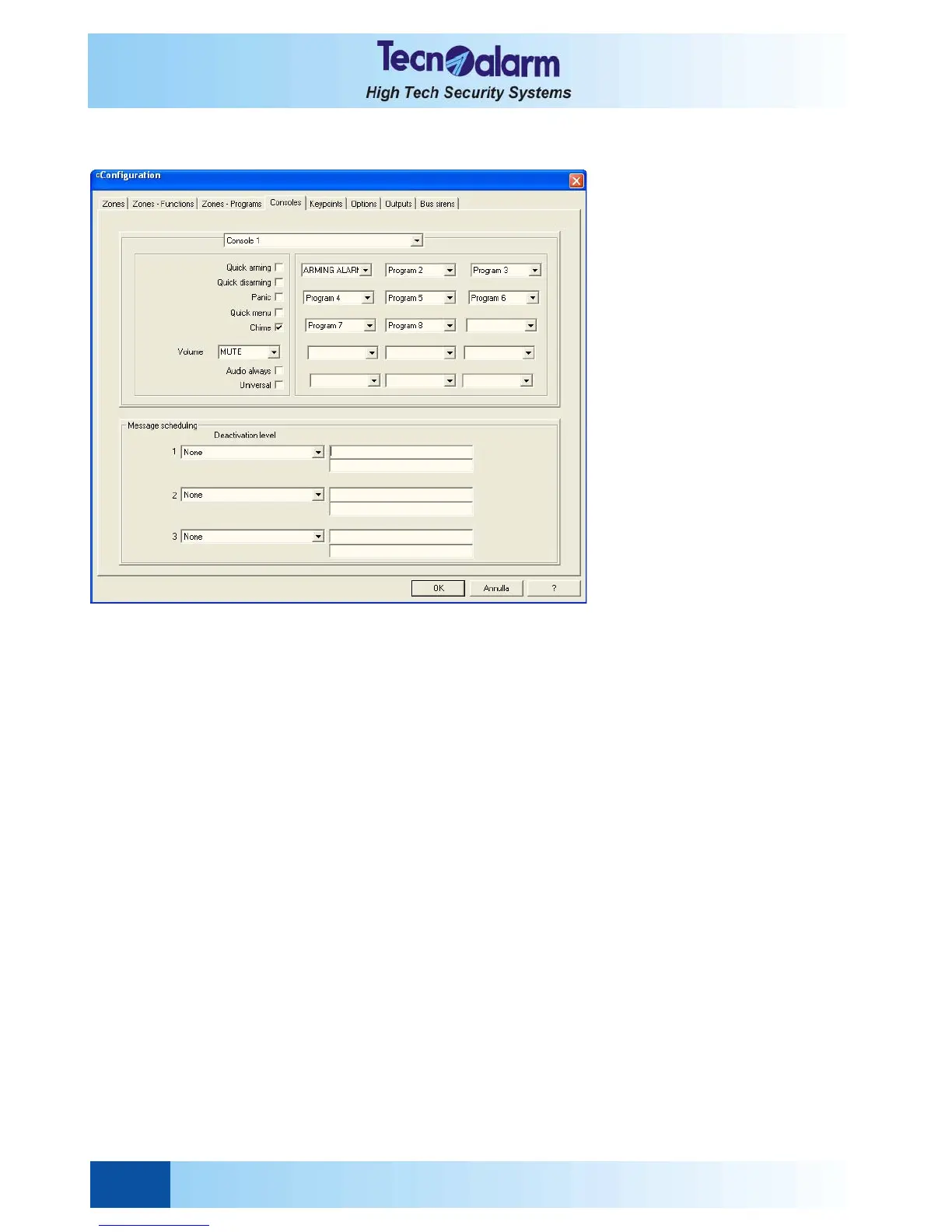
Open the zone configuration tables and select the Console window. On the screen is viewed:
Select the console to be configured by clicking on the arrow next to the inscription Console 1 and scrolling the list.
Every console provides 15 couples of LED (status led and alarm LED) to view the status of the same number of
programs.
To associate a couple of LED to a determined program, click on the arrow next to the program number and select the
program (1 to 8) to be associated.
It is possible to define a series of functioning parameters of the console:
z Quick arming
z Quick disarming
z Panic
Panic alarm is released if the two arrow up and arrow down keys are pressed simultaneously on the console.
z Quick menu
Permits the activation/deactivation of the remote controls without entering any code.
z Chime
Permits enabling of the buzzer of the console for sending out a sound signal if the one of the chime zones is opened
and the program it belongs to is disarmed.
z Volume
The volume for the reproduction of the voice messages by the loudspeaker of the console can be set at four levels:
mute, low, moderate, high.
z Audio always
Enables the console for the reproduction of voice messages even if the relative operations (e.g. arming/disarming)
are executed by another console.
z Universal
Enables the console for the control of all the programs of the system, even those not associated to the LED. The
processes concerning the programs the status of which is not shown by the LED, will be viewed on the display.


 To Next Page