Programming of access codes and keys Installer Manual - TP8-96 VIDEO
5-6
5.3 PROGRAMMING OF THE WIRELESS KEYS
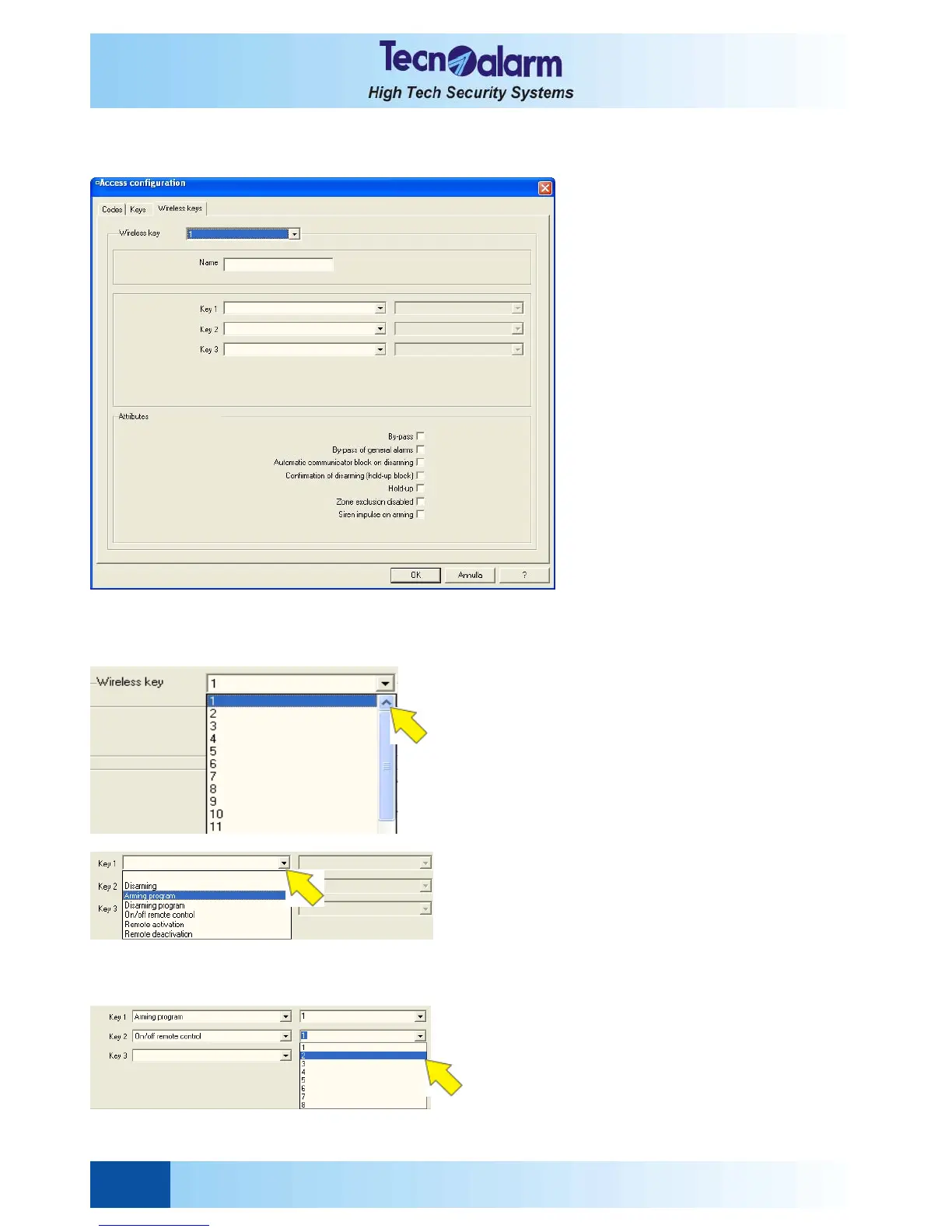
Open the access configuration tables and select the Wireless key window. On the screen is viewed:
The wireless keys configuration table permits:
z Programming of the wireless key name
z Association of the functions to the function keys
z Programming of the attributes of the wireless keys
SELECTION OF THE WIRELESS KEY
Select the item next to Wireless key and scroll down the
list then click on the name of the wireless key to be
programmed.
PROGRAMMING OF THE WIRELESS KEY NAME
For every wireless key a 16 caracters name or
description can be programmed.
WIRELESS KEY-FUNCTIONS ASSOCIATION
Each wireless key provides 3 function keys that are
individually programmable with the following functions:
z Disarming
Disarming of all the programs armed by wireless key.
z Arming program
Arming of the associated program (1 to 8).
z Disarming program
Disarming of the associated program (1 to 8).
z On/off remote controle
Toggling of the associated remote control (1 to 8).
z Remote activation
Activation of the associated remote control (1 to 16).
z Remote deactivation
Deactivation of the associated program (1 to 16).
To associate a function to one of the function keys select
the item next to the number of the function key and scroll
down the list, then select from the device to be activated
or deactivated by clicking on the item and scrolling down
the list.


 To Next Page