Programming of zones and programs Installer Manual - TP8-96 VIDEO
2-22
2.1.8 BUS SIRENS
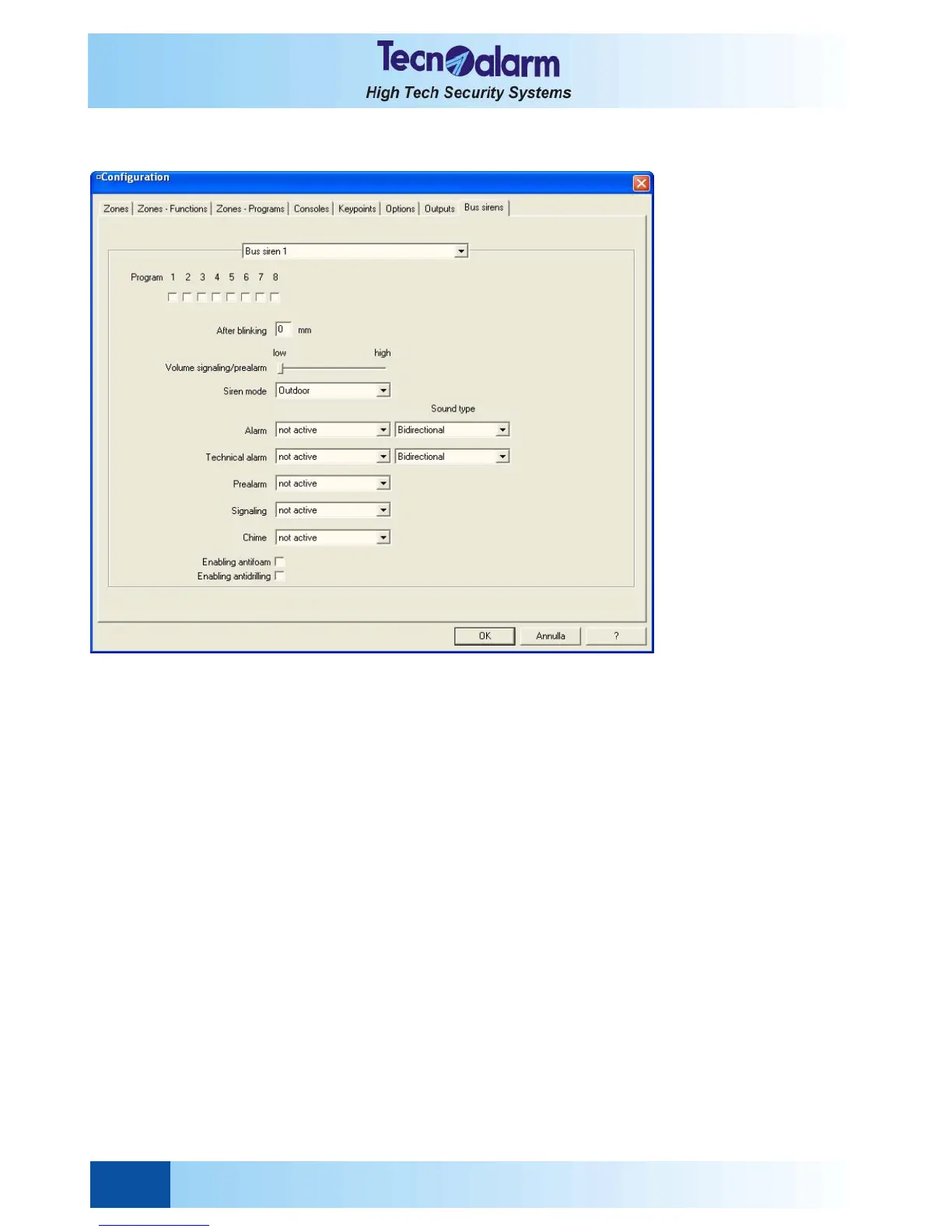
Open the zone configuration tables and select the Bus siren window. On the screen is viewed:
Permits to select the bus sirens (1 to 8) and to define their functions.
z Program
Permits the association of the selected bus sirens to the programs arming by the control panel (1 to 8).
z After blinking
Defines the time of blinking (in minutes) once the alarm ring is off.
z Volume signaling/prealarm
Defines the volume of the signaling (4 levels from low to high)
z Siren mode
The available functioning modes of the sirens are the followings:
• Outdoor Modes, time and volume typical of the outdoor siren
• Indoor Modes, time and volume typical of the indoor siren
z Alarm
The siren is activated when minimum one of the associated programs is in alarm (considering the time parameter
configuration) and in case of general alarm (tamper, trouble, etc.)
Sound type available:
• Bidirectional (default configuration)
• Monodirectional
• Bitone
z Technical alarm
The siren is activated if the technical zone is completely excluded from the programs or if it is included in one of the
associated programs.
Sound type available:
• Bidirectional (default configuration)
• Monodirectional
• Bitone
z Prealarm
The siren is activated if minimum one of the associated programs is in prealarm.
The sound type is fixed.
z Signaling
The siren is activated if the associated programs are armed/disarmed.
The sound type is fixed.


 To Next Page