Programming of telephone section Installer Manual - TP8-96 VIDEO
3-10
3.1.5 REPORT CODES
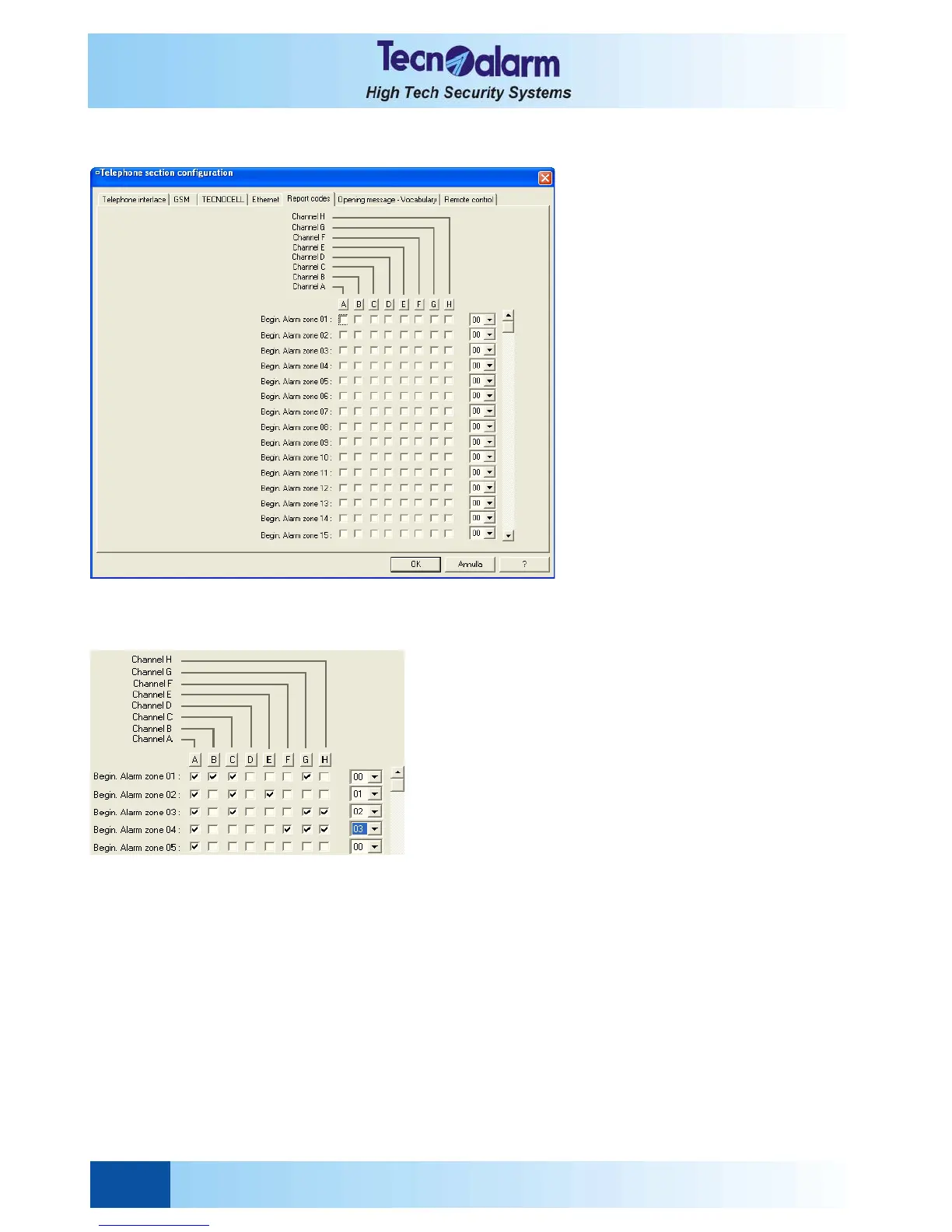
Open the telephone configuration tables and select the Report code window. On the screen is viewed:
The report code configuration table permits both the events-channel association and programming to the report codes.
The report codes identify the alarm type or the event transmitted by a digital call by a non-Tecnoalarm device as a
monitoring station of other costumers.
Each event can be associated to an hexadecimal code (00 to FF) with 2 digits.
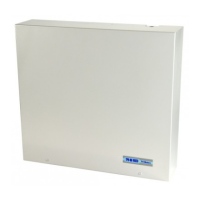
EVENT-CHANNEL ASSOCIATION
Enable the association of a specific event to a specific channel
by clicking on the item of the corresponding line to the wished
channel.
Enable the association of all the events to a specific channel by
clicking on the letter corresponding to the wished channel. All
the items of the column are automatically selected.
REPORT CODES DEFINITION
It is possible to define or to modify the report code by clicking
on the lateral scroll bar and by clicking on the wished value
which will be viewed in the report code item.
For select the alarm motives or signaling not viewed, click on the lateral scroll bar until the wished one.
Press:
z OK to confirm and quit
z Abandon to quit without saving


 To Next Page